Windows Vista Forums
Vista Forums Home Join Vista Forums Windows 7 help and support Forum Windows 8 Forum Vista Tutorials

Welcome to Windows Vista Forums. Our forum is dedicated to helping you find solutions with any problems, errors or issues you are experiencing with Windows Vista. The Vista forum also covers news and updates and has an extensive Windows Vista tutorial section that covers a wide range of tips and tricks.

Go Back   Vista Forums > Vista Forums > Tutorials

Vista - Error 0x8007000D When Editing MP3 Metadata - Fix

Comment
 

Error 0x8007000D When Editing MP3 Metadata - Fix

How to Fix 0x8007000D Error when Editing MP3 Metadata
Published by tom982
08-03-2011
Error 0x8007000D When Editing MP3 Metadata - Fix

How to Fix 0x8007000D Error when Editing MP3 Metadata

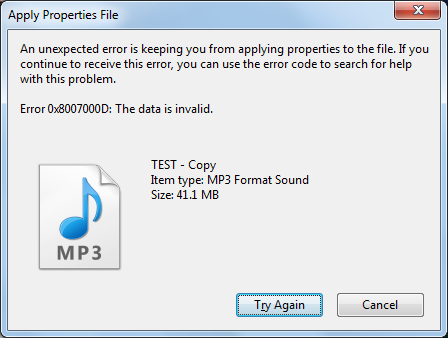
Here's the error you should receive when you try and do it:

Name:  Error Image.png
Views: 532
Size:  30.8 KB

As you can see, Windows isn't allowing you to edit the ID3 tag of the file. Let's fix this:

STAGE 1

1. For this process, you will need two programs:
VLC Media Player

ID3-TagIT

Download and install both of these
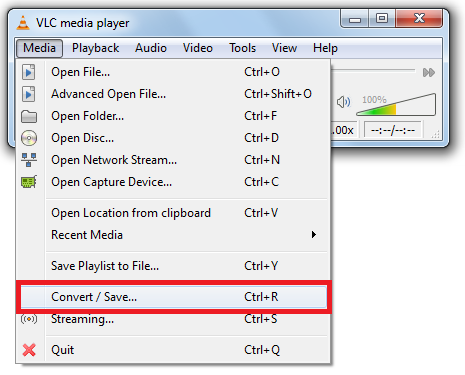
2. Open up VLC and click Media > Convert/Save...
Name:  VLC Menu.png
Views: 507
Size:  34.1 KB
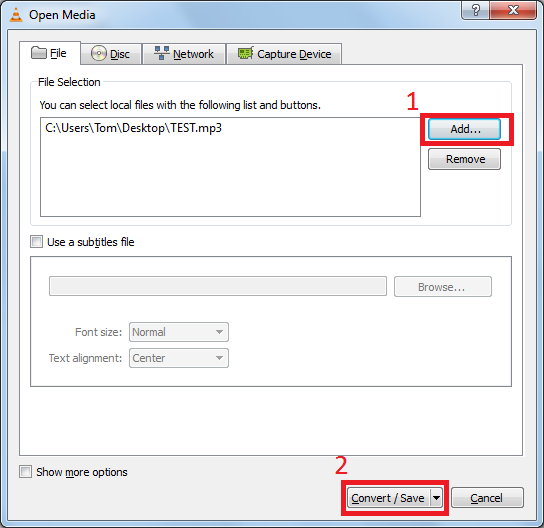
3. Click Add... and navigate to the location of your MP3 file, and then open it. Then click Convert/Save
Name:  VLC Convert.png
Views: 515
Size:  32.8 KB
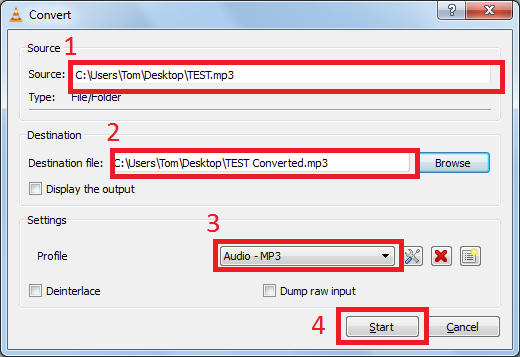
4. It will then open the following menu:
Name:  VLC Convert 2.png
Views: 509
Size:  28.8 KB
1. Make sure this is the location of your MP3 file - it shouldn't have changed but just check
2. Choose a destination file for your conversion - this is where your converted file will be saved to
3. Select Audio - MP3 from the drop down menu
4. Click Start
STAGE 2

1. Now we need to open up ID3-TagIT
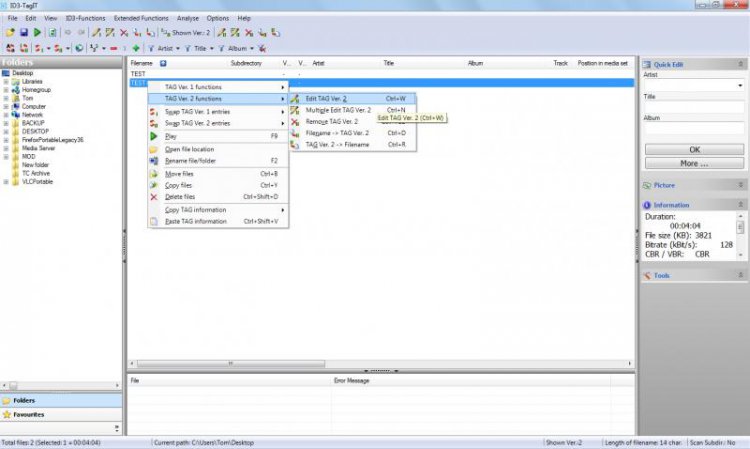
Right click on your converted file, and select TAG Ver. 2 functions > Edit TAG Ver. 2

Note   Note
This must be your converted file and it must be Ver. 2


Name:  ID3-TagIT.jpg
Views: 505
Size:  43.2 KB
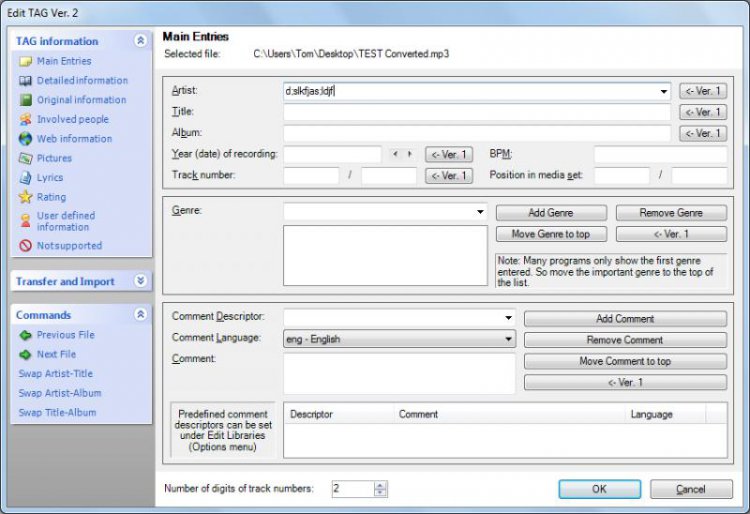
2. Enter anything in the artist field:
Name:  ID3-TagIT 2.jpg
Views: 505
Size:  70.9 KB

Press OK. Then File > Save
You should now be able to edit any of the information using Windows or any other program


Tom

Edit: This isn't really a fix, more of a workaround - if anyone knows of a valid fix then I would be very interested to hear about it

Published by
tom982's Avatar
I'm here to help :)


Join Date: Mar 2010
Location: England
Posts: 2,952
tom982 has a reputation beyond reputetom982 has a reputation beyond reputetom982 has a reputation beyond repute
tom982 has a reputation beyond reputetom982 has a reputation beyond repute

Tutorial Tools

Applies to
All Vista Versions
64 Bit & 32 Bit

Comment

 Error 0x8007000D When Editing MP3 Metadata - Fix problems?


Tutorial Tools


Similar topics to: Error 0x8007000D When Editing MP3 Metadata - Fix
Tutorial Category
Error code: 0x8007000D Vista installation & setup
ERROR 0X8007000D in OEM install Vista installation & setup
Error: 200, Error Number: 0x8007000D after receiving headers Vista mail
RC1 x64 Install Error 0x8007000D Vista installation & setup
Editing metadata in the main Explorer window in Beta 2 Vista file management


Vista Forums is an independent web site and has not been authorized,
sponsored, or otherwise approved by Microsoft Corporation.
"Windows Vista", the Start Orb, and related materials are trademarks of Microsoft Corp.
© Designer Media Ltd

1 2 3 4 5 6 7 8 9 10 11 12 13 14 15 16 17 18 19 20 21 22 23 24 25 26 27 28 29 30 31 32 33 34 35 36 37 38 39 40 41 42 43 44 45 46 47 48 49 50