
How to Turn User Account Control (UAC) On or Off in Vista
 Information
UAC or User Account Control is used to increase the security of the operating system by helping the user gain more control over the actions that are performed with administrative rights on their computers. Anytime a action requires administrative rights, UAC will confirm the action with you first. When a program asks for your permission to run with a UAC prompt, this means that program is asking for complete and unrestricted access to every part of your computer. This keeps you in control of what is happening on your computer. For more information, see:
 Note
NoteNormal default administrator accounts run like a Standard User until a program or application requests elevation to run with administrator privileges. You then have a choice of allowing or denying the elevation. To allow, you must then click Continue or Run in the Administrator account, while in a Standard User account you must enter the administrator account's password to do so.
 Warning
This also turns Protected Mode in IE7 off and on. Also, please note that if UAC is disabled, you may have compatibility issues when installing some older programs since Vista is now acting like XP. (See related link 7 below) This can result in some unexplained Access Denied error messages. You will also not be notified to confirm a action of a program you did not know was going to use administrator privileges. You may wish to do releated link 1 instead to help prevent possible compatibility issues with some programs with UAC turned off.
 Tip
TipTo Have UAC Progam Exceptions to not have UAC ask for your permission on certain programs, then you can use the Norton UAC Tool for this.
If you really must stop the UAC prompts, then it would be better to elevate the administrator accounts instead so they will no longer be bothered by the UAC. This way UAC is not completely off and IE7 Protected Mode is still on.
For better security, it is recommended that you leave the UAC turned on and not elevate the administrator account.
If you really must stop the UAC prompts, then it would be better to elevate the administrator accounts instead so they will no longer be bothered by the UAC. This way UAC is not completely off and IE7 Protected Mode is still on.
For better security, it is recommended that you leave the UAC turned on and not elevate the administrator account.
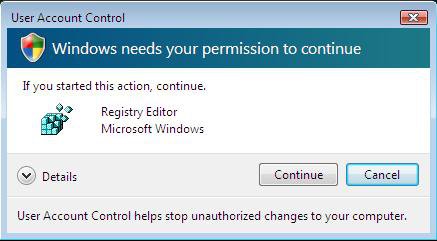
EXAMPLE: UAC Prompt
 OPTION ONE
1. Open the Control Panel. (Classic View)
2. Click on the User Account icon.
3. Click on Turn User Account Control on or off. (See screenshot below)
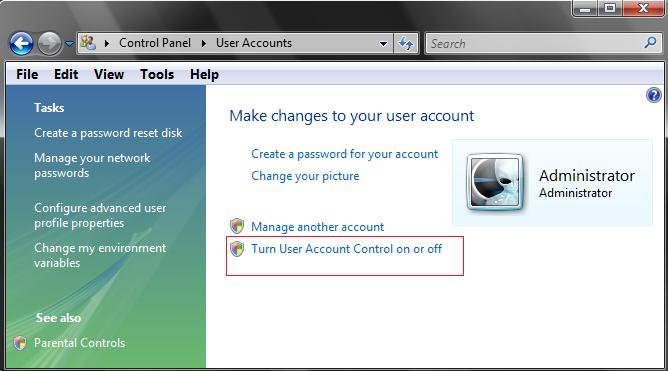
4. To Turn Off UAC
A) Uncheck Use UAC to help protect your computer. (See screenshot below step 5)
NOTE: When you turn off UAC, the Security Center will give you an alert warning notification in the notification area of the taskbar until you turn UAC back on. To turn this alert off, see: How to Disable or Enable the Security Center Alert Warning Notification in Vista
B) Go to step 6
5. To Turn On UAC
A) Check Use UAC to help protect your computer. (See screenshot below)
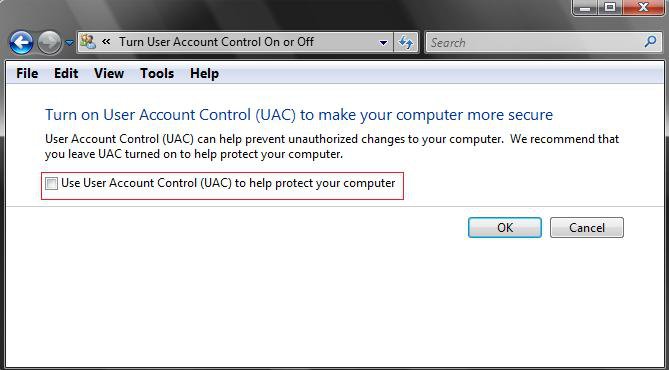
6. Click on OK.
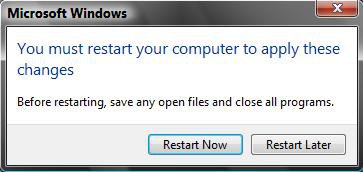
7. Click on Restart Now to apply the changes. (See screenshot below)
WARNING: This will restart the computer when clicked on. Be sure to save and close anything else running first.
OPTION TWO 1. To Turn UAC On
A) Click on the Download button below to download the file below.
Turn_UAC_On.reg

B) Go to step 3.
2. To Turn UAC Off
A) Click on the Download button below to download the file below.
NOTE: When you turn off UAC, the Security Center will give you an alert warning notification in the notification area of the taskbar until you turn UAC back on. To turn this alert off, see: How to Disable or Enable the Security Center Alert Warning Notification in Vista
Turn_UAC_Off.reg
3. Click on Save, and save the .reg file to the Desktop.
4. Right click on the downloaded .reg file and click on Merge.
5. Click on Run, Continue (UAC), Yes, and then OK when prompted.
6. When done, you can delete the downloaded .reg file if you like.
7. Restart the computer to apply changes.
OPTION THREE 1. Open the Start Menu.
2. In the white line (Start Search) area, type regedit and press Enter.
3. Click on Continue in the UAC prompt.
4. In regedit, go to: (See screenshot below)
HKEY_LOCAL_MACHINE\SOFTWARE\Microsoft\Windows\CurrentVersion\Policies\System
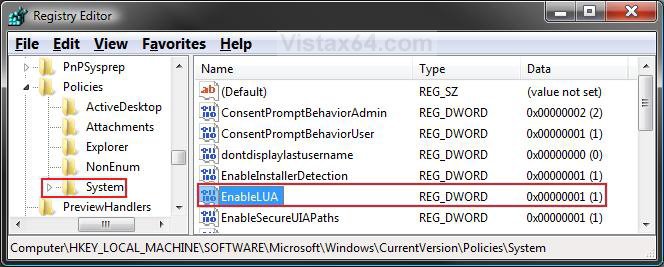
5. To Turn UAC Off
NOTE: When you turn off UAC, the Security Center will give you an alert warning notification in the notification area of the taskbar until you turn UAC back on. To turn this alert off, see: How to Disable or Enable the Security Center Alert Warning Notification in Vista
A) In the right pane, right click on EnableLUA and click on Modify. (See screenshot above)
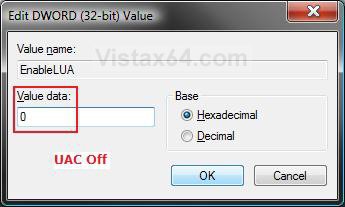
B) Type 0 (Number Zero) and click on OK. (See screenshot below)
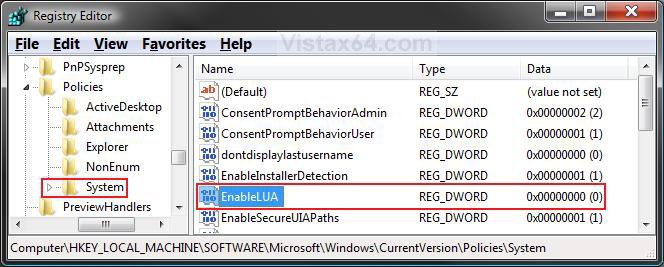
C) The registry will now look like this. (See screenshot below)
D) Go to step 7.
6. To Turn UAC On
A) In the right pane, right click on EnableLUA and click on Modify. (See screenshot above)
B) Type 1 (Number Zero) and click on OK. (See screenshot below)
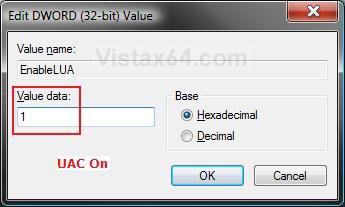
C) The registry will now look like this. (See screenshot below step 4)
7. Close regedit.
8. Restart the computer to apply changes.
That's it,Shawn
Related Tutorials
- How to Create a Elevated Program Shortcut without a UAC Prompt
- How to Elevate Administrators UAC Privilege Level in Vista
- How to Enable or Disable the Real Built-in Administrator Account in Vista
- How to Use Compatibilty Mode in Vista
- How to Delete a User Account in Vista
- How to Create a New User Account in Vista
- How to Hide a User Account in Vista
- How to Fix a Installing Program Error in Vista
- How to Take Ownership of a Item in Vista
- How to Disable or Enable the Security Center Alert Warning Notification in Vista
- How to Turn Windows Defender On or Off
- How to Enable or Disable the User Account Control (UAC) Blacking Out of Screen in Vista
- How to Turn DEP On or Off for a Program
- How to Enable or Disable DEP in Vista
- How to Change a User Account Type in Vista
- Bypass UAC for Standard Users
- How to Make UAC Require Password for Extra Admin Security in Vista
Attachments
Last edited by a moderator:


