
How to Increase Hard Drive Performance in Vista
 Information
This will show you how to increase the hard drive performance by enabling Advanced Performance, disabling NTFS from creating 8.3 versions of file names, and defragging on a regular schedule.
 Note
NoteYou can follow all the steps below, or just pick the ones you would like to do.
 STEP ONE
 Warning
This option enables extremely aggressive write caching that will speed up the hard drive's performance, but it can also cause you to lose data in the drive's cache if you lose power suddenly. It is not recommended for laptops that run on battery power all the time. While this is fine for the normal home desktop, it may not be a good idea if you have unreliable power.
NoteThis may not be supported by some hard drive setups (Ex: RAID). If it does not, then you will see that it will just change back to the default settings automatically when you look at the Properties again.
1. Open the Control Panel. (Classic View)
2. Click on the Device Manager icon.
3. Click on Continue in the UAC prompt.
4. Close the Control Panel.
5. Click on Disk drives to expand it. (See screenshot below)
6. Right click on your hard drive device listing and click Properties.
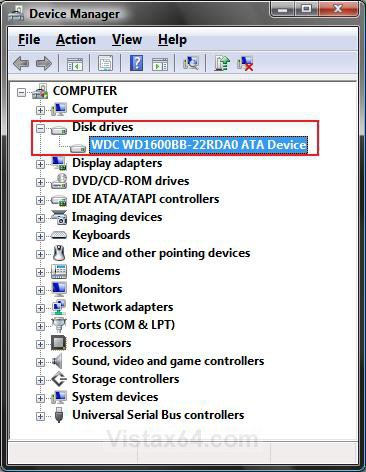
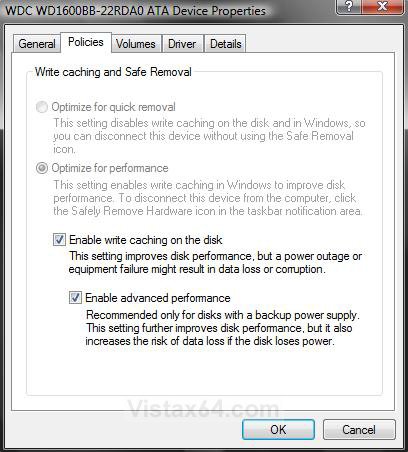
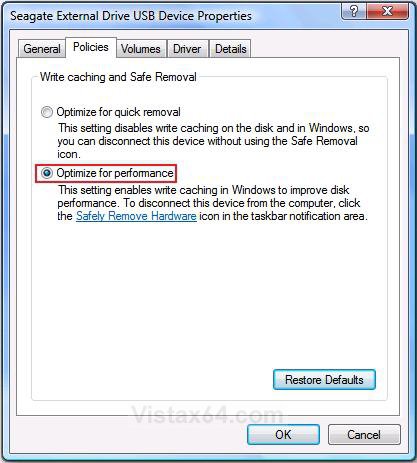
7. Click on the Policies tab. (See screenshots below)
8. For a ATA (Parallel) or Serial ATA (SATA) Hard Drive
A) Check the Enable write caching on the disk box. (See left screenshot below step 10)
NOTE: This should already be checked by default.
B) Check the Enable Advanced performance box.
NOTE: If this will not stay checked for you, then check to make sure that you have the latest chipset drivers installed for your motherboard. Also see: Write-Caching - Enable or Disable - Windows 7 Forums
9. For an External Hard Drive
A) Dot Optimize for performance. (See right screenshot below step 10)
10. Click on OK to apply.
STEP TWO NOTE: You will not need this unless you work with DOS or the command prompt and have long file names.
1. Open the Start Menu.
2. In the white line (Start Search) area, type regedit and press Enter.
3. Click on Continue in the UAC prompt.
4. In regedit, go to: (See screenshot below)
HKEY_LOCAL_MACHINE\System\CurrentControlSet\Control\Filesystem
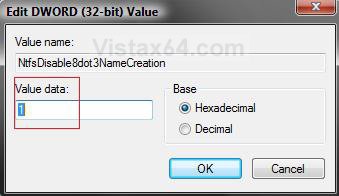
5. In the right pane, right click on NtfsDisable8dot3NameCreation and click on Modify.
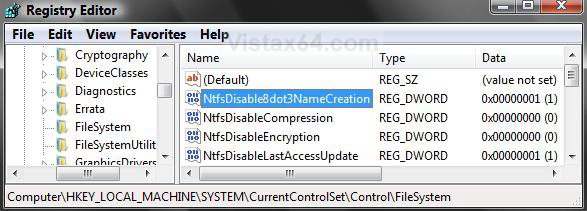
6. Type 1 and click on OK. (See screenshow below)
NOTE: To enable it again, type 0 (number) instead.
7. Close regedit.
STEP THREE 1. If you use Vista's Disk Defragmenter, see the link below on how to create a automatic defrag schedule.
2. If you do not like Vista's Disk Defragmenter, you can use a 3rd party program instead. Auslogics Disk Defrag is a great program that has a status graph of the hard drive's defragmentation progress, but the free version does not have a automatic defrag schedule. Here is the link:
3. Here is a recommended schedule of times to defrag.
NOTE: The more you save and delete items off your hard drive, the more often you should defrag. Adjust to your needs.
Scheduled Time | Description |
Once a Month | For a user that is only on the computer a few hours a week and does not do much file saving and deleting. You rarely install and uninstall programs. |
Once a Week | For most average users that use the computer for a few hours on a daily basis and does a lot more file saving and deleting. You only do a few installing and uninstalling of programs. |
Once a Day | For your power user that uses the computer for several hours a day and does an unbelievable amount of file saving and deleting. You do a lot of installing and uninstalling of programs. |
Enjoy faster performance,Shawn
Related Tutorials
- How to Speed Up the Performance of Vista
- How to Disable or Enable Low Disk Space Warning in Vista
- How to Shrink and Create a Partition with Disk Management in Vista
- How to Delete and Extend a Partition with Disk Management in Vista
- How to Change a Drive Icon in Vista
- How to Show or Remove Drive Letters from Displaying in Vista
- How to Rename a Drive in Vista
- How to Add, Change, or Remove a Drive Letter in Vista
- How to Restrict or Unrestict Drive Access in Vista
- How to Hide or Unhide a Drive in Vista
- How to Create a Drive Shortcut in Vista
Attachments
Last edited by a moderator:


