Vista Forums
Vista Forums Home Join Vista Forums Donate Vista Tutorials Tags

Welcome to Vista Forums we are your forum to discuss Windows Vista x64 and x86 systems. Whether you need help or just want to post an idea you have on Vista, this is the forum for you.
Register at Vista forums...the world biggest Windows Vista resource Join Vista Forums Now

Go Back   Vista Forums > Vista Forums > Tutorials

Vista Tutorial Categories Network & Internet Tutorials File & Folder Settings Tutorials Taskbar & Start Menu Tutorials Performance & Maintenance Tutorials General Tips Tutorials Programs & Features Tutorials Context Menu Tutorials Shortcut Tutorials Security & System Tools Tutorials Parental Controls Tutorials User Account Tutorials Hardware & Drivers Tutorials Appearance & Personalization Tutorials Backup & Restore Tutorials Music, Photo, Video and Media Tutorials Power Management Tutorials

Compatibility Mode List of Programs

Update your Vista Drivers Update Your Drivers Now!!
Poll: Did this Tutorial help and work for you?
Poll Options
Did this Tutorial help and work for you?

Comment
 
Tutorial Tools Display Modes
<!-- google_ad_section_start -->Compatibility Mode List of Programs<!-- google_ad_section_end -->
Compatibility Mode List of Programs
How to See and Change the List of Programs in Compatibility Mode in Vista
Published by Brink
05-16-2007

How to See and Change the List of Programs in Compatibility Mode in Vista
Information
  This will show you how to see a list of all the installed programs you have in Compatibility Mode and what they are set on without having to go to each individual program. You can then manually change, add, or remove a installed program from running in Compatibility Mode if the normal method in the NOTE below does not allow you.
WARNING
  You should add or remove a program from Compatibilty Mode normally by using this method instead, see: How to Use Compatibilty Mode in Vista . There is no guarantee that putting a program in compatibility mode will allow it to work properly.
Tip
  To check and see if your hardware or software is compatible with Vista, see: Windows Vista Compatibility Center
RELATED LINKS:
Here's How:
1. Open the Start Menu.
2. In the white line (Start Search) area, type regedit and press Enter.
3. Click Continue button for UAC prompt.
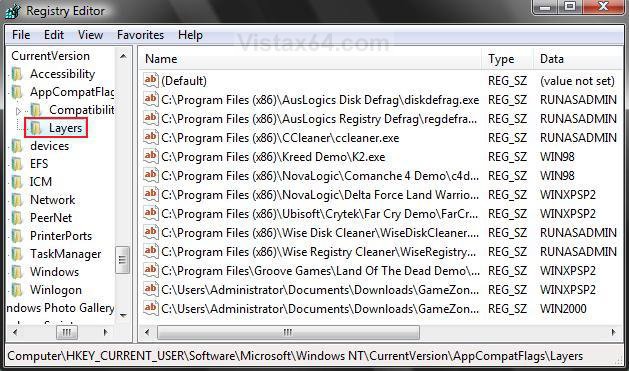
4. In regedit, go to: (See screenshot below step 5)
HKEY_CURRENT_USER\Software\Microsoft\Windows NT\CurrentVersion\AppCompatFlags\Layers

5. To Have a Program Run in Compatibility Mode -
A) In the right pane, right click on a empty area and click New, then click String Value. (See screenshot below table)
C) Type in the full path of the program's exe file and press Enter.
D) In the right pane, right click on the full path and click Modify.
E) Type in a compatibility mode Data value (see table below) you want below, and click OK.

Compatibility Mode Data Value
Run as Administrator RUNASADMIN
Windows 95 Mode WIN95
Windows 98 / Windows Me Mode WIN98
Windows NT 4.0 (Service Pack 5) Mode NT4SP5
Windows 2000 WIN2000
Windows XP (Service Pack 2) Mode WINXPSP2
Windows Server 2003 (Service Pack 1) WINSRV03SP1
Name:  Cmode.jpg
Views: 2193
Size:  197.8 KB

6. To Remove a Program from Running in Compatibility Mode -
A) In the right pane, right click on the full path Name and click Delete. (See screenshot above)
B) Click OK to confirm the delete.
7. Close regedit when done.
That's it,
Shawn

Published by
Brink's Avatar
Administrator
Join Date: Apr 2007
Location: Texas, USA
Posts: 16,594
Rep Power: 150
Brink has a reputation beyond reputeBrink has a reputation beyond reputeBrink has a reputation beyond reputeBrink has a reputation beyond reputeBrink has a reputation beyond reputeBrink has a reputation beyond reputeBrink has a reputation beyond reputeBrink has a reputation beyond reputeBrink has a reputation beyond reputeBrink has a reputation beyond reputeBrink has a reputation beyond repute

Tutorial Tools
Show Printable Version Show Printable Version
Email this Page Email this Page

Applies to
All Vista Versions
64 Bit & 32 Bit

Old 11-24-2007  
Brink's Avatar
Brink
Administrator


Join Date: Apr 2007
Vista x64 Ultimate SP1
Texas, USA
 
Rep Power: 150
Brink has a reputation beyond reputeBrink has a reputation beyond reputeBrink has a reputation beyond reputeBrink has a reputation beyond reputeBrink has a reputation beyond reputeBrink has a reputation beyond reputeBrink has a reputation beyond reputeBrink has a reputation beyond reputeBrink has a reputation beyond reputeBrink has a reputation beyond reputeBrink has a reputation beyond repute
  Brink is offline

Re: Compatibility Mode List of Programs

Updated 11-24-07 to include how to manually add a program to the Compatibility Mode program list. Also, updated the available Compatibility Modes.

Shawn

My System SpecsSystem Spec
Old 08-12-2008  
HerrS
Newbie


Join Date: Aug 2008
Vista Home Premium x32
 
Rep Power: 6
HerrS has a spectacular aura aboutHerrS has a spectacular aura aboutHerrS has a spectacular aura about
  HerrS is offline

Re: Compatibility Mode List of Programs

I'm thinking there's a typo in the instructions. You're showing the registry path as HKEY_CURRENT_USER\Software\Microsoft\WindowsNT\CurrentVersion\
AppCompatFlags\Layers.

I think this should be shown as
HKEY_CURRENT_USER\Software\Microsoft\Windows NT\CurrentVersion\
AppCompatFlags\Layers (note the space between Windows and NT)

It looks correct in the screen capture.

By the way, I had searched for hours for a way to set compatibility mode during installation of a program. After finding this explanation, it was a piece of cake. Thanks for taking the time to post this.
My System SpecsSystem Spec
Old 08-12-2008  
Brink's Avatar
Brink
Administrator


Join Date: Apr 2007
Vista x64 Ultimate SP1
Texas, USA
 
Rep Power: 150
Brink has a reputation beyond reputeBrink has a reputation beyond reputeBrink has a reputation beyond reputeBrink has a reputation beyond reputeBrink has a reputation beyond reputeBrink has a reputation beyond reputeBrink has a reputation beyond reputeBrink has a reputation beyond reputeBrink has a reputation beyond reputeBrink has a reputation beyond reputeBrink has a reputation beyond repute
  Brink is offline

Re: Compatibility Mode List of Programs

Thank you HerrS for letting me know about the spacing typo. It has been corrected.

You might also take a look at this tutorial to.

Compatibility Mode

Thank you again,
Shawn
My System SpecsSystem Spec
Comment

Tags
compatibility, programs & features

Tutorial Tools
Display Modes


Update your Vista Drivers Update Your Drivers Now!!

Similar Threads
Tutorial Tutorial Starter Category Comments Last Post
Compatibility Mode Brink Tutorials 3 04-13-2008 01:08 PM
compatibility mode Joannie Vista General 3 08-25-2007 06:18 PM
Adding new programs to Default Programs list Tyree Vista General 2 04-19-2007 11:08 PM
Compatibility Mode S Murder Vista music pictures video 0 02-18-2007 12:00 AM
is there a new compatibility list? Judy Vista General 0 10-08-2006 08:15 AM


Vistax64.com is an independent web site and has not been authorized,
sponsored, or otherwise approved by Microsoft Corporation.
"Windows Vista", the Start Orb, and related materials are trademarks of Microsoft Corp.
© Designer Media 2005-2008
Tutorial powered by GARS 2.1.8m ©2005-2006