Vista Forums
Vista Forums Home Join Vista Forums Donate Vista Tutorials Tags

Welcome to Vista Forums we are your forum to discuss Windows Vista x64 and x86 systems. Whether you need help or just want to post an idea you have on Vista, this is the forum for you.
Register at Vista forums...the world biggest Windows Vista resource Join Vista Forums Now

Go Back   Vista Forums > Vista Forums > Tutorials

Vista Tutorial Categories Network & Internet Tutorials File & Folder Settings Tutorials Taskbar & Start Menu Tutorials Performance & Maintenance Tutorials General Tips Tutorials Programs & Features Tutorials Context Menu Tutorials Shortcut Tutorials Security & System Tools Tutorials Parental Controls Tutorials User Account Tutorials Hardware & Drivers Tutorials Appearance & Personalization Tutorials Backup & Restore Tutorials Music, Photo, Video and Media Tutorials Power Management Tutorials

ZIP File Support - Restore

Update your Vista Drivers Update Your Drivers Now!!
Poll: Did this Tutorial help and work for you?
Poll Options
Did this Tutorial help and work for you?

Comment
 
Tutorial Tools Display Modes
<!-- google_ad_section_start -->ZIP File Support - Restore<!-- google_ad_section_end -->
ZIP File Support - Restore
How to Restore the Built-in ZIP File Support in Vista
Published by Brink
05-22-2007

How to Restore the Built-in ZIP File Support in Vista

Information
  This will show you how to restore the built-in ZIP file support in Vista by restoring the ZIP file association.
NOTE
  You may have used a program like WinZip, WinRar, or some other Zip program and Vista will now not go back to it's default Zip handler in explorer after you uninstalled the other program.
Tip
  If when you try to open a ZIP folder and it does not open in a Windows Explorer window, then turn on Compressed Folders. See related link below for how.
WARNING
  This must be done while logged on to a administrator account.
RELATED LINK:
Here's How:
1. Click on the download button below and save the zipfix_vista.reg file to your desktop.
NOTE: This also contains the reg file to turn on Compressed Folders from the tutorial: How to Turn Compressed Folders On or Off in Vista


2. Right click on the zipfix_vista.reg file (on Desktop) and click on Merge.
3. Click on the Run button in the Security Warning pop-up. (See screenshot below)
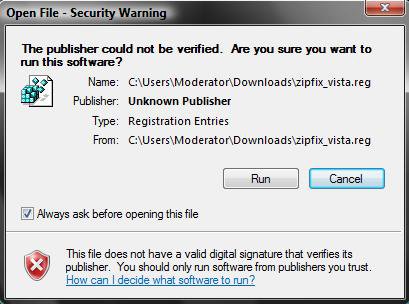
Name:  Security warning.jpg
Views: 3484
Size:  27.3 KB

4. Click on Continue (UAC), Yes, and then OK when prompted.
5. When done, you can delete the zipfix_vista.reg file (on Desktop) if you want.
6. Restart the computer to apply changes.

That's it,
Shawn

Published by
Brink's Avatar
Administrator
Join Date: Apr 2007
Location: Texas, USA
Posts: 16,597
Rep Power: 150
Brink has a reputation beyond reputeBrink has a reputation beyond reputeBrink has a reputation beyond reputeBrink has a reputation beyond reputeBrink has a reputation beyond reputeBrink has a reputation beyond reputeBrink has a reputation beyond reputeBrink has a reputation beyond reputeBrink has a reputation beyond reputeBrink has a reputation beyond reputeBrink has a reputation beyond repute

Tutorial Tools
Show Printable Version Show Printable Version
Email this Page Email this Page

Applies to
All Vista Versions
64 Bit & 32 Bit

Old 11-26-2007  
altkon
Newbie


Join Date: Nov 2007
Vista Home Premium 32 bit
 
Rep Power: 7
altkon is on a distinguished road
  altkon is offline

Re: ZIP file in Vista

I have tried:
to Restore Vista's Built-in Support of ZIP Files
By applying your Method 1

When I double-click the zipped file to view/unzip, internet explorer launches and then that browser window maximizes, minimizes in a perpetual loop which I could only stop by shutting down / restarting the PC.
Is there another way ???
thanks,
altkon

My System SpecsSystem Spec
Old 11-26-2007  
Brink's Avatar
Brink
Administrator


Join Date: Apr 2007
Vista x64 Ultimate SP1
Texas, USA
 
Rep Power: 150
Brink has a reputation beyond reputeBrink has a reputation beyond reputeBrink has a reputation beyond reputeBrink has a reputation beyond reputeBrink has a reputation beyond reputeBrink has a reputation beyond reputeBrink has a reputation beyond reputeBrink has a reputation beyond reputeBrink has a reputation beyond reputeBrink has a reputation beyond reputeBrink has a reputation beyond repute
  Brink is offline

Re: ZIP file in Vista

Hi Altkon,

Welcome to the forum.

It appears that you are having more than just a Zip problem. If you have a Vista installation DVD and not a Recovery (clone) DVD, then I would recommend that you do a Repair Install. It'll only take around 25 minutes. This will allow you to repair your Vista installation without losing your files, settings, and programs.

How To Perform a Repair Installation For Vista

Shawn
My System SpecsSystem Spec
Old 11-27-2007  
altkon
Newbie


Join Date: Nov 2007
Vista Home Premium 32 bit
 
Rep Power: 7
altkon is on a distinguished road
  altkon is offline

Re: ZIP file in Vista

Quote:
brink
View Post
Hi Altkon,

Welcome to the forum.

It appears that you are having more than just a Zip problem. If you have a Vista installation DVD and not a Recovery (clone) DVD, then I would recommend that you do a Repair Install. It'll only take around 25 minutes. This will allow you to repair your Vista installation without losing your files, settings, and programs.

How To Perform a Repair Installation For Vista

Shawn
Unfortunately I have only a product Recovery DVD which does not permit me to do a Repair Install.
Can it be that this defect occurred due to the installation of some other application such as Open Office Org 2.2.1 gr which I Installed to my laptop??
I have checked into my Windows>32System> and
zipfldr.dll is included at the bottom of the list.
Please comment.
Regards,
altkon
My System SpecsSystem Spec
Old 11-27-2007  
Brink's Avatar
Brink
Administrator


Join Date: Apr 2007
Vista x64 Ultimate SP1
Texas, USA
 
Rep Power: 150
Brink has a reputation beyond reputeBrink has a reputation beyond reputeBrink has a reputation beyond reputeBrink has a reputation beyond reputeBrink has a reputation beyond reputeBrink has a reputation beyond reputeBrink has a reputation beyond reputeBrink has a reputation beyond reputeBrink has a reputation beyond reputeBrink has a reputation beyond reputeBrink has a reputation beyond repute
  Brink is offline

Re: ZIP file in Vista

Altkon,

You might consider using the free program 7-ZIP instead. I use it without any problems, and it supports a lot more file formats. After it is installed, run it and click Tools -> Options and Select all file formats for this program to be associated with.

7-Zip

Shawn
My System SpecsSystem Spec
Old 12-04-2007  
jamepc's Avatar
jamepc
Junior Member


Join Date: Sep 2007
Vista 64
 
Rep Power: 8
jamepc is on a distinguished road
  jamepc is offline

Re: ZIP file in Vista

Quote:
When I double-click the zipped file to view/unzip, internet explorer launches and then that browser window maximizes, minimizes in a perpetual loop which I could only stop by shutting down / restarting the PC.

This also happened to me when I applied this method and it never happened before. My zip files are associated to open with IE when double clicked, then this loop happens. Don't double click it if IE is the default program.
I then right clicked the file and selected Extract and it worked. However now after a reboot the extract option is gone.
Why did the extract option disappear?
How do I make the default program to be Vista's unzipper? I know how to Browse for the proper application but don't know what or where it is.

Thanks,
Jamie
My System SpecsSystem Spec
Old 12-04-2007  
Brink's Avatar
Brink
Administrator


Join Date: Apr 2007
Vista x64 Ultimate SP1
Texas, USA
 
Rep Power: 150
Brink has a reputation beyond reputeBrink has a reputation beyond reputeBrink has a reputation beyond reputeBrink has a reputation beyond reputeBrink has a reputation beyond reputeBrink has a reputation beyond reputeBrink has a reputation beyond reputeBrink has a reputation beyond reputeBrink has a reputation beyond reputeBrink has a reputation beyond reputeBrink has a reputation beyond repute
  Brink is offline

Re: ZIP file in Vista

Hi Jamie,

Yeah, ZIP should not be associated to open with IE. By default it should be Compressed Folders, or a 3rd party ZIP program. Doing a method above in the tutorial will reset ZIP to associated back to Compressed Folders.

Shawn
My System SpecsSystem Spec
Old 12-04-2007  
jamepc's Avatar
jamepc
Junior Member


Join Date: Sep 2007
Vista 64
 
Rep Power: 8
jamepc is on a distinguished road
  jamepc is offline

Re: ZIP file in Vista

Thanks for your reply Shawn. Vista's unzipper is working again however I can only use it if I right click the folder and select Extract. How do I specify Vista's decompressor to start when the folder is double clicked. I can "Select from a list of installed programs" but there's no decompressor listed. I can "Browse" but don't know where or what to look for.

Thanks again,
Jamie
My System SpecsSystem Spec
Old 12-05-2007  
Brink's Avatar
Brink
Administrator


Join Date: Apr 2007
Vista x64 Ultimate SP1
Texas, USA
 
Rep Power: 150
Brink has a reputation beyond reputeBrink has a reputation beyond reputeBrink has a reputation beyond reputeBrink has a reputation beyond reputeBrink has a reputation beyond reputeBrink has a reputation beyond reputeBrink has a reputation beyond reputeBrink has a reputation beyond reputeBrink has a reputation beyond reputeBrink has a reputation beyond reputeBrink has a reputation beyond repute
  Brink is offline

Re: ZIP file in Vista

Jamie,

You will need to turn on Compressed Folders to then.

How to Turn Compressed Folders On or Off in Vista

You want the compressed folder to be opened with Windows Explorer. (C:\Windows\explorer.exe) The Zip file is associated with Compressed Folders.

Shawn
My System SpecsSystem Spec
Old 04-25-2008  
mistah
Newbie


Join Date: Apr 2008
vista home premium x32
 
Rep Power: 4
mistah is on a distinguished road
  mistah is offline

Re: ZIP file in Vista

omg! it works. thanks alot!!! i looked everywhere and this was the only place that had the solution.
My System SpecsSystem Spec
Comment

Tags
backup and restore, file, file & folder settings, zip

Tutorial Tools
Display Modes


Update your Vista Drivers Update Your Drivers Now!!

Similar Threads
Tutorial Tutorial Starter Category Comments Last Post
system restore more than one restore file neil baker Vista General 4 08-15-2008 09:05 AM
File restore after Complete PC Restore - 0x80070057 error OliverNZ Vista performance & maintenance 4 06-04-2008 08:19 PM
I deleted a file, tried to restore it, and it didn't restore. Dazedandconfused Vista file management 1 04-09-2008 10:17 PM
Backup and Restore Center support DVD DL? Harry Vista performance & maintenance 2 04-01-2008 09:00 PM
Restore support for tape backup Andrew Vista performance & maintenance 0 03-13-2007 04:09 AM


Vistax64.com is an independent web site and has not been authorized,
sponsored, or otherwise approved by Microsoft Corporation.
"Windows Vista", the Start Orb, and related materials are trademarks of Microsoft Corp.
© Designer Media 2005-2008
Tutorial powered by GARS 2.1.8m ©2005-2006