
How to Repair and Verify the Integrity of Vista System Files with System File Checker
 Information
System File Checker (SFC) checks that all Vista system files are where they should be as they were by default and not corrupted, changed, or damaged. This will show you how to verify and repair the integrity of Vista system files with the System File Checker (SFC) command codes.
 Tip
TipIf SFC Cannot Finish or Repair a File:
NOTE: This is for when after you run the SFC scan below, it cannot finish or repair a file. There is no guarantee that SFC can repair the system files if they are corrupted or damaged to much. If SFC still cannot repair them after this, then you might try running Check Disk (chkdsk), System Restore, a Repair Installation, or a clean reinstall of Vista.
1. How to Read the CBS.LOG
NOTE: When SFC runs, it logs it's actions to the C:\WINDOWS\LOGS\CBS\CBS.LOG. You can find the specific SFC entries by searching for the [SR] tags in the log.
2. Replace the Files that SFC Cannot Fix
NOTE: If SFC cannot fix a file, it will be listed in the CBS.LOG above. Read the CBS.LOG to find out what file it is so you can replace it with a good copy.
NOTE: This is for when after you run the SFC scan below, it cannot finish or repair a file. There is no guarantee that SFC can repair the system files if they are corrupted or damaged to much. If SFC still cannot repair them after this, then you might try running Check Disk (chkdsk), System Restore, a Repair Installation, or a clean reinstall of Vista.
1. How to Read the CBS.LOG
NOTE: When SFC runs, it logs it's actions to the C:\WINDOWS\LOGS\CBS\CBS.LOG. You can find the specific SFC entries by searching for the [SR] tags in the log.
A) For how to see only the SFC scan details in the CBS.LOG:
- Open a elevated command prompt.
- Copy and paste the command below into the elevated command prompt and press Enter.
Code:findstr /c:"[SR]" %windir%\logs\cbs\cbs.log >%userprofile%\Desktop\sfcdetails.txt - Close the elevated command prompt.
- Click on the sfcdetails.txt file that was just placed on your desktop to see the SFC scan details (ones with the [SR] tags) in the CBS.LOG.
- You can safely delete the sfcdetails.txt file afterwards if you like.
NOTE: If SFC cannot fix a file, it will be listed in the CBS.LOG above. Read the CBS.LOG to find out what file it is so you can replace it with a good copy.
A) For how, see:
 Warning
Be aware that if you have modified your system files as in theming explorer/system files, running sfc/scannow will revert the system files such as explorer.exe back to it's default state. Make the appropriate backups of your system files that you have modified for theming if you wish to save them before running sfc/scannow.
Here's How:
NOTE: If sfc cannot start or finish, then try running it Safe Mode.
1. Open a elevated command prompt.
2. In the elevated command prompt, type the command that you want to do in bold below in steps A to E to run System File Check.
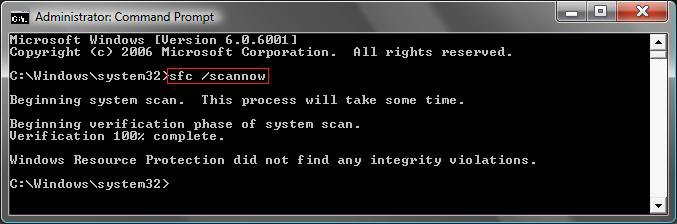
A) sfc /scannow - Scans the integrity of all protected system files and repairs the system files if needed. (See screenshot below)
NOTE: Restores Vista's original setup of system files. (EX: Fonts, wallpapers, System32 files, etc.)
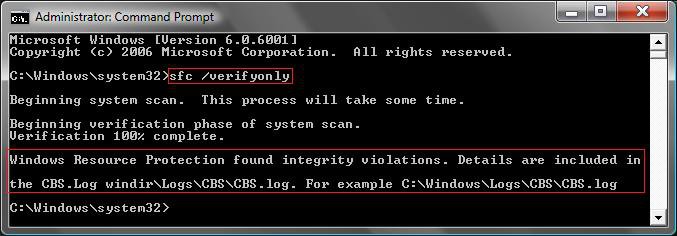
B) sfc /verifyonly - Scans and only verifies the integrity of all proteced system files only. (See screenshot below)
NOTE: If it finds anything like in the screenshot below boxed in red at the bottom, you should run step A to see if it can fix it. See how to read the CBS log above for details on the SFC scan results.
C) sfc /scanfile=(full path of file) - Scans the integrity of the chosen system file and repairs it if needed.
EX: sfc /scanfile=C:\Windows\System32\kernel32.dll
D) sfc /verifyfile=(full path of file) - Scans and only verifies the integrity of the chosen system file.
EX: sfc /verifyfile=C:\Windows\System32\kernel32.dll
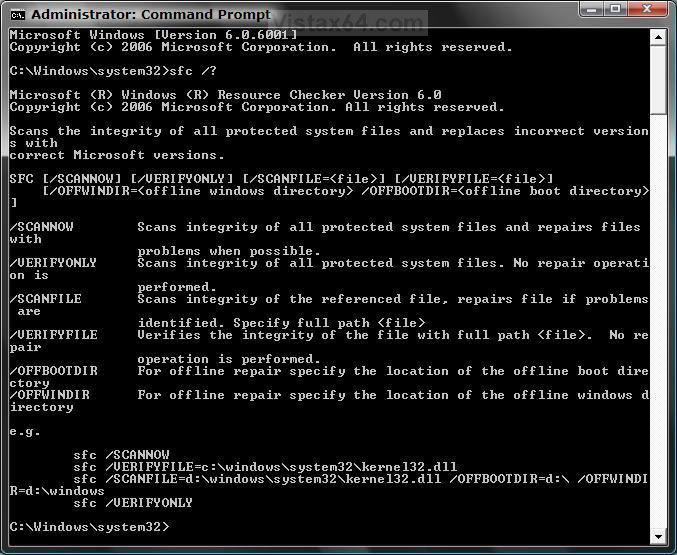
E) sfc /? - For a list of all sfc command codes with description. (see screenshot below)
3. Press Enter.
NOTE: It may take a while to finish.
4. Close the elevated command prompt when it finishes.
5. If you got a message to restart the computer in the command prompt, then restart the computer to finish the repair.
 Note
NoteIf SFC could not fix something, then run the command again to see if it may be able to the next time. Sometimes it may take running the sfc /scannow command 3 times restarting the PC after each time to completely fix everything that it's able to.
If not, then download and run the 32-bit (x86) or 64-bit (x64) System Update Readiness Tool for your same installed 32-bit or 64-bit Vista, restart the PC afterwards, and try the sfc /scannow command again.
If still not, then you can attempt to run a System Restore using a restore point dated before the bad file occured to fix it. You may need to repeat doing a System Restore until you find a older restore point that may work.
If still not, then you can use the steps in the yellow TIP box at the top of the tutorial to manually replace the files that SFC could not fix.
If not, then download and run the 32-bit (x86) or 64-bit (x64) System Update Readiness Tool for your same installed 32-bit or 64-bit Vista, restart the PC afterwards, and try the sfc /scannow command again.
If still not, then you can attempt to run a System Restore using a restore point dated before the bad file occured to fix it. You may need to repeat doing a System Restore until you find a older restore point that may work.
If still not, then you can use the steps in the yellow TIP box at the top of the tutorial to manually replace the files that SFC could not fix.
That's it,
Shawn
Related Tutorials
- How to Extract Files from the Vista Installation DVD
- How To Perform a Repair Installation For Vista
- How to Do a Clean Install of Vista with a Upgrade Version
- How to Do a Clean Install with a Full Version of Vista
- How to Start the Memory Diagnostics Tool in Vista
- How to Generate a System Health Report in Vista
- How to Troubleshoot the Computer with Reliability Monitor in Vista
- How to Do a Startup Repair in Vista
- How to Run Check Disk at Startup in Vista
- How to Do a System Restore in Vista
- How to Use the DirectX Diagnostic Tool in Vista
- How to Use the Resource Monitor in Vista
- List of Commands for Vista and How to Use Them
- How to Fix a Crashing Internet Explorer in Vista
- How to Disable or Enable Vista Services With a Advice Guide
- How to Restore Previous Versions of a File and Folder in Vista
- How to Start Vista in Safe Mode
- Cannot Rename or Move a File or Folder in Vista Fix
- How to Restore Missing Default Start Menu Shortcuts in Vista
- How to Restore TrustedInstaller as Owner of a File in Vista
- How to Open and Use File Signature Verification in Vista
- Access Files On Your Vista Install DVD
Attachments

Last edited by a moderator:


