Windows Vista Forums
Vista Forums Home Join Vista Forums Windows 7 Forum Vista Tutorials Tags
Welcome to Windows Vista Forums. Our forum is dedicated to helping you find solutions with any problems, errors or issues you are experiencing with Windows Vista. The Vista forum also covers news and updates and has an extensive Windows Vista tutorial section that covers a wide range of tips and tricks.

Go Back   Vista Forums > Vista Forums > Tutorials

Vista - Administrator Account

Comment
 
Old 06-01-2007  
Brink


Vista x64 Ultimate SP2, Windows 7 Ultimate x64


Administrator Account

How to Enable or Disable the Real Built-in Administrator Account in Vista
...


Last edited by Brink; 04-21-2009 at 07:51 AM..
My System SpecsSystem Spec
Old 07-01-2008  
Brink


Vista x64 Ultimate SP2, Windows 7 Ultimate x64


Re: Administrator Account

Hello Learner,

Welcome to Vista Forums.

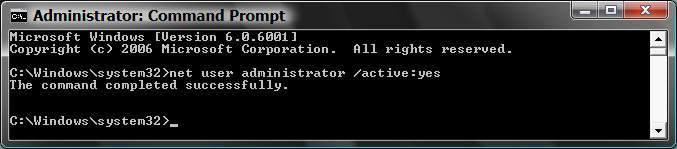
Did you type this below (step 5) to enable the account in a elevated command prompt (Steps 1 to 4) ?

net user administrator /active:yes

It sounds like you just mistyped the command.


Shawn

P.S.
North TX

My System SpecsSystem Spec
Old 07-01-2008  
Learner


Vista Home Premium 32bit


Re: Administrator Account

Quote  Quote: Originally Posted by Brink View Post
Hello Learner,

Welcome to Vista Forums.

Did you type this below (step 5) to enable the account in a elevated command prompt (Steps 1 to 4) ?

net user administrator /active:yes

It sounds like you just mistyped the command.

Shawn

P.S.
North TX

...duhhh, no...I typed in 'net user administrator /active:yes'
after . . . C:\Users\Barbara> after I clicked on the command to open . . . here is a snapshot of screen...well bless, can't get Snipping Tool to work here. Anyway, it's the first command line that appears and as stated before that's what I got. Didn't get past 1st step.
Thanks.
My System SpecsSystem Spec
Old 07-01-2008  
Brink


Vista x64 Ultimate SP2, Windows 7 Ultimate x64


Re: Administrator Account

Learner,

Since you see C:\Users\Barbara, then you are not in an elevated command prompt. In a elevated command prompt you will see C:\Windows\System32 instead. Be sure to right click on cmd at the top of the Start menu white area as in the example screenshot, and click Run as administrator. Afterwards, type the command and it should enabled the built-in Administrator account for you.

Hope this helps,
Shawn
My System SpecsSystem Spec
Old 07-02-2008  
ClancyMalloy


Vista Home Premium x64


Re: Administrator Account

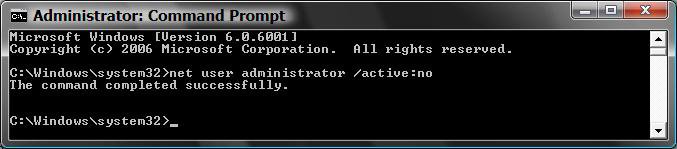
Okay, now I know how to enable/disable the builtin Admin account. Is there a way to enable it only in safe mode? (Like WinXP)
My System SpecsSystem Spec
Old 07-02-2008  
dr_amarendrakr


Vista Home Basic 32bit


Re: Administrator Account

Thanks for help
My System SpecsSystem Spec
Old 07-02-2008  
Learner


Vista Home Premium 32bit


Re: Administrator Account

Quote  Quote: Originally Posted by Brink View Post
Learner,

Since you see C:\Users\Barbara, then you are not in an elevated command prompt. In a elevated command prompt you will see C:\Windows\System32 instead. Be sure to right click on cmd at the top of the Start menu white area as in the example screenshot, and click Run as administrator. Afterwards, type the command and it should enabled the built-in Administrator account for you.

Hope this helps,
Shawn
Thanks Shawn...I put an extra space in behind the / mark...when I tried again it went thru successfully.
I just love success!
Barbara (in SE Texas)
My System SpecsSystem Spec
Old 07-02-2008  
Brink


Vista x64 Ultimate SP2, Windows 7 Ultimate x64


Re: Administrator Account

Quote  Quote: Originally Posted by dr_amarendrakr View Post
Thanks for help
Quote  Quote: Originally Posted by Learner View Post
Thanks Shawn...I put an extra space in behind the / mark...when I tried again it went thru successfully.
I just love success!
Barbara (in SE Texas)
Your welcome Dr. Amarendrakr and Barbara. I'm happy to hear it is working now for you.

Shawn
My System SpecsSystem Spec
Old 07-02-2008  
Brink


Vista x64 Ultimate SP2, Windows 7 Ultimate x64


Re: Administrator Account

Quote  Quote: Originally Posted by ClancyMalloy View Post
Okay, now I know how to enable/disable the builtin Admin account. Is there a way to enable it only in safe mode? (Like WinXP)
Hi Clancy,

Yes, you can have it set to work only in Safe Mode.

One way:
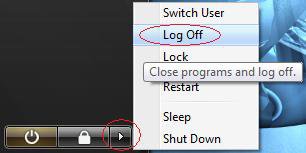
You can boot into another account for Vista normally, and when you boot into Safe Mode, log off and log on to the built-in Administrator account. I would create a password for the built-in Administrator account to prevent anyone with access to your computer from logging on to it though.

Second way: (Not practical though)
Disable the buil-in Administrator account to prevent it from being able to log on with in Vista. If all of your normal administrator accounts are deleted or not functioning for whatever reason, then when you boot into Safe Mode, it will boot into the built-in Administrator account automatically.

Hope this helps,
Shawn
My System SpecsSystem Spec
Old 07-03-2008  
Learner


Vista Home Premium 32bit


Re: Administrator Account

OK Shawn...I "gotter done" yesterday, but somehow I must have messed up big time. Here's the sequence:

I had User#1 Barbara (as Admin), User#2 estxgran, and User#3 guest on my desktop, and only User#1 Barbara (me) was logged on.

I went ONLY thru step #1 (apparently), and now I have a new User/Administrator, which has no logon password, but worse than that, User#1 and User#2 are being shown as logged on.

Should I: print out these instructions and just start over, or do you need to back me out of this? ;>)

TIA...and bless you.
My System SpecsSystem Spec
Old 07-03-2008  
Brink


Vista x64 Ultimate SP2, Windows 7 Ultimate x64


Re: Administrator Account

Hi Barbara,

It sounds like you may have switched user instead of logging off from user #1 & #2. You can log on to them again and then log off, restart the computer to log all users off, or use Task Manager (see link below for how) to log them off.

Task Manager Users - Log Off a Local User


The new built-in Administrator account you just created in this tutorial does not have a pssword by default. If you wish to keep it enabled, then you this tutorial will show you how to create a password for it like the others if needed.

User Account - Create Password

Hope this helps,
Shawn
My System SpecsSystem Spec
Comment

Tutorial Tools


Similar Threads
Tutorial Category
guest account is now administrator account Network & Sharing
Administrator account is lock,no other account available to logon Vista account administration
Account 'NAMED' Administrator vs. 'administrator rights' question Vista installation & setup
Administrator Account Vista account administration
Administrator Account is Already in Use as Main Account? Vista account administration


Vista Forums is an independent web site and has not been authorized,
sponsored, or otherwise approved by Microsoft Corporation.
"Windows Vista", the Start Orb, and related materials are trademarks of Microsoft Corp.
© Designer Media Ltd
Tutorial powered by GARS 2.1.8m ©2005-2006

1 2 3 4 5 6 7 8 9 10 11 12 13 14 15 16 17 18 19 20 21 22 23 24 25 26 27 28 29 30 31 32 33 34 35 36 37 38 39 40 41 42 43 44 45 46