Vista Forums
Vista Forums Home Join Vista Forums Donate Vista Tutorials Tags

Welcome to Vista Forums we are your forum to discuss Windows Vista x64 and x86 systems. Whether you need help or just want to post an idea you have on Vista, this is the forum for you.
Register at Vista forums...the world biggest Windows Vista resource Join Vista Forums

Go Back   Vista Forums > Vista Forums > Tutorials

Administrator Account

Poll: Did this Tutorial help and work for you?
Poll Options
Did this Tutorial help and work for you?

Comment
 
Tutorial Tools Display Modes
<!-- google_ad_section_start -->Administrator Account<!-- google_ad_section_end -->
Administrator Account
How to Enable or Disable the Real Built-in Administrator Account in Vista
Published by Brink
06-01-2007

How to Enable or Disable the Real Built-in Administrator Account in Vista

Information
  In Vista, even though you are using an Administrator account, you still run with Standard account privileges. When a program or a action by you tries to run with administrtors rights, you must first give it permission before it is allowed. This is the User Account Control (UAC). The hidden real Built-in Administrator Account does not use UAC and is like the one in XP with full rights on your computer. For more information, see: Microsoft Help and Support: KB942956


WARNING
  If you enable the hidden Built-in Administrator Account, it is recommended that you do not use this account all the time since everything installed and running on your computer will also have full access to computer too. Instead, I would recommmend that you use it for administrative purposes only, and then use a Standard or normal administrator user account that is restricted for everyday tasks for better security.


NOTE
 
A) This will not delete your current account. It just adds a new account named Administrator that is the real administrator account in Vista.
B) If you do not have any other administrator account on your computer, then you will automatically startup into the built-in Administrator account when you boot into Safe Mode. See: How to Start Vista in Safe Mode

RELATED LINKS:
1. How to Logon Automatically at Startup in Vista

2. How to Elevate Administrators UAC Privilege Level in Vista

3. How to Turn UAC On or Off in Vista

4. How to Create a New User Account in Vista

5. How to Take Ownership of a Item in Vista

6. How to Enable or Disable the User Account Control (UAC) Blacking Out of Screen in Vista

7. How to Change a User Account Type in Vista

8. How to Create a Password for a User Account in Vista

9. How to Restore the Administrative Tools Shortcuts in Vista

10. How to Start Vista in Safe Mode


Here's How:
1. Open the Start Menu.
2. In the white line (Start Search) area, type cmd.
NOTE
  You can also click All Programs (Programs for Classic menu) and Accessories to see cmd.

3. Right click cmd (at top) and click Run as administrator. (See screenshot below)

cmd_Start_Menu.jpg

4. Click Continue button for UAC prompt.

5. To Enable the Hidden Built-In Administrator Account -
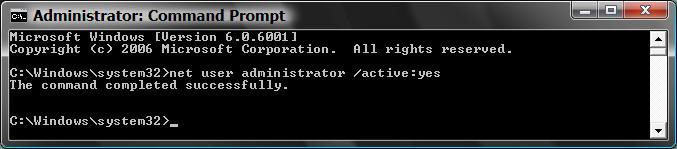
A) In command prompt, type: net user administrator /active:yes and press Enter. (See screenshot below)
B) Go to step 7.

CMD_Enable.jpg

6. To Disable the Hidden Built-in Administrator Account -
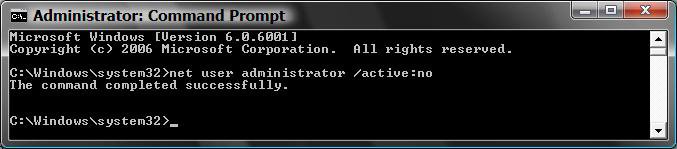
A) Type: net user administrator /active:no instead. (See screenshot below)
WARNING
  Make sure you are not logged into the Real Administrator account when turning it off. Use a regular administrator account to do this instead. It will not work if you try to disable the built-in Administrator account when you are logged on it.


CMD_Disable.jpg

7. You will get the message, The command completed successfully. If not, repeat steps.
NOTE
  If you are still unable to enable the built-in Administrator account from here, then try this again in Safe Mode instead. See: How to Start Vista in Safe Mode

8. Close command prompt.
9. Log off (in Start Menu) and you will see your new real built-in Administrator account next to your current account(s).
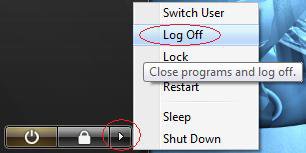
LogOff.jpg

10. Click on the new Administrator account display picture icon and log on to it.
11. You should give this account a password for better security.

12. You will then need to set up it's desktop preferences like any other account.


That's it,
Shawn
Published by
Brink's Avatar
Administrator
Join Date: Apr 2007
Location: Texas, USA
Posts: 12,904
Rep Power: 200
Brink has a reputation beyond reputeBrink has a reputation beyond reputeBrink has a reputation beyond reputeBrink has a reputation beyond reputeBrink has a reputation beyond reputeBrink has a reputation beyond reputeBrink has a reputation beyond reputeBrink has a reputation beyond reputeBrink has a reputation beyond reputeBrink has a reputation beyond reputeBrink has a reputation beyond repute

Tutorial Tools

Applies to
All Vista Versions
64 Bit & 32 Bit

Rating
Skill Level
40%40%40%
2

Page copy protected against web site content infringement by Copyscape

Old 06-01-2007  
Asky
Here to Help
Asky has a reputation beyond reputeAsky has a reputation beyond reputeAsky has a reputation beyond reputeAsky has a reputation beyond reputeAsky has a reputation beyond reputeAsky has a reputation beyond reputeAsky has a reputation beyond reputeAsky has a reputation beyond reputeAsky has a reputation beyond reputeAsky has a reputation beyond reputeAsky has a reputation beyond repute
 
Asky's Avatar
 
Join Date: Jun 2007
Windows Vista X64
Posts: 401

Location: Mumbai,India

Neat,Thnx man
Asky is offline   Reply With Quote
Old 06-01-2007  
Brink
Administrator
Brink has a reputation beyond reputeBrink has a reputation beyond reputeBrink has a reputation beyond reputeBrink has a reputation beyond reputeBrink has a reputation beyond reputeBrink has a reputation beyond reputeBrink has a reputation beyond reputeBrink has a reputation beyond reputeBrink has a reputation beyond reputeBrink has a reputation beyond reputeBrink has a reputation beyond repute
 
Brink's Avatar
 
Join Date: Apr 2007
Vista x64 Ultimate SP1
Posts: 12,904

Location: Texas, USA

Hi Asky,

Glad you like it. I was tired of that restricted account too.

Shawn

There are no dumb questions, just the people that do not ask them.
Please post feedback to help others.
Brink is offline   Reply With Quote
Old 11-18-2007  
niconicolino
Newbie
niconicolino is on a distinguished road
 
Join Date: Nov 2007
vista bussiness
Posts: 1

Re: Administrator Account

I do what you said but in the cmd appears a number 5 error. Access is denied. Please help.
niconicolino is offline   Reply With Quote
Old 11-18-2007  
Brink
Administrator
Brink has a reputation beyond reputeBrink has a reputation beyond reputeBrink has a reputation beyond reputeBrink has a reputation beyond reputeBrink has a reputation beyond reputeBrink has a reputation beyond reputeBrink has a reputation beyond reputeBrink has a reputation beyond reputeBrink has a reputation beyond reputeBrink has a reputation beyond reputeBrink has a reputation beyond repute
 
Brink's Avatar
 
Join Date: Apr 2007
Vista x64 Ultimate SP1
Posts: 12,904

Location: Texas, USA
Re: Administrator Account

Hi Niconicolino,

Welcome to the forum.

You will need to right click on CMD and click Run as administrator, even if you are doing this in a Administrator account.

Shawn

There are no dumb questions, just the people that do not ask them.
Please post feedback to help others.
Brink is offline   Reply With Quote
Old 01-06-2008  
shank
Newbie
shank is on a distinguished road
 
shank's Avatar
 
Join Date: Jan 2008
windows vista home premium 32bit
Posts: 7

Re: Administrator Account

Safe m8 i tried that tutorial and it worked but. even wen im on the admin account it still wont allow me to activate the windows side bar please help!
shank is offline   Reply With Quote
Old 01-06-2008  
Brink
Administrator
Brink has a reputation beyond reputeBrink has a reputation beyond reputeBrink has a reputation beyond reputeBrink has a reputation beyond reputeBrink has a reputation beyond reputeBrink has a reputation beyond reputeBrink has a reputation beyond reputeBrink has a reputation beyond reputeBrink has a reputation beyond reputeBrink has a reputation beyond reputeBrink has a reputation beyond repute
 
Brink's Avatar
 
Join Date: Apr 2007
Vista x64 Ultimate SP1
Posts: 12,904

Location: Texas, USA
Re: Administrator Account

Hi Shank,

Welcome to Vista Forums.

Is this the tutorial you tried? It should help.

How to Fix Windows Sidebar not Starting in Vista

Shawn

There are no dumb questions, just the people that do not ask them.
Please post feedback to help others.
Brink is offline   Reply With Quote
Old 01-06-2008  
shank
Newbie
shank is on a distinguished road
 
shank's Avatar
 
Join Date: Jan 2008
windows vista home premium 32bit
Posts: 7

Re: Administrator Account

Ive tried that m8 it still sayin that its managed by the system admin wen i im and i unlocked the hidden admin account
shank is offline   Reply With Quote
Old 01-06-2008  
Brink
Administrator
Brink has a reputation beyond reputeBrink has a reputation beyond reputeBrink has a reputation beyond reputeBrink has a reputation beyond reputeBrink has a reputation beyond reputeBrink has a reputation beyond reputeBrink has a reputation beyond reputeBrink has a reputation beyond reputeBrink has a reputation beyond reputeBrink has a reputation beyond reputeBrink has a reputation beyond repute
 
Brink's Avatar
 
Join Date: Apr 2007
Vista x64 Ultimate SP1
Posts: 12,904

Location: Texas, USA
Re: Administrator Account

Shank,

Even after this: How to Enable or Disable Windows Sidebar in Vista ?

Did you install or change anything before this happened? (Ex: Gadget or settings)

Shawn

There are no dumb questions, just the people that do not ask them.
Please post feedback to help others.
Brink is offline   Reply With Quote
Old 01-06-2008  
shank
Newbie
shank is on a distinguished road
 
shank's Avatar
 
Join Date: Jan 2008
windows vista home premium 32bit
Posts: 7


no m8

i tried that way and it didnt work i tried both wayz aswell if your fed up be in my shoes i dont understand why it wont work its stupid
shank is offline   Reply With Quote
 
Comment

Tags
account, administrator

Tutorial Tools
Display Modes


Vistax64.com is an independent web site and has not been authorized,
sponsored, or otherwise approved by Microsoft Corporation.
"Windows Vista", the Start Orb, and related materials are trademarks of Microsoft Corp.
© Vistax64.com 2005-2008
Tutorial powered by GARS 2.1.8m ©2005-2006

1 2 3 4 5 6 7 8 9 10 11 12 13 14 15 16 17 18 19 20 21 22 23 24 25 26 27 28 29 30 31 32 33 34 35 36 37 38 39 40 41 42 43 44 45 46 47 48