Vista Forums
Vista Forums Home Join Vista Forums Donate Vista Tutorials Store Tags

Welcome to Vista Forums we are your forum to discuss Windows Vista x64 and x86 systems.

Go Back   Vista Forums > Vista Forums > Tutorials

Security Center

Poll: Did this Tutorial help and work for you?
Poll Options
Did this Tutorial help and work for you?

Comment
 
Tutorial Tools Display Modes
<!-- google_ad_section_start -->Security Center<!-- google_ad_section_end -->
Security Center
How to Disable or Enable Security Center in Vista
Published by Brink
06-02-2007

How to Disable or Enable Security Center in Vista

Information
  Security Center alerts you when your security software is out of date, turned off, or when your security settings should be strengthened. Security Center monitors the following: Firewall, Automatic updating, Antivirus, Antispyware (EX: Windows Defender), Internet security settings, and UAC (User Account Control).
WARNING
  If you disable the Security Center, then you will not be alerted if something disables one of your security programs.
RELATED LINKS:
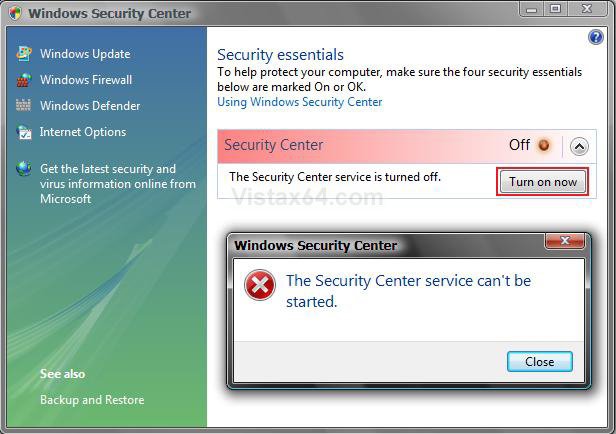
EXAMPLE: Security Center Disabled
Disabled.jpg


STEP ONE:
Security Center Alert Warning
1. If you are Disabling the Security Center -
NOTE: You will need to do this before you Disable the Security Center in step 7 below.
A) Turn off the Security Center alert warning notification.
NOTE: For how, see: How to Disable or Enable the Security Center Alert Warning Notification in Vista
B) Go to STEP TWO below.
2. If you are Enabling the Security Center -
NOTE: You will only be able to do this after you enabled the Security Center in step 8 below.
A) Turn on the Security Center alert warning notification if you want to.
NOTE: For how, see: How to Disable or Enable the Security Center Alert Warning Notification in Vista
B) Continue to STEP TWO.

STEP TWO:
Vista Services
3. Open the Start Menu.
4. In the white line (Start Search) area, type services and press Enter.
5. Click the Continue button for the UAC prompt.
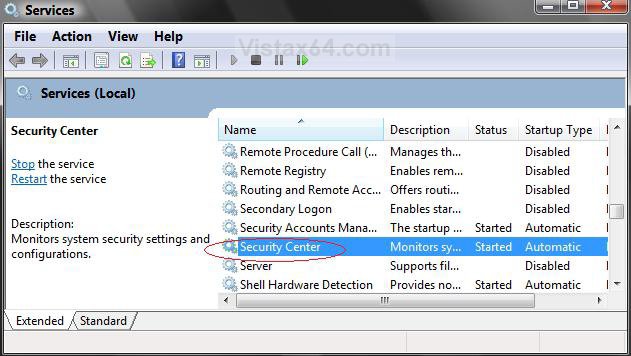
6. Scroll down and right click on Security Center and click Properties. (See screenshot below)

Services.jpg

7. To Disable Security Center -
NOTE: Be sure to do step 1 above before you disable the Security Center.
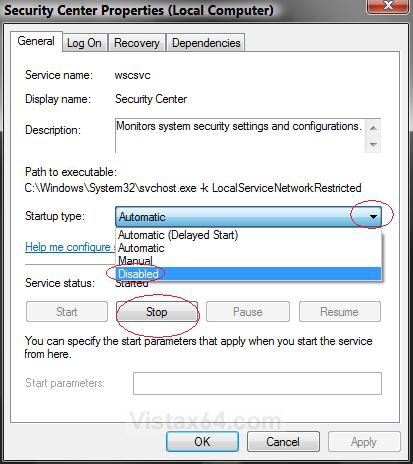
A) Click on the Stop button and wait a second for it to stop. (See screenshot below)
B) Next to Startup type, click on Automatic and select Disable.
C) Click on the Apply button.
8. To Enable Security Center -
NOTE: Be sure to do step 2 above after enabling the Security Center.
A) Next to Startup type, click on Disabled and select Automatic. (See screenshot below)
B) Click on the Apply button.
C) Click on the Start button.
9. Click OK.

Service Properties.jpg

10. Close Services Window.
That's it,
Shawn
Published by
Brink's Avatar
Administrator
Join Date: Apr 2007
Location: Texas, USA
Posts: 13,545
Rep Power: 200
Brink has a reputation beyond reputeBrink has a reputation beyond reputeBrink has a reputation beyond reputeBrink has a reputation beyond reputeBrink has a reputation beyond reputeBrink has a reputation beyond reputeBrink has a reputation beyond reputeBrink has a reputation beyond reputeBrink has a reputation beyond reputeBrink has a reputation beyond reputeBrink has a reputation beyond repute

Tutorial Tools

Applies to
All Vista Versions
64 Bit & 32 Bit

Rating
Skill Level
40%40%40%
2

Page copy protected against web site content infringement by Copyscape

Old 11-29-2007  
jamiemyhaven
Newbie
jamiemyhaven is on a distinguished road
 
Join Date: Nov 2007
Vista Ultimate 32bit
Posts: 8

Re: Security Center

With my computer I go to services and it has security accounts manager but does not have Security Center under it so how can I get that to show up so I can turn security center back on.
jamiemyhaven is offline   Reply With Quote
Old 11-30-2007  
Brink
Administrator
Brink has a reputation beyond reputeBrink has a reputation beyond reputeBrink has a reputation beyond reputeBrink has a reputation beyond reputeBrink has a reputation beyond reputeBrink has a reputation beyond reputeBrink has a reputation beyond reputeBrink has a reputation beyond reputeBrink has a reputation beyond reputeBrink has a reputation beyond reputeBrink has a reputation beyond repute
 
Brink's Avatar
 
Join Date: Apr 2007
Vista x64 Ultimate SP1
Posts: 13,545

Location: Texas, USA
Re: Security Center

Hi JamieMyHaven,

Welcome to the forum.

If you do not have the Security Center service listed, then you do have a problem. Did you install some other security program by chance? EX: Live Onecare

You can run a sfc /scannow command to see if it may fix the problem.

How to Repair and Verify the Integrity of Vista System Files with System File Checker


If that does not work, then run a Repair install.

How To Perform a Repair Installation For Vista

Shawn

There are no dumb questions, just the people that do not ask them.
Please post feedback to help others.
Brink is offline   Reply With Quote
Old 11-30-2007  
jamiemyhaven
Newbie
jamiemyhaven is on a distinguished road
 
Join Date: Nov 2007
Vista Ultimate 32bit
Posts: 8

Re: Security Center

I am just doing the sfc/scannow and yes I had installed live one care. I have a norton 360 disc here do you think that is a better program. Also I think it is a virus that is doing this because I have had the shutdown removed,task manager and regedit.exe but I have fixed them up now it had happened with my previous vista installation but I did a clean install hopefully sfc/scannow can fix the problem and thanks for your help anyway
jamiemyhaven is offline   Reply With Quote
Old 11-30-2007  
Brink
Administrator
Brink has a reputation beyond reputeBrink has a reputation beyond reputeBrink has a reputation beyond reputeBrink has a reputation beyond reputeBrink has a reputation beyond reputeBrink has a reputation beyond reputeBrink has a reputation beyond reputeBrink has a reputation beyond reputeBrink has a reputation beyond reputeBrink has a reputation beyond reputeBrink has a reputation beyond repute
 
Brink's Avatar
 
Join Date: Apr 2007
Vista x64 Ultimate SP1
Posts: 13,545

Location: Texas, USA
Re: Security Center

I would not use Norton with Vista. It has caused problems for a lot of people.

I think that Live OneCare may the one that removed it.

You did a clean install and the Security Center service is not there?

There are no dumb questions, just the people that do not ask them.
Please post feedback to help others.
Brink is offline   Reply With Quote
Old 11-30-2007  
jamiemyhaven
Newbie
jamiemyhaven is on a distinguished road
 
Join Date: Nov 2007
Vista Ultimate 32bit
Posts: 8

Re: Security Center

nah I had done a clean install just on the Saturday because I was setting up dual boot and I had security center running perfectly now the only thing that shows up under security center is the security center is turned off and the button to turn it on but it says its disabled when i press it, just yesterday I started getting a few problems happening. would u be able to recommend any better antivirus to use besides live one care. I will see scannow if it has fixed the problem I just have to reboot so I will be back in a few mins
jamiemyhaven is offline   Reply With Quote
Old 11-30-2007  
Brink
Administrator
Brink has a reputation beyond reputeBrink has a reputation beyond reputeBrink has a reputation beyond reputeBrink has a reputation beyond reputeBrink has a reputation beyond reputeBrink has a reputation beyond reputeBrink has a reputation beyond reputeBrink has a reputation beyond reputeBrink has a reputation beyond reputeBrink has a reputation beyond reputeBrink has a reputation beyond repute
 
Brink's Avatar
 
Join Date: Apr 2007
Vista x64 Ultimate SP1
Posts: 13,545

Location: Texas, USA
Re: Security Center

I use the free Avast antivirus program and have not had any problems with it yet.

http://avast.com/eng/avast_4_home.html


If Live OneCare is still installed, then I think it will need to be uninstalled first.

There are no dumb questions, just the people that do not ask them.
Please post feedback to help others.
Brink is offline   Reply With Quote
Old 11-30-2007  
jamiemyhaven
Newbie
jamiemyhaven is on a distinguished road
 
Join Date: Nov 2007
Vista Ultimate 32bit
Posts: 8

Re: Security Center

If I do a install from the vista disc the one that keeps your files does that mean everything in the registry, such as games or programs would have to be reregistered and would it probably fix this problem
jamiemyhaven is offline   Reply With Quote
Old 11-30-2007  
jamiemyhaven
Newbie
jamiemyhaven is on a distinguished road
 
Join Date: Nov 2007
Vista Ultimate 32bit
Posts: 8

Re: Security Center

Yeah I cant get the Avast program I am over my download limit and it says it will take 2 hrs which the connection will probably drop out anyway. So how do you think I can get security center working again, if i uninstall live onecare I don't think that will put Security center properties back in so what can u suggest I do now

Because if I install the vista option which keeps your files I will ahev to re register the programs won't I ?
jamiemyhaven is offline   Reply With Quote
Old 11-30-2007  
Brink
Administrator
Brink has a reputation beyond reputeBrink has a reputation beyond reputeBrink has a reputation beyond reputeBrink has a reputation beyond reputeBrink has a reputation beyond reputeBrink has a reputation beyond reputeBrink has a reputation beyond reputeBrink has a reputation beyond reputeBrink has a reputation beyond reputeBrink has a reputation beyond reputeBrink has a reputation beyond repute
 
Brink's Avatar
 
Join Date: Apr 2007
Vista x64 Ultimate SP1
Posts: 13,545

Location: Texas, USA
Re: Security Center

I would try uninstalling the Live OneCare first to see if that will return the Security Center service in Services. It will save you a lot of time if it does. You can always reinstall it.

Using the Repair install option will repair your Vista installation without losing your files, settings, and programs. Just backup anything you do not want to lose, like Favorites and email messages, just in case something goes wrong. I do not know if you will need to re-register the programs or not afterwards. If so, it should not take long to do.

There are no dumb questions, just the people that do not ask them.
Please post feedback to help others.
Brink is offline   Reply With Quote
 
Comment

Tags
center, security

Tutorial Tools
Display Modes


Vistax64.com is an independent web site and has not been authorized,
sponsored, or otherwise approved by Microsoft Corporation.
"Windows Vista", the Start Orb, and related materials are trademarks of Microsoft Corp.
© Designer Media 2005-2008
Tutorial powered by GARS 2.1.8m ©2005-2006

1 2 3 4 5 6 7 8 9 10 11 12 13 14 15 16 17 18 19 20 21 22 23 24 25 26 27 28 29 30 31 32 33 34 35 36 37 38 39 40 41 42 43 44 45 46 47 48