How to Add a Tray Icon for Windows Mail
 Information
This program will add a system tray icon that will allow Windows Mail to be minimized to the tray icon allowing you to be notified of new messages without Windows Mail being on the taskbar.
 Note
NoteThis program will not integrate into Windows Mail, but is a stand alone EXE program that works with Windows Mail.
WinMailTray
Current Download Site:
http://www.msblog.org/download/WinMailTray.zip
Written by: Kristan Kenney
WinMailTray
Current Download Site:
http://www.msblog.org/download/WinMailTray.zip
Written by: Kristan Kenney
 Tip
TipAnother free program that has a few more features is Windows Mail Tray Icon.
 OPTION ONE
1. Click on the Download button below to download the WinMailTray.zip file from the Current download site above.

2. Click on Save and save it to your Desktop.
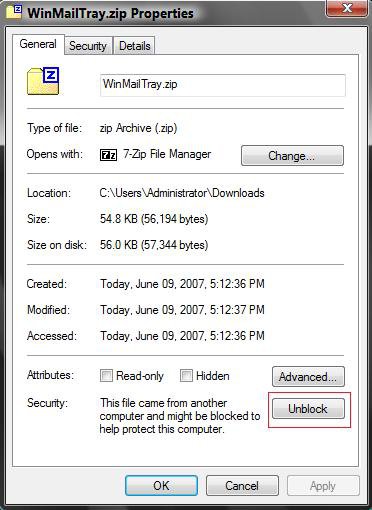
3. Right click on the downloaded WinMailTray.zip file and click on Properties.
4. Click on Unblock and OK to apply. (See screenshot below)
5. Right click on the downloaded WinMailTray.zip file and click on Open.
6. Extract the WinMailTray.exe (Inside WinMailTray.zip) to the Desktop.
7. Delete the downloaded WinMailTray.zip folder when done extracting WinMailTray.exe.
8. Go to C:\Program Files in Windows Explorer.
NOTE: This is for adding a folder to put WinMailTray.exe in later.
9. Right click in a empty area and click New and click Folder.
10. Click on Continue in Access Denied pop-up.
11. Click on Continue in UAC pop-up.
12. Type WinMailTray and press Enter.
13. Click on Continue in Access Denied pop-up.
14. Click on Continue in UAC pop-up.
15. Right click on the extracted WinMailTray.exe file and click on Cut.
16. Go back to C:\Program Files\WinMailTray and right click on a empty area and click Paste.
NOTE: This is to put WinMailTray.exe inside the WinMailTray folder.
17. Click on Continue in Access Denied pop-up.
18. Click on Continue in UAC pop-up.
19. In C:\Program Files\WinMailTray, right click on WinMailTray.exe and click Send To and click Desktop (create shortcut).
20. Place the shortcut (on desktop) where you like to be able to run WinMailTray when you like.
NOTE: Place a copy of the shortcut in your Startup folder in the Start menu and All Programs if you want WinMailTray to run at startup.
21. Click on the shortcut to open WinMailTray.
22. Open Windows Mail from WinMailTray icon on traybar.
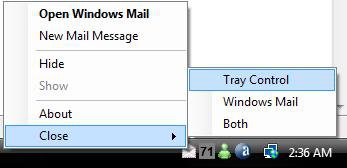
NOTE: You will now see an envelope in the Tray notification area with these options below:
OPTION TWO 1. Have WinMailTray running.
NOTE: WinMailTray must be running to be able to Hide (minimize) Windows Mail to the tray icon.
2. Right click the WinMailTray white envelope tray icon.
NOTE: The Minimize, Maximize, and Close buttons on Windows Mail will still work as they always have. You must use the tray icon's options to minimize to the tray icon and not the taskbar.
3. Click on Open Windows Mail to open Window Mail.
NOTE: You can still open Windows Mail from the normal Windows Mail shortcut for WinMailTray icon to work.
4. Click on Hide to leave Windows Mail open and minimize it to the tray icon instead of the taskbar.
NOTE: Clicking Minimize on Windows Mail will still just minimize it to the taskbar.
You must use the tray icon options.
5. Click on Show to maximize Windows Mail again.
6. New Mail Message is to open Windows Mail's Create a new E-mail.
7. The rest of the options are self explanatory.
OPTION THREE 1. Go to the location (above) where you saved the WinMailTray.exe file toand delete it.
NOTE: Example: C:\Program Files\WinMailTray
2. Delete any shortcuts you have of it, including the Startup folder in Start Menu and All Programs if you put a shortcut there to.
That's it,Shawn
Attachments

Last edited: