Windows Vista Forums
Vista Forums Home Join Vista Forums Windows 7 Forum Vista Tutorials Tags
Welcome to Windows Vista Forums. Our forum is dedicated to helping you find solutions with any problems, errors or issues you are experiencing with Windows Vista. The Vista forum also covers news and updates and has an extensive Windows Vista tutorial section that covers a wide range of tips and tricks.

Go Back   Vista Forums > Vista Forums > Tutorials

Vista Tutorial - Windows Mail Spell Check

Comment
 
Old 05-20-2007  
Brink
Administrator


Join Date: Apr 2007
Vista x64 Ultimate SP2, Windows 7 Ultimate x64


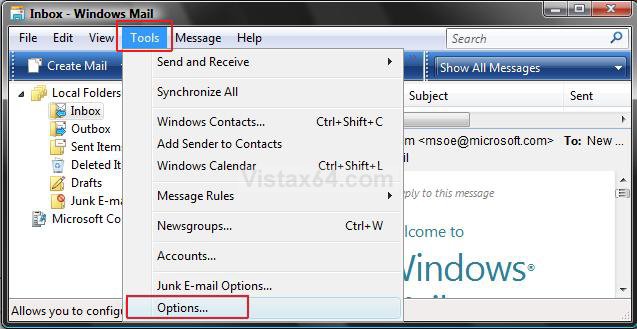
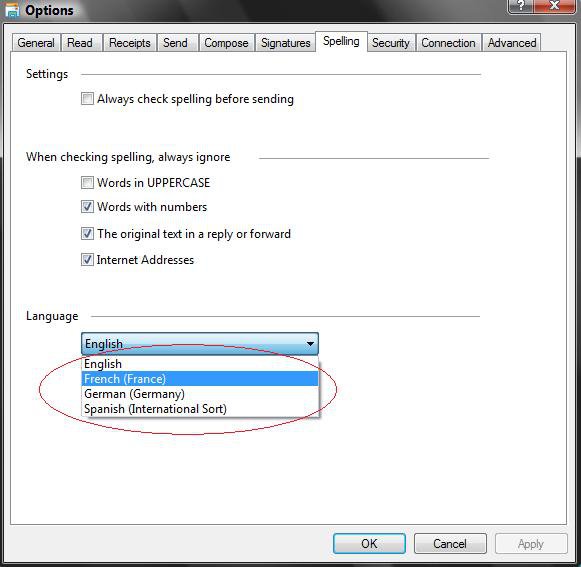
Windows Mail Spell Check

How to Fix the Vista Windows Mail Spell Check Language Error
...

My System SpecsSystem Spec
Old 01-08-2008  
Brink
Administrator


Join Date: Apr 2007
Vista x64 Ultimate SP2, Windows 7 Ultimate x64


Re: Windows Mail Spell Check

Your welcome 1-gabe.

Welcome to Vista Forums.

Shawn

My System SpecsSystem Spec
Old 01-10-2008  
Duckysan1
Newbie


Join Date: Jan 2008
Vista Business 32


Re: Windows Mail Spell Check

OK, great, but how do I change from the US English to International English or UK.
I do not spell reliase with a 'z'
I have tyres on my car, not tires
I also have colour in my life, not color
Anybody know???
Cheers, Duckysan
My System SpecsSystem Spec
Old 01-10-2008  
Brink
Administrator


Join Date: Apr 2007
Vista x64 Ultimate SP2, Windows 7 Ultimate x64


Re: Windows Mail Spell Check

Hi Duckysan,

Welcome to Vista Forums.

Windows Mail only has the English (US), French (France), German (Germany), Spanish (International Sort) languages available to it. If you want or need a email program for languages other than these, then you might consider using Mozilla Thunderbird instead. See: Mozilla Thunderbird Language Versions


Shawn
My System SpecsSystem Spec
Old 01-10-2008  
Duckysan1
Newbie


Join Date: Jan 2008
Vista Business 32


Re: Windows Mail Spell Check

Thanks Brink. Of course, Windows Mail has gone backwards in this respect as the old Outlook Express had the option. Cheers, Duckysan
My System SpecsSystem Spec
Old 01-10-2008  
Brink
Administrator


Join Date: Apr 2007
Vista x64 Ultimate SP2, Windows 7 Ultimate x64


Re: Windows Mail Spell Check

Your welcome Ducysan,

I agree.
My System SpecsSystem Spec
Old 01-30-2008  
fulweiler
Newbie


Join Date: Jan 2008
Vista Home Premium 32 bit


Re: Windows Mail Spell Check

I don't know how I found my way to this site but your directions were excellent and you fixed my problem. What I was doing before was clicking on the tools tab in an email message. Your explanation was to click on the tools tab from the main email screen. It worked!

Thank you because I am a terrible speller and I rely on spell check.
My System SpecsSystem Spec
Old 01-30-2008  
Brink
Administrator


Join Date: Apr 2007
Vista x64 Ultimate SP2, Windows 7 Ultimate x64


Re: Windows Mail Spell Check

Your welcome fulweiler. LOL, I'm not so great myself between that and the typo's.

Shawn
My System SpecsSystem Spec
Old 03-03-2008  
catcorbett
Newbie


Join Date: Mar 2008
Vista Home Premium


Re: Windows Mail Spell Check

BLESS YOU....... it worked
My System SpecsSystem Spec
Old 03-03-2008  
Brink
Administrator


Join Date: Apr 2007
Vista x64 Ultimate SP2, Windows 7 Ultimate x64


Re: Windows Mail Spell Check

Your welcome catcorbett, and welcome to Vista x64 Forums.

Thank you for the blessing. I need it.

Shawn
My System SpecsSystem Spec
Old 03-27-2008  
cpemma
Member


Join Date: Feb 2008
Home Premium 32 SP1


Re: Windows Mail Spell Check

Quote  Quote: Originally Posted by Brink View Post
Windows Mail only has the English (US), French (France), German (Germany), Spanish (International Sort) languages available to it...
With the Win Live Mail the language can be swapped to UK (or Canadian) English with a simple edit to the spell.ini file. The same dictionary file is used for all English variations, so hopefully MS will make it easier to change in an update.

This thread in the Live Mail forum gives the particulars.
Quote  Quote: Originally Posted by Noel
If you're looking for British English spell checking (so colour is accepted
but color gets a wiggly red line), use Notepad (run as Admin) to open spell.ini in
%programfiles%/Windows Live/Mail/Proof/prf0009/2 and change lang=1033 to
lang=2057. For Canadian, lang=4105.
It's also a better email program IMO.

Last edited by cpemma; 03-27-2008 at 08:17 PM..
My System SpecsSystem Spec
Comment

Tutorial Tools


Similar Threads
Tutorial Category
Windows mail spell check Vista mail
Windows e-mail spell check Vista mail
spell check in windows mail Vista General
windows mail, spell check Vista mail
Windows mail spell check Browsers & Mail


Vista Forums is an independent web site and has not been authorized,
sponsored, or otherwise approved by Microsoft Corporation.
"Windows Vista", the Start Orb, and related materials are trademarks of Microsoft Corp.
© Designer Media Ltd
Tutorial powered by GARS 2.1.8m ©2005-2006

1 2 3 4 5 6 7 8 9 10 11 12 13 14 15 16 17 18 19 20 21 22 23 24 25 26 27 28 29 30 31 32 33 34 35 36 37 38 39 40 41 42 43 44 45 46