Vista Forums
Vista Forums Home Join Vista Forums Donate Vista Tutorials Tags

Welcome to Vista Forums we are your forum to discuss Windows Vista x64 and x86 systems. Whether you need help or just want to post an idea you have on Vista, this is the forum for you.
Register at Vista forums...the world biggest Windows Vista resource Join Vista Forums

Go Back   Vista Forums > Vista Forums > Tutorials

Windows Mail Spell Check

Poll: Did this Tutorial help and work for you?
Poll Options
Did this Tutorial help and work for you?

Comment
 
Tutorial Tools Display Modes
<!-- google_ad_section_start -->Windows Mail Spell Check<!-- google_ad_section_end -->
Windows Mail Spell Check
How to Fix the Spell Checking Language Error, and How To Add the Language List Back
Published by Brink
05-20-2007

How to Fix the Spell Checking Language Error in Windows Mail

WHY:
You get this error, This language is no longer available for Spell Checking. Please select another in the Spelling Options Dialogue. If there are no languages listed in the Spell Check menu, then this will show you how to add them back and fix the error.

NOTE:
Windows Mail only has the English (US), French (France), German (Germany), Spanish (International Sort) languages available to it. If you want or need a email program for languages other than these, then you might consider using the free Mozilla Thunderbird instead. See: Mozilla Thunderbird Language Versions

RELATED LINKS: FIRST:
NOTE: For more information on this, see: OETips #3 : Turn off email scanning in your antivirus software
Make sure your antivirus or anti-spamware program has all of it's email scanning options turned off. These scanning options can corrupt Windows Mail entire message folder, or the entire message store, when it attempts to remove a message containing a potential virus. You will still be protected against infection with the antivirus program's system protection.

If you have Norton or McAfee as your antivirus program, then you should check their website for a update. You will most likely need to uninstall it completely though until they have one. They have not been compatible with Windows Mail, and simply turning off the email scanning options will not be sufficient. If Norton does not uninstall cleanly, then you will need to use the Norton Removal Tool. If McAfee does not uninstall cleanly, then you will need to use the MCPR Removal Tool .

Some Free Alternative Antivirus Programs :
NOTE: These work with Vista x32 or x64 with no problems, but will need to have their email scanning options turned off as well.
Avast - http://avast.com/eng/avast_4_home.html
(Right click the blue A ball tray icon and click On-Access Protection Control.)
AVG - http://free.grisoft.com/doc/5390/us/frt/0?prd=aff
(Do a Custom install and don't install email scanning)


Here's How:
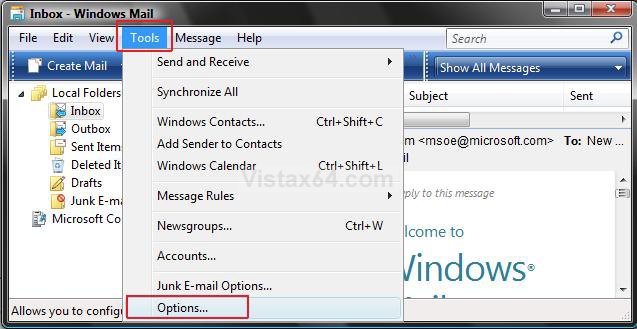
1. Click on Tools on the menu bar in the main default Windows Mail window. (See screenshot below)
NOTE: Do not click on Tools from within a compose email message window. You will not see Options if you do. The main default Windows Mail window is the window that Windows Mail opens to when it is first opened. (Inbox)

2. Click Options.

Menu.jpg

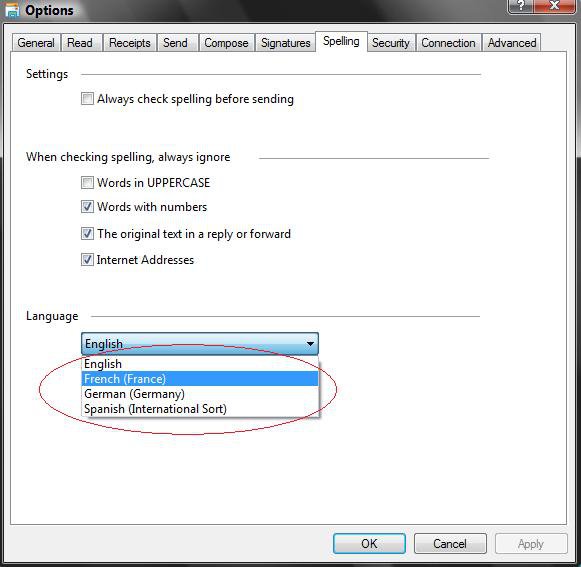
3. Click on the Spelling tab. (See screenshot below)

4. Choose another language other than English, or your current language, under the Language line.

NOTE: If there are no languages listed then go to step A below. If there is, then go to step 5 instead.
  • Close Windows Mail.
  • Click on the download button below and save Languages.reg to the desktop.

  • Right click Languages.reg (on desktop) and click Merge.
  • Click Run for Security Warning pop-up.
  • Click Continue button for UAC prompt.
  • Click Yes and OK at the confirmation windows.
  • Delete Languages.reg (on desktop).
  • Go back to step 1 above.
Language.jpg

5. Click Apply.
6. Now choose English or your original language again.
7. Click Apply.
8. Click OK to close window.

You should be able to Spell check now.


That's it,
Shawn
Published by
Brink's Avatar
Administrator
Join Date: Apr 2007
Location: Texas, USA
Posts: 12,929
Rep Power: 200
Brink has a reputation beyond reputeBrink has a reputation beyond reputeBrink has a reputation beyond reputeBrink has a reputation beyond reputeBrink has a reputation beyond reputeBrink has a reputation beyond reputeBrink has a reputation beyond reputeBrink has a reputation beyond reputeBrink has a reputation beyond reputeBrink has a reputation beyond reputeBrink has a reputation beyond repute

Tutorial Tools

Applies to
All Vista Versions
64 Bit & 32 Bit

Rating
Skill Level
20%20%20%
1

Page copy protected against web site content infringement by Copyscape

Old 06-10-2007  
shovelhead93
Newbie
shovelhead93 is on a distinguished road
 
Join Date: Jun 2007
vista
Posts: 2

Smile Re: Windows Mail Spell Check

Thank you for the help! It worked perfectly..
shovelhead93 is offline   Reply With Quote
Old 06-10-2007  
Brink
Administrator
Brink has a reputation beyond reputeBrink has a reputation beyond reputeBrink has a reputation beyond reputeBrink has a reputation beyond reputeBrink has a reputation beyond reputeBrink has a reputation beyond reputeBrink has a reputation beyond reputeBrink has a reputation beyond reputeBrink has a reputation beyond reputeBrink has a reputation beyond reputeBrink has a reputation beyond repute
 
Brink's Avatar
 
Join Date: Apr 2007
Vista x64 Ultimate SP1
Posts: 12,929

Location: Texas, USA
Re: Windows Mail Spell Check

shovelhead93,

Your Welcome, and thank you for the feedback.

Shawn

There are no dumb questions, just the people that do not ask them.
Please post feedback to help others.
Brink is online now   Reply With Quote
Old 08-26-2007  
lovemymac
Newbie
lovemymac is on a distinguished road
 
Join Date: Aug 2007
i have no idea
Posts: 1

Re: Windows Mail Spell Check

Thanks so much! This was a quick and accurate solution!
lovemymac is offline   Reply With Quote
Old 08-26-2007  
Brink
Administrator
Brink has a reputation beyond reputeBrink has a reputation beyond reputeBrink has a reputation beyond reputeBrink has a reputation beyond reputeBrink has a reputation beyond reputeBrink has a reputation beyond reputeBrink has a reputation beyond reputeBrink has a reputation beyond reputeBrink has a reputation beyond reputeBrink has a reputation beyond reputeBrink has a reputation beyond repute
 
Brink's Avatar
 
Join Date: Apr 2007
Vista x64 Ultimate SP1
Posts: 12,929

Location: Texas, USA
Re: Windows Mail Spell Check

Your welcome Lovemymac.

Welcome to the forum, and thank you for the feedback.

Shawn

There are no dumb questions, just the people that do not ask them.
Please post feedback to help others.
Brink is online now   Reply With Quote
Old 01-06-2008  
Ninefinger
Newbie
Ninefinger is on a distinguished road
 
Join Date: Jan 2008
vista home premium 32 bit
Posts: 2

Re: Windows Mail Spell Check

Yes that works, but now in Dutch
Ninefinger is offline   Reply With Quote
Old 01-06-2008  
Brink
Administrator
Brink has a reputation beyond reputeBrink has a reputation beyond reputeBrink has a reputation beyond reputeBrink has a reputation beyond reputeBrink has a reputation beyond reputeBrink has a reputation beyond reputeBrink has a reputation beyond reputeBrink has a reputation beyond reputeBrink has a reputation beyond reputeBrink has a reputation beyond reputeBrink has a reputation beyond repute
 
Brink's Avatar
 
Join Date: Apr 2007
Vista x64 Ultimate SP1
Posts: 12,929

Location: Texas, USA
Re: Windows Mail Spell Check

Hi Ninefinger,

Welcome to Vista Forums.

If you need Dutch, then you might consider switching from Windows Mail to Mozilla Thunderbird instead. It has a Dutch version.

http://www.mozilla.com/en-US/thunderbird/all.html

Shawn

There are no dumb questions, just the people that do not ask them.
Please post feedback to help others.
Brink is online now   Reply With Quote
Old 01-06-2008  
Ninefinger
Newbie
Ninefinger is on a distinguished road
 
Join Date: Jan 2008
vista home premium 32 bit
Posts: 2

Re: Windows Mail Spell Check

Quote:
brink
View Post
Hi Ninefinger,

Welcome to Vista Forums.

If you need Dutch, then you might consider switching from Windows Mail to Mozilla Thunderbird instead. It has a Dutch version.

http://www.mozilla.com/en-US/thunderbird/all.html

Shawn
Hello Shawn,

Thanks that´s a great idea.

Ninefinger is offline   Reply With Quote
Old 01-06-2008  
Brink
Administrator
Brink has a reputation beyond reputeBrink has a reputation beyond reputeBrink has a reputation beyond reputeBrink has a reputation beyond reputeBrink has a reputation beyond reputeBrink has a reputation beyond reputeBrink has a reputation beyond reputeBrink has a reputation beyond reputeBrink has a reputation beyond reputeBrink has a reputation beyond reputeBrink has a reputation beyond repute
 
Brink's Avatar
 
Join Date: Apr 2007
Vista x64 Ultimate SP1
Posts: 12,929

Location: Texas, USA
Re: Windows Mail Spell Check

Your welcome Ninefinger.

There are no dumb questions, just the people that do not ask them.
Please post feedback to help others.
Brink is online now   Reply With Quote
Old 01-08-2008  
1-gabe
Newbie
1-gabe is on a distinguished road
 
Join Date: Jan 2008
Vista Home Premium 32bit
Posts: 1

Location: Eureka, California
Re: Windows Mail Spell Check

Thank you very much. That was a great fix for an annoying problem.
1-gabe is offline   Reply With Quote
 
Comment

Tags
check, spell, mail, windows

Tutorial Tools
Display Modes


Vistax64.com is an independent web site and has not been authorized,
sponsored, or otherwise approved by Microsoft Corporation.
"Windows Vista", the Start Orb, and related materials are trademarks of Microsoft Corp.
© Vistax64.com 2005-2008
Tutorial powered by GARS 2.1.8m ©2005-2006

1 2 3 4 5 6 7 8 9 10 11 12 13 14 15 16 17 18 19 20 21 22 23 24 25 26 27 28 29 30 31 32 33 34 35 36 37 38 39 40 41 42 43 44 45 46 47 48