Windows Vista Forums
Vista Forums Home Join Vista Forums Windows 7 Forum Vista Tutorials Tags
Welcome to Windows Vista Forums. Our forum is dedicated to helping you find solutions with any problems, errors or issues you are experiencing with Windows Vista. The Vista forum also covers news and updates and has an extensive Windows Vista tutorial section that covers a wide range of tips and tricks.

Go Back   Vista Forums > Vista Forums > Tutorials

Vista - Recycle Bin Menu

Comment
 

Recycle Bin Menu

How to Replace Delete in the Recycle Bin Context Menu in Vista
Published by Brink
05-31-2007

How to Replace Delete in the Recycle Bin Context Menu in Vista
Information
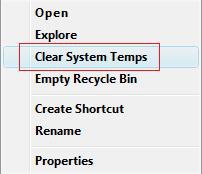
  This will show you how to replace Delete in the Recycle Bin context menu with Disk Cleanup, Search, or Clear System Temps.
RELATED LINKS: EXAMPLE: Recylce Bin Context Menu with Delete
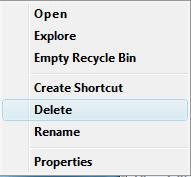
Name:  Original.jpg
Views: 4023
Size:  6.6 KB
EXAMPLE: Context Menu after Delete is Replaced with One of These Options
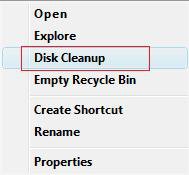
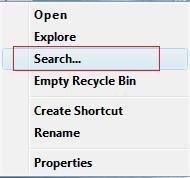
Name:  Replace Delete3.jpg
Views: 4020
Size:  6.7 KBName:  Replaced Delete.jpg
Views: 4033
Size:  6.9 KBName:  Replace Delete2.jpg
Views: 4018
Size:  7.5 KB

Here's How:
NOTE
  You do not need to restore Delete to switch between the items below to replace Delete with. They will automatically replace each other. You will only need to restore Delete if you want Delete back instead of the items.
1. To Replace Delete with Disk Cleanup -
A) Click on the download button below to download the Replace with Disk Cleanup.reg file.

B) Go to step 5.
2. To Replace Delete with Search -
A) Click on the download button below to download the Replace with Search.reg file.

B) Go to step 5.
3. To Replace Delete with Clear System Temps -
NOTE: This clears the %UserProfile%\AppData\Local\Temp and %SystemRoot%\Temp temporary files in Vista.
A) Click on the download button below to download the Replace with Clear System Temps.reg file.

B) Go to step 5.
4. To Restore the Default Delete -
A) Click on the download button below to download the Restore Delete.reg file.

5. Click on Save, and save the .reg file to the Desktop.

6. Right click the .reg (On Desktop) file and click Merge.

7. Click on the Run button for Security Warning pop-up.

8. Click on Continue (UAC), Yes, and then OK when prompted.

9. When done, you can delete the .reg file (On Desktop).
That's it,
Shawn

Published by
Brink's Avatar
Administrator

Join Date: Apr 2007
Location: Texas, USA
Posts: 25,919
Rep Power: 150
Brink has a reputation beyond reputeBrink has a reputation beyond reputeBrink has a reputation beyond reputeBrink has a reputation beyond reputeBrink has a reputation beyond reputeBrink has a reputation beyond reputeBrink has a reputation beyond reputeBrink has a reputation beyond reputeBrink has a reputation beyond reputeBrink has a reputation beyond reputeBrink has a reputation beyond repute

Tutorial Tools

Applies to
All Vista Versions
64 Bit & 32 Bit

Old 11-22-2007  
paulmallory


Vista Home Premium 32bit


Re: Recycle Bin Menu

Thanks, Shawn, but this solution didn't work for me. I may have to have a pro check the registry. Thanks, anyway.

My System SpecsSystem Spec
Old 11-22-2007  
Brink


Vista x64 Ultimate SP2, Windows 7 Ultimate x64


Re: Recycle Bin Menu

Hi Paulmallory,

Welcome to the forum.

What specifically did not work for you? This way I can investigate it for you to see what may have happened.

Shawn
My System SpecsSystem Spec
Old 11-22-2007  
paulmallory


Vista Home Premium 32bit


Re: Recycle Bin Menu

The recycle bin icon on my desktop still does not change to full when items are placed into it. This all started when I accidentally deleted the recycle bin icon from my desktop. I got it back on the desktop, but it won't change to full.
My System SpecsSystem Spec
Old 11-22-2007  
Brink


Vista x64 Ultimate SP2, Windows 7 Ultimate x64


Re: Recycle Bin Menu

Oh ok Paulmallory,

You will want to do this tutorial below instead to fix your problem. This one just replaces Delete so the Recycle Bin will not be deleted by mistake again.

How to Fix the Recycle Bin Icon Not Refreshing When Emptied

Shawn
My System SpecsSystem Spec
Old 03-03-2008  
bam4846


Vista home premium 32bit


Re: Recycle Bin Menu

This did not work for me on my Vista Home Premium 32 bit machine.

It added the Disk Cleanup path to the recycle bin but it did not remove the Delete option. Removing the Delete option is really all I want to do.
My System SpecsSystem Spec
Old 03-03-2008  
Brink


Vista x64 Ultimate SP2, Windows 7 Ultimate x64


Re: Recycle Bin Menu

Hi bam4846,

Welcome to Vista x64 Forums.

Strange these were tested on both the 32 bit and 64 bit versions of Vista. Did any of the other ones replace Delete for you?

Shawn
My System SpecsSystem Spec
Old 03-04-2008  
bam4846


Vista home premium 32bit


Re: Recycle Bin Menu

Only tried the one since it was moderately useful to me.

I really would just like the delete option removed with nothing else added. Unless I could replace it with a "winning lottery numbers generator" option. That would come in handy. Anything else just makes a large pain-in-the-ass into a small pain-in-the-ass.

Thank you for your reply.
My System SpecsSystem Spec
Old 03-04-2008  
Bare Foot Kid


Vista 64-bit Ultimate Win7 64-bit Ultimate XP SP3 32-bit Pro


Re: Recycle Bin Menu

Hi Brink!
I was just wondering if other things can be removed from the
recycle bin menu?
Thanks for you'r reply.

Later, Ted
My System SpecsSystem Spec
Old 03-04-2008  
Brink


Vista x64 Ultimate SP2, Windows 7 Ultimate x64


Re: Recycle Bin Menu

Ted, I'm sure there may be a way somehow. What are you intereseted in removing? I'll take a poke around the registry to see if I can find it.

Shawn
My System SpecsSystem Spec
Comment

Tutorial Tools


Similar Threads
Tutorial Category
Empty Recycle Bin - Add to Desktop Context Menu Tutorials
No "delete" option in Recycle Bin Menu General Discussion
Recycle Bin - No menu or properties! PLEASE help! General Discussion
Recycle bin icon not filling/emptying when recycle bin is full/emp Vista General
Recycle Bin - Add program to menu Tutorials


Vista Forums is an independent web site and has not been authorized,
sponsored, or otherwise approved by Microsoft Corporation.
"Windows Vista", the Start Orb, and related materials are trademarks of Microsoft Corp.
© Designer Media Ltd
Tutorial powered by GARS 2.1.8m ©2005-2006

1 2 3 4 5 6 7 8 9 10 11 12 13 14 15 16 17 18 19 20 21 22 23 24 25 26 27 28 29 30 31 32 33 34 35 36 37 38 39 40 41 42 43 44 45 46