
How to Change the Default Sounds in Windows Live Messenger
 Information
This will show you how to change the Windows Live Messenger sound events to what you want them to be instead of the default sounds. You will also see how to backup the old sound events in case you want to restore them later.
 Warning
Make sure Windows Live Messenger is turned off before during this.
 METHOD ONE
 Note
NoteThis is for the WLM version 8.5 and older
1. Open Windows Live Messenger.
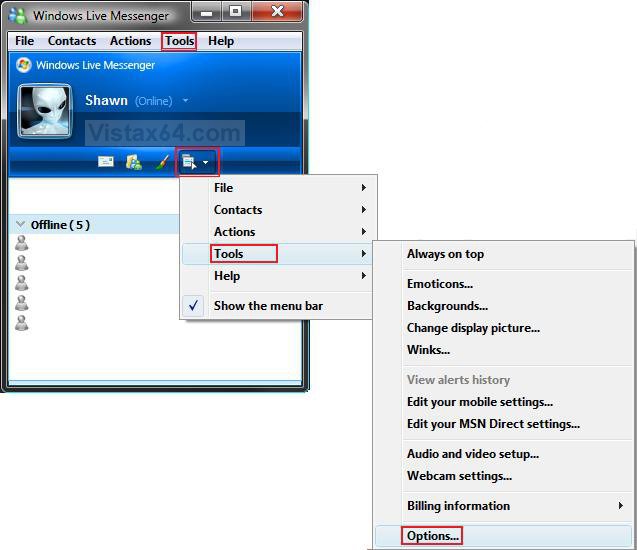
2. Click on the menu icon and click on Tools and Options. (See screenshot below)
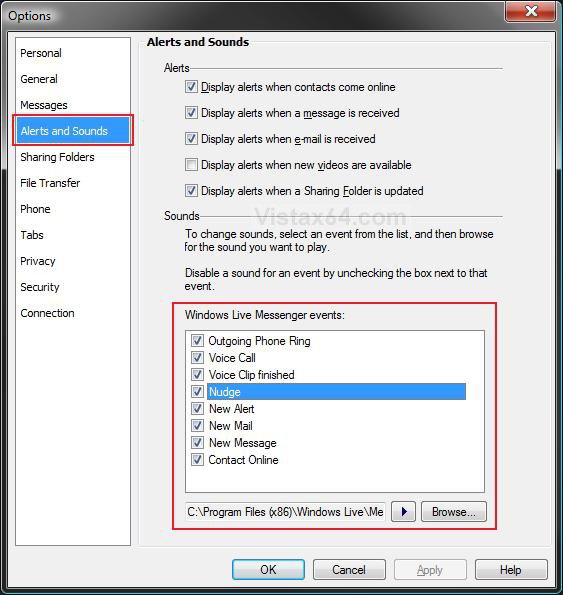
3. In the left pane, click on Alerts and Sounds. (See screenshot below step 7)
4. To Enable or Disable an Alert
A) Under the Alerts section (top right pane), check or uncheck the Alerts you want or do not want. (See screenshot below step 7)
NOTE: Alerts are not
5. To Enable or Disable a Sound Event
A) Under the Sounds section (bottom right pane), check or uncheck the sound event. (See screenshot below step 7)
6. To Change a Sound Event
A) Click on a listed sound event to highlight it. (See screenshot below step 7)
B) Click on the Browse button.
C) Navigate to your new .wav, .wma, or .mp3 sound file that you want to use.
D) Select the new sound file and click Open.
E) Repeat for any other sound event you want to change.
7. When done, click on OK.
METHOD TWO 1. Open Windows Live Messenger.
2. Click on the menu icon and click on Tools and Options. (See screenshot below step 2 in METHOD ONE)
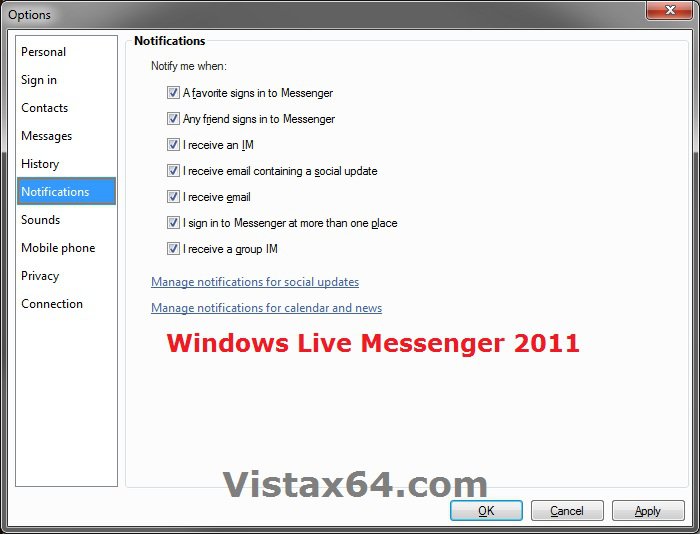
NOTE: In Windows Live Messenger 2011 (15.4.3502.922 + versions), you click on the drop down menu under your name and then on More Options.
3. To Enable or Disable an Alert or Notification
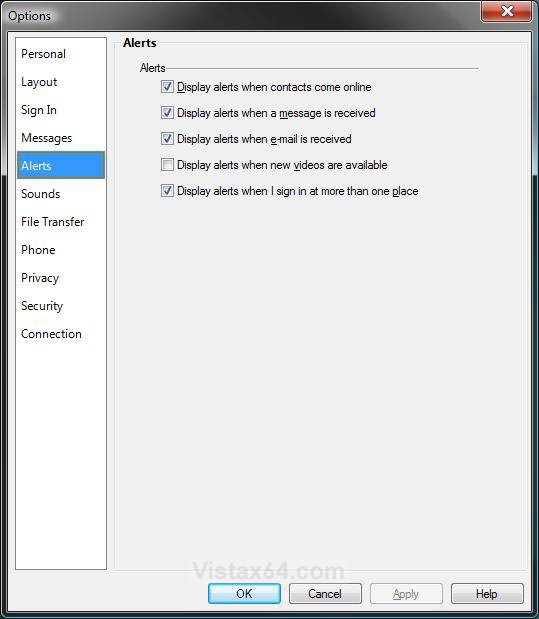
A) In the left pane, click on Alerts. (See screenshot below)
NOTE: In Windows Live Messenger 2011 (15.4.3502.922 version) this is called Notifications instead.
B) Check or uncheck the Alerts you want or do not want.
4. To Enable or Disable a Sound Event
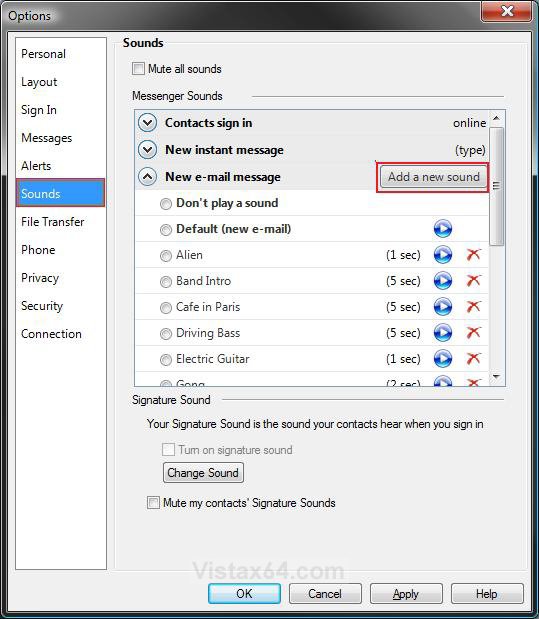
A) In the left pane, click on Sounds. (See screenshot below step 7)
B) Click on the Sound event to expand it, and dot or undot Don't play a sound. (See screenshot below step 7)
C) Go to step 7.
5. To Change a Sound Event
A) In the left pane, click on Sounds. (See screenshot below step 7)
B) Click on the Sound event to expand it.
C) Dot the sound file you want to play for this sound event, and go to step 7.
NOTE: This is if you want a sound file already listed under the expanded sound event.
OR
D) Click on the Add a new sound button.
NOTE: This is if you want to add a new sound file that is not already listed under the expanded sound event.
E) Navigate to your new .wav, .wma, or .mp3 sound file that you want to use.
F) Select the new sound file and click on Done.
G) Dot the sound file you just added to select it.
7. When done, click on OK.
That's it,
Shawn
Attachments
Last edited:


