
How to Associate a File Extension Type With a Program in Vista
 Information
This will show you how to associate a file extension type or protocol to open with a program that you want it to open with by default.
These Default Programs association settings are a per user setting and not applied to all users.
These Default Programs association settings are a per user setting and not applied to all users.
 Note
NoteThe program you select will need to be able to support that file extension for it to open it. For example, .TXT with Notepad or Wordpad. It would not open with MSPaint.
 METHOD ONE
1. Go to the link below to select a file extension to download a .reg file for to merge and restore it's default associations for.
METHOD TWO  Tip
TipTo add a program to the Open With menu list, see METHOD TWO here: How to Add a Program to Open With in Vista
1. Right click on a file, with the file extension type you want to change, that you want to open.
2. Click on Open With and click on the program you want to open it if listed. (See screenshot below)
NOTE: This will only open the file with the selected program for just this one time.
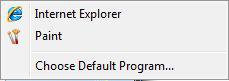
3. If the program is not listed, then click on Choose Default Program. (See screenshot above)
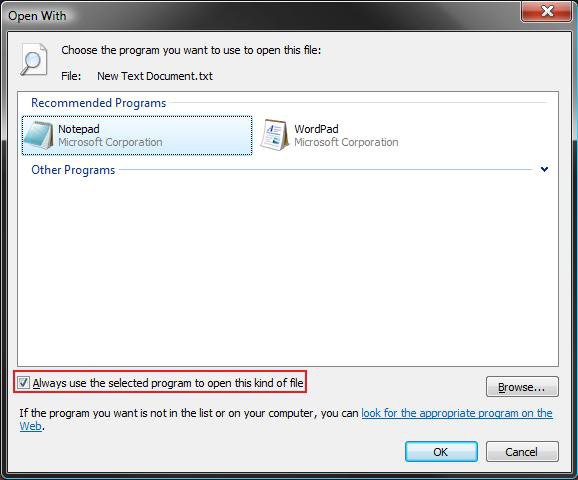
A) Click on the Browse button. (See screenshot below)
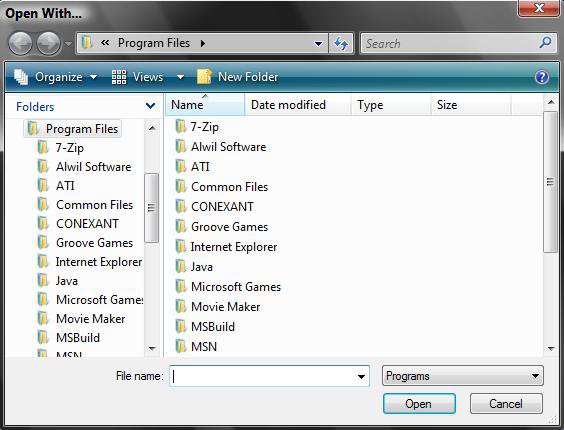
B) Navigate to the program's .exe location that you want to open the file and select it. (See screenshot below)
C) Click on Open.
4. To Make this the Default Program to Open this File Extension -
A) Check the Always use the selected program to open this kind of program box. (See screenshot below step 3A)
B) Go to step 6.
5. To Open this File Extension with this Program for just this Time Only -
A) Uncheck the Always use the selected program to open this kind of program box. (See screenshot below step 3A)
6. Click on OK. (See screenshot below step 3A)
METHOD THREE 1. Open the Control Panel. (Classic View)
2. Click on the Default Programs icon.
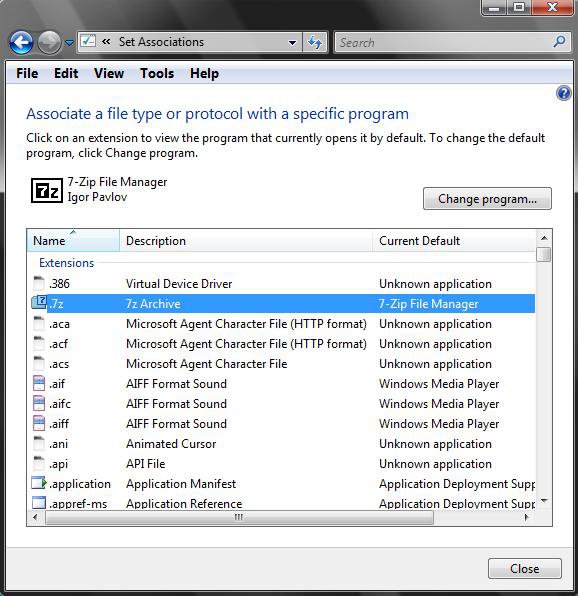
3. Click on the Associate a file type or protocol with a program link. (See screenshot below)
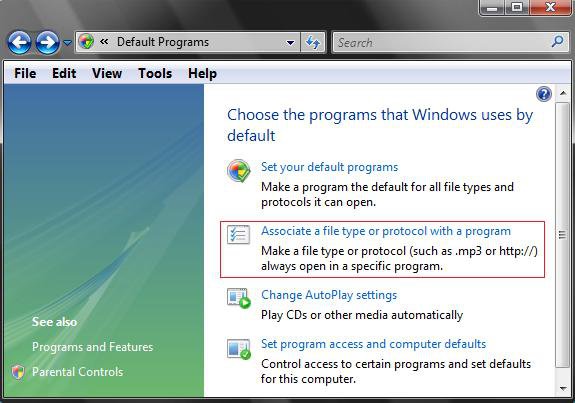
4. Click on the file extension type you want to change the association for what .exe program opens it. (See screenshot below)
NOTE: It may take a moment to load up.
5. Click on the Change Program button.
6. If listed, select the program you want to be associated with (opens) the file extension. (See screenshot below)
A) Check the Always use the selected program to open this kind of program box and click OK.
7. If the program is not listed, then click the Browse button and navigate to the .exe of the program you want as the default to open the file extension.
A) Select the program.
B) Click on the Open button. (See screenshot below)
C) Check the Always use the selected program to open this kind of program box and click on OK to apply. (See screenshot below step 7)
That's it,
Shawn
Related Tutorials
- How to Set Default Associations For a Program in Vista
- How to Add Back and Set Windows Mail Default Associations
- How to Unassociate a File Extension Type in Vista
- How to Show and Change a File Name Extension in Vista
- How to Add a Program to Open With in Vista
- How to Change a File Extension Type Icon in Vista
- How to Restore or Remove Windows Media Player from Default Programs
- How to Restore or Remove Windows Media Center from Default Programs
- Restore Default Vista File Extension Type Associations
- How to Change the Default Program of the "Edit" Context Menu in Windows
Attachments

Last edited:


