
How to Speed Up Shut Down in Vista
 Information
This will show you how to set the amount of time Vista waits for programs to save data and close before shutting down. Always, as usual, make sure you save and close applications before shutting down to prevent data loss.
 Tip
TipWhen you shut down the operating system, the OnShutdown method is called. However, the OnShutdown method does not change the system state to the Stop state. This behavior causes the service to appear unresponsive. Therefore, the shutdown process is delayed. If you have this problem, see: Microsoft Help and Support: KB943412 Hotfix . Be sure to download the correct 32 bit (x86) or 64 bit (x64) version. To see what bit version you have of Vista, open the Control Panel (Classic View) and click the System icon, or right click Computer in the Start Menu and click Properties. You will see the bit version under the System type section.
 Warning
You should always save and close all programs before shutting down the computer to help prevent any data loss.
 METHOD ONE
1. To Speed Up Shut Down Time
A) Click on the download button below to download the file below.
NOTE: This uses the 2 seconds (2000) setting. If you want shutdown to wait for a different amount of seconds, then do the manual method below.
2_Second_Shutdown.reg

B) Go to step 3.
2. To Restore Default Shut Down Time
A) Click on the download button below to download the file below.
NOTE: The default time is 20 seconds (20000).
Default_Shutdown.reg
3. Click on Save, and save the .reg file to the Desktop.
4. Right click on the downloaded .reg file and click Merge.
5. Click on Run, Continue (UAC), Yes, and then OK when prompted.
6. When done, you can delete the downloaded .reg file if you like.
METHOD TWO 1. Open the Start Menu.
2. In the white line (Start Search) area, type regedit and press Enter.
3. If prompted by UAC, then click on Continue.
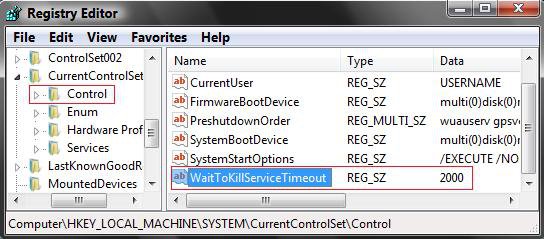
4. In regedit, navigate to the location below. (See screenshot below)
HKEY_LOCAL_MACHINE\SYSTEM\CurrentControlSet\Control
5. In right pane, right click on WaitToKillServiceTimeout and click Modify.
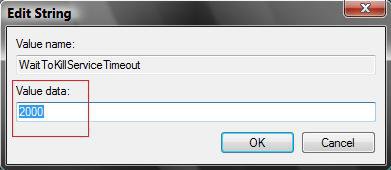
6. Type in a number between 2000-20000 (2-20 seconds) and click OK. (See screenshot below)
NOTE: The default time is 20000. I use 2000 and have not had any problems. Your experience may vary.
7. Close regedit.
NOTE: If you have problems with your computer shutting down to quickly with the value you set in step 6, then repeat step 6 above to increase the time until Vista does shutdown properly.
That's it,Shawn
Related Tutorials
- How to Create a Shut Down Computer Shortcut in Vista
- How to Shutdown, Restart, Switch User, Log Off, Sleep, or Lock Vista from the Keyboard
- How to Speed Up Vista Boot Up Time
- How to Speed up the Menu Show Delay Time in Vista
- How to Speed Up the Performance of Vista
- How to Remove or Show the Start Menu Shut Down Options in Vista
- How to Allow or Prevent Users and Groups to Shut Down the Computer
- How to See the Last Shutdown Time of Your Windows PC
Attachments

Last edited:


 I've lost my Admin


