
How to Reset Windows Explorer Folder View Settings to Make Vista Remember
 Information
Vista sets the Explorer window view settings and folder type template according to what folder types are in the window. This will show you how to reset the Windows Explorer folder view settings, turn off Automatic Folder Type Discovery, and increase the folder view cache to have Vista remember the view settings, folder type template, size, or position of a specific window for when it was last closed at the specific path location.
This does not work with the sub Save As, Open With, Open in New Tab (Internet Explorer), etc.... type dialog windows through the File menu bar item though. These do not seem to be able to have their size or position remembered. For these, you can use the free program AutoSizer to resize them.
This does not work with the sub Save As, Open With, Open in New Tab (Internet Explorer), etc.... type dialog windows through the File menu bar item though. These do not seem to be able to have their size or position remembered. For these, you can use the free program AutoSizer to resize them.
 Note
Note- The Windows Explorer window pane Layout settings are universal for all window templates. These are the Search Pane, Details Pane, Preview Pane, and Navigation Pane. They can only be turned on or off for all windows with the same folder template. For example, the Music Details, Music Icons, Pictures and Videos, All Items, Contacts, and Documents.
- This will have no affect on the memory for the Open, Save, and Save As dialog boxes for having them open to the same location.
- External devices (EX: USB drive) will not retain their folder view settings when turned off or disconnected from the computer.
 Tip
TipIt has been reported that installing the Vista SP2 has helped resolved this issue of Vista forgetting folder view settings for no apparent reason.
 Warning
The exact cause of Vista losing it's memory on your folder view settings has not been found yet. This may just reset them for now to help Vista remember them again. It has been noticed that changing a lot of window folder view settings in combination with some unknown applications settings may be triggering this forgetfulness. Make sure that you do not have a setting in a 3rd party program set to clear the folder view setting cache when it is used. (EX: CCleaner - Window Size/Location cache option under Cleaner -> Advanced)
 METHOD ONE
  Note
NoteThis resets the folder view settings for all folders with this same folder template type back to the default view settings. You will need to use METHOD TWO below for Vista not remembering your settings for all the folder views.
1. Open Folder Options from the Control Panel (Classic View), and click on the View tab and Reset Folders button. (See screenshot below)
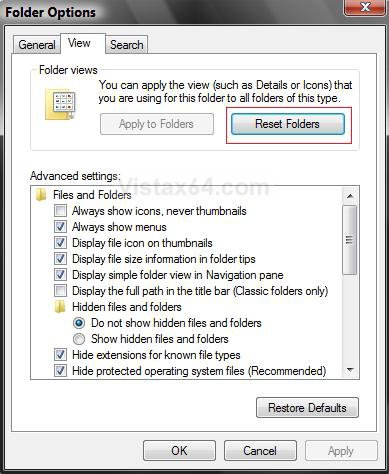
2. Click on Yes to the confirmation pop-up.
3. Click on OK to close Folder Options.
METHOD TWO Note- This resets all current folder view settings so they will be rebuilt when you restart.
- This will also bring back the Uninstall, Change, Repair, or Uninstall/Change buttons in Programs and Features if missing.
OPTION ONE
1. Click on the Download button below to download the Reset_Folder_View.zip file and save it to your desktop.
Note
NoteThis .reg download includes and does all of the Manual section below for you automatically.

2. Open the ZIP file and extract the Reset_Folder_View.reg file to your desktop.
3. Right click on the downloaded Reset_Folder_View.reg file and click on Merge.
4. Click on Run button in the Security Warning prompt.
5. Click on Continue in the UAC prompt.
6. Click on YES in the Confirmation prompt.
7. Click on OK in the Success prompt.
8. Go to step 29 in OPTION TWO below to finish wrapping this up.
OPTION TWO
Reset Folder View Settings :
1. Open the Start Menu.
2. In the white line (Start Search) area, type regedit and press Enter.
3. Click on Continue in the UAC prompt.
4. In regedit, go to:
Code:
HKEY_CURRENT_USER\Software\Classes\Local Settings\Software\Microsoft\Windows\Shell5. In the left pane, right click on Bags, and click on Delete. (See screenshot below)
A) Click on Yes in the confirmation pop-up window.
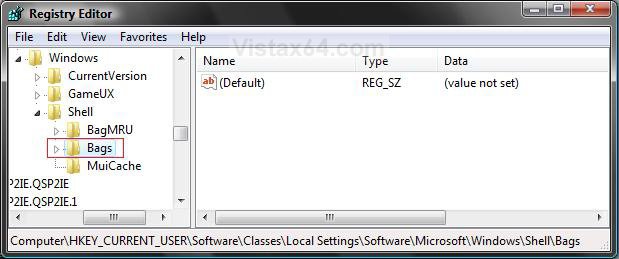
6. In the left pane, right click on BagMRU, and click on Delete. (See screenshot below)
A) Click on Yes in the confirmation pop-up window.
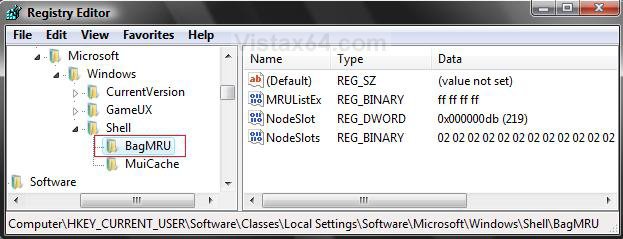
7. In regedit, go to:
Code:
HKEY_CURRENT_USER\Software\Microsoft\Windows\Shell
A) In the left pane, right click on BagMRU and click Delete. (See screenshot below step 8)
B) Click on Yes in the confirmation pop-up window.
C) In the left pane, right click on Bags and click on Delete.
D) Click on Yes in the confirmation pop-up window.
8. In regedit, go to:
Code:
HKEY_CURRENT_USER\Software\Microsoft\Windows\ShellNoRoam
A) In the left pane, right click on BagMRU if here and click Delete. (See screenshot below step 8)
B) Click on Yes in the confirmation pop-up window.
C) In the left pane, right click on Bags if here and click on Delete.
D) Click on Yes in the confirmation pop-up window.
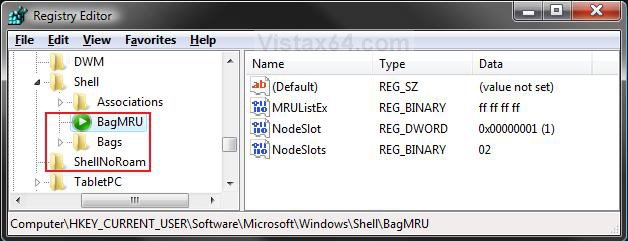
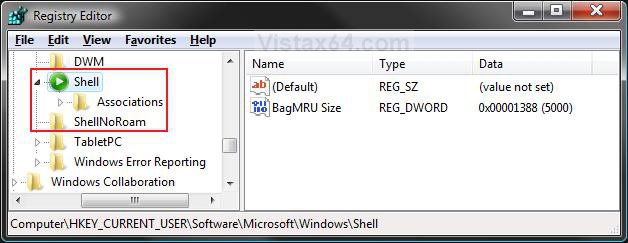
9. The registry will now look like this. (See screenshot below)
Disable Automatic Folder Type Discovery for Templates :
CREDIT TO: Kristan Kenney: Confessions of a Windows Enthusiast
Note
NoteThis will allow you to have what folder type template you set for the window instead of Vista automatically assigning a default template to it based on the contents of the window. This is when you have your folder template changed to Pictures and Videos from All Items when you put one image file in the folder.
NoteOPTION: This is an optional section, but it is recommended. Steps 1-9 must have been done first before you do this section. If you decide to skip it, then go to step 21.
10. In regedit, go to: (See screenshot below)
Code:
HKEY_CURRENT_USER\Software\Classes\Local Settings\Software\Microsoft\Windows\Shell11. In the left pane, right click on Shell and click on New and Key.
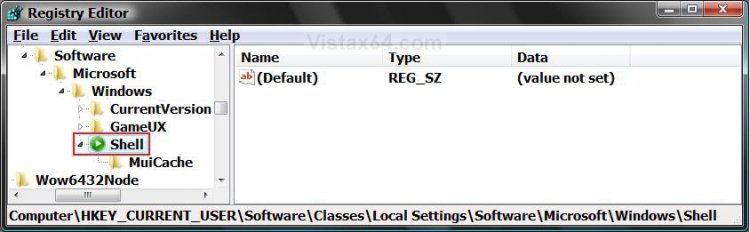
12. Type Bags and press Enter. (See screenshots below)
13. In the left pane, right click on Bags and click New and Key.
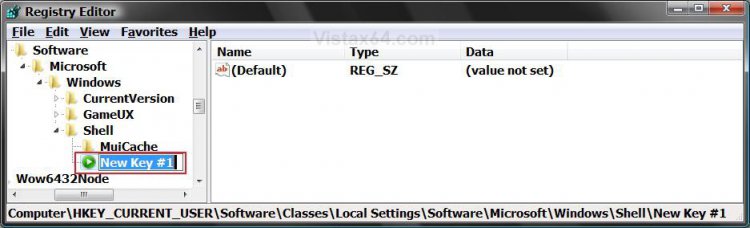
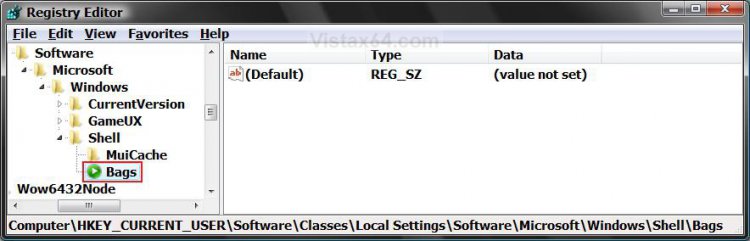
14. Type AllFolders and press Enter. (See screenshots below)
15. In the left pane, right click AllFolders and click on New and Key.
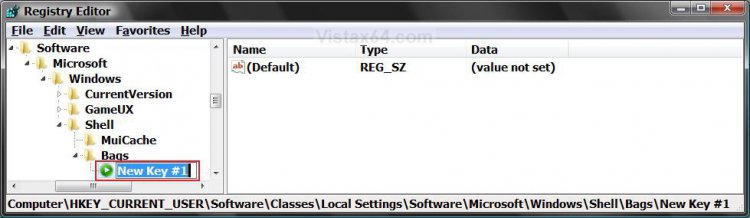
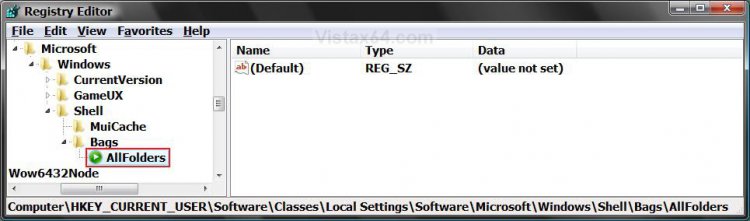
16. Type Shell and press Enter. (See screenshots below)
17. In the right pane of Shell, right click on a empty area and click on New and String Value.
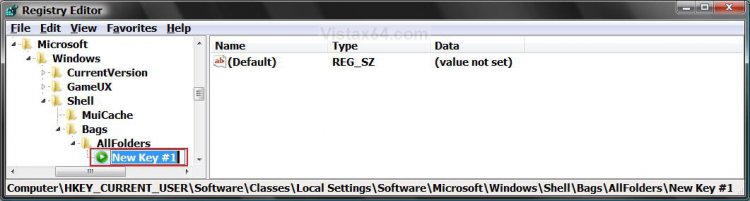
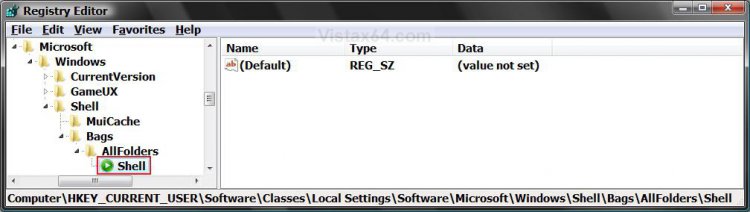
18. Type FolderType and press Enter. (See screenshot below)
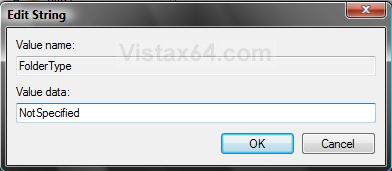
19. In the right pane, right click on FolderType and click on Modify.
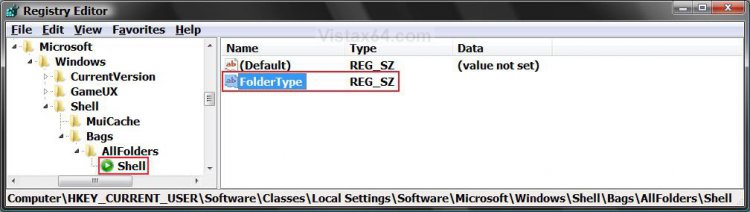
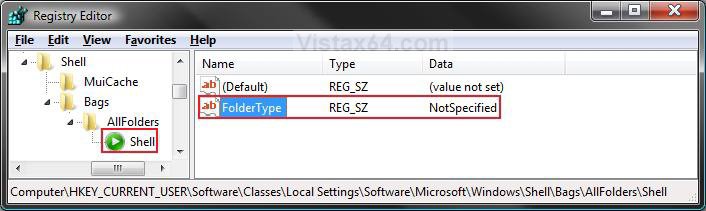
20. Type NotSpecified (or one below) and click on OK. (See screenshots below)
TipYou can type any one of these values in bold below instead to apply the template as the default for all folder types. You will still be able to change a individual folder type template to what you want and have Vista remember it afterwards.
Tip
[TABLE=class:-grid,-width:-500][TR][TD]Value
[/TD]
[TD]
Description
[/TD][/TR]
[TR][TD]
NotSpecified
[/TD]
[TD]
All Items folder type template
[/TD][/TR]
[TR][TD]
Contacts
[/TD]
[TD]
Contacts folder type template
[/TD][/TR]
[TR][TD]
Music
[/TD]
[TD]
Music Details folder type template
[/TD][/TR]
[TR][TD]
MusicIcons
[/TD]
[TD]
Music Icons folder type template
[/TD][/TR]
[TR][TD]
Documents
[/TD]
[TD]
Documents folder type template
[/TD][/TR]
[TR][TD]
Pictures
[/TD]
[TD]
Pictures and Videos folder type template with large icons
[/TD][/TR][/TABLE]
Increase Folder View Cache Memory :
Note
NoteThis will increase the amount of folders to be remembered for changes to the folder view settings.
NoteOPTION: This is a optional step, but the increase will help ensure that Vista does not forget. Steps 1-9 must be done first before you do this section. If you decide to skip it, them go to step 25.
21. In regedit, go to: (See screenshot below)
Code:
HKEY_CURRENT_USER\Software\Classes\Local Settings\Software\Microsoft\Windows\Shell22. In the right pane, right click on BagMRU Size.
NOTE: If you do not have the BagMRU Size value, then right click on a empty space in the right pane and click on New and DWORD (32-bit) Value. Type in BagMRU Size and press enter.
23. Click on Modify.
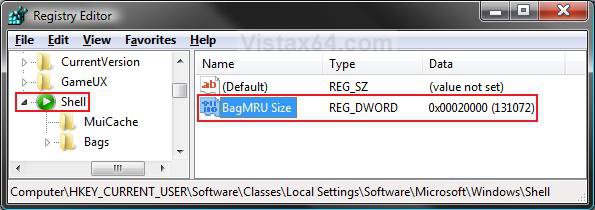
24. Dot the Decimal and type 20000 (folders) and click on OK. (See screenshot below)
Note
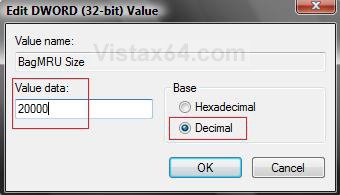
Note5000 is the default number of folders to be remembered.
Deleting Local Group Policy Setting :
NoteThis will show you how to check to see if this Group Policy setting has been set to not save the position of open windows or the size and position of the taskbar when users log off, and to delete if it is so that the changed will now be remembered at exit.
25. In regedit, go to: (See screenshot below)
HKEY_CURRENT_USER\Software\Microsoft\Windows\CurrentVersion\Policies\Explorer
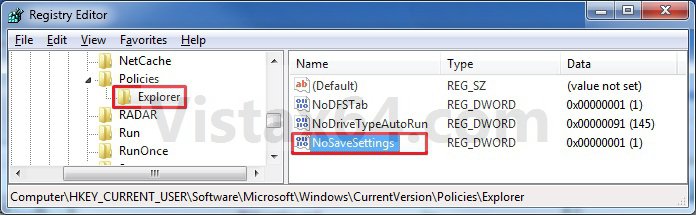
26. In the right pane, look to see if you have NoSaveSettings. If you do, then right click on NoSaveSettings and click on Delete and Yes to confirm deletion. (See screenshot above)
27. In regedit, go to:
HKEY_LOCAL_MACHINE\Software\Microsoft\Windows\CurrentVersion\Policies\Explorer
28. Repeat step 26 if you have NoSaveSettings here as well.
Wrapping it Up :
29. Close regedit.
30. Log off and log on,or restart the computer to apply the reset and to let Vista rebuild the registry keys with a clean slate.
31. Open Folder Options.
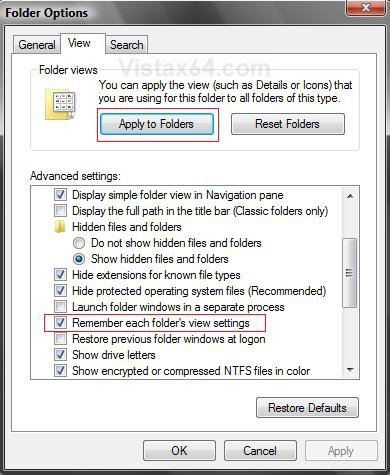
A) Click on the View tab. (See screenshot below)
B) Check Remember each folder's view settings.
WarningIf left unchecked, Vista will ignore custom view settings for every folder and have every folder open using default settings instead. Only, uncheck this setting to force all folders to stop using display settings you have specified.
C) Uncheck Restore previous folder windows at logon.
D) Click on OK.
32. Make the changes you want for the opened Windows Explorer windows.
33. To Apply These Changes to All the Same Folder Type Templates
TipFor more information on folder templates, see: How to Choose and Customize a Folder Type Template and Columns in Vista and How to Change the Windows Explorer Columns and Sort Order in Vista
A) Open Folder Options
WARNING: Folder Options must be opened from within the same Windows Explorer window that you are changing or the Apply to Folders button will be grayed out.
B) Click on the View tab. (See screenshot below step 31D)
C) Click on the Apply to Folders button.
D) Click on Yes in the confirmation prompt.
E) Click on OK.
34. To Apply Changes to Just this Window Template
A) Close the window when you make your changes to the Windows Explorer window to save the folder view settings for just that one window. Warning
WarningVista will only remember the way it is when you last closed the window.
35. To Apply Changes to All Window Templates
A) In step 20 above, you can change the default folder template used of (NotSpecified) to what you want instead for all folder templates without having to restart the computer again.
That's it,
Shawn
Related Tutorials
- How to Back Up and Restore Your Folder View Settings in Vista, Windows 7, and Windows 8
- How to Change a Windows Explorer Folder Type Template in Vista
- How to Change a Default Open Window Size for a Shortcut in Vista
- How to Change Windows Explorer Default Open Location
- How to Use the Windows Explorer Address Bar in Vista
- How to Enable or Disable the Menu Bar in Vista
- How to Change the Windows Explorer Columns and Sort Order in Vista
- How to Enable or Disable Folder Options in Vista
- How to Turn the Preview Pane On or Off in Vista
- How to Turn the Navigation Pane On or Off in Vista
- How to Change the Sort Order for Numbers in File and Folder Names in Vista
- How to Enable or Disable Auto-Hide for Vista Explorer Full Screen F11
- How to Hide or Show File Names in Vista
- How to Disable Auto Arrange in Vista Windows Explorer to have Free Sorting
Attachments

Last edited by a moderator:


