
How to See Vista or Windows 7 Boot Information at Startup
 Information
This will show you how to see the boot information to see what Vista is loading during the boot process. This can be handy if you are having boot up problems.
 Note
NoteThis will replace the green bar in the default Vista boot screen with the boot information instead.
Here's How:
1. Open the Start Menu, then type msconfig in the search box and press Enter.
2. If prompted by UAC, then click on Continue (Vista) or Yes (Windows 7).
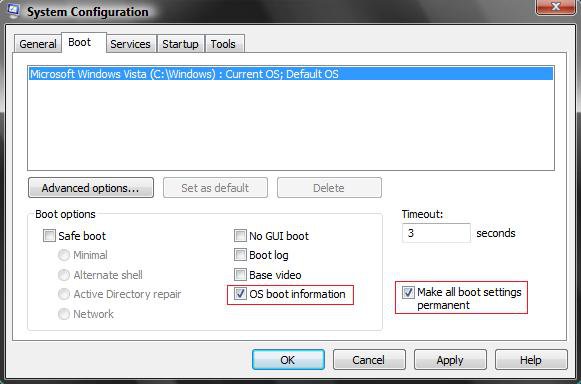
3. Click on the Boot tab. (See screenshot below)
4. To See OS Boot Information
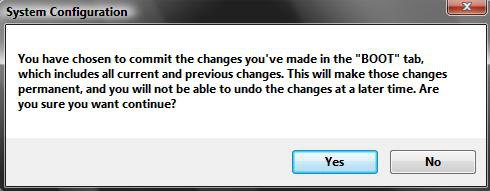
7. Click on Yes at the confirmation window. You will be able to change this back. (See screenshot below)
8. Restart the computer to see the boot information.
That's it,2. If prompted by UAC, then click on Continue (Vista) or Yes (Windows 7).
3. Click on the Boot tab. (See screenshot below)
4. To See OS Boot Information
A) Check OS boot information. (See screenshot below step 7)
B) Go to step 6.
5. To Restore Normal OS BootB) Go to step 6.
A) Uncheck OS boot information. (See screenshot below step 6)
6. Check the Make all boot settings permanent box, and click on Apply.
Shawn
Related Tutorials
- How to See the About Windows Vista and System Information
- How to See Windows Vista Current License Information
- How to Display Information About Previous Logons During User Logon in Vista
- How to See What the System Uptime is in Vista
- Enable or Disable Detailed Logon, Logoff, and Shutdown Status Messages in Vista
Attachments
Last edited: