Windows Vista Forums
Vista Forums Home Join Vista Forums Windows 7 Forum Vista Tutorials Tags
Welcome to Windows Vista Forums. Our forum is dedicated to helping you find solutions with any problems, errors or issues you are experiencing with Windows Vista. The Vista forum also covers news and updates and has an extensive Windows Vista tutorial section that covers a wide range of tips and tricks.

Go Back   Vista Forums > Vista Forums > Tutorials

Vista - Superfetch (Memory Prefetcher)

Comment
 

Superfetch (Memory Prefetcher)

How to Disable or Enable Superfetch in Vista
Published by Brink
06-21-2007

How to Disable or Enable Superfetch in Vista

Information
  Superfetch is a new improved feature in Vista that monitors which applications you use the most and preloads these into your system memory (RAM) so they'll be ready when you need them. It treats system memory like a cache much more aggressively and effectively than any other version of Windows. Superfetch will help Vista prioritize background programs, (EX: Disk Defrag and Windows Defender), at a low priority so that they can do their job while your work always comes first. The folder Superfetch uses is located at: C:\Windows\Prefetch
NOTE
  Sometimes Superfetch may cause a bit of a longer startup as it loads everything into memory and your hard drive is running more to preload this data for Superfetch into system memory. This should improve over time as Superfetch learns by building a profile of your usage habbits and applies this information to it's prefetching decisions.
Tip
  This will vary from person to person and with how and what type of system you have set up. Try turning OFF Superfetch and see for yourself if your computer runs faster with or without it. You can always turn it back ON. In most cases your computer will run faster with Superfetch on after the initial loading into memory at startup. Superfetch may not be helpful for a server since it is always being ramdomly accessed.
RELATED LINKS:

Here's How:

NOTE
  Superfetch is enabled by default.
1. Open the Start Menu.

2. In the white line (Start Search) area, type services and press Enter.

3. Click on Continue in the UAC prompt.

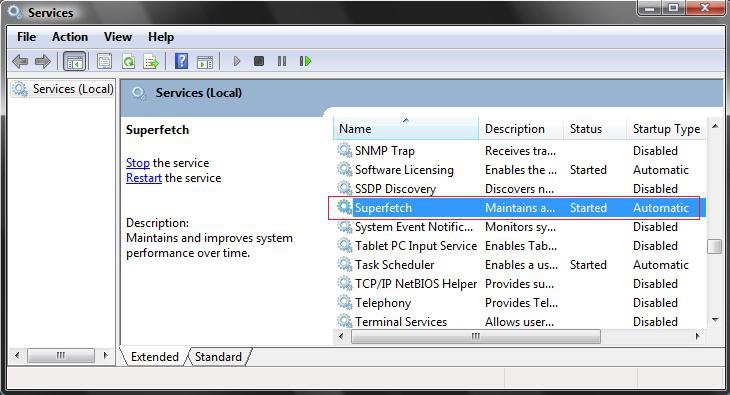
4. Scroll down and right click on Superfetch and click on Properties. (See screenshot below)
services.jpg
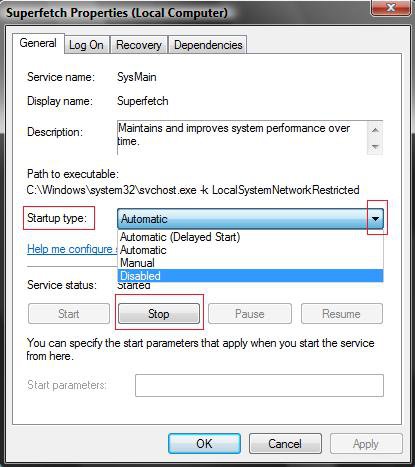
5. To Disable Superfetch -
A) Click on the Stop button and click on Disabled under the Startup type: drop down menu. (See screenshot below step 6B)

B) Click on OK.

C) Go to step 7.
6. To Enable Superfetch -
A) Click on Automatic (Under Startup type) and click on the Apply button, then click on the Start button.

B) Click on OK.
properties.jpg
7. Close Services window.
That's it,
Shawn

Published by
Brink's Avatar
Administrator

Join Date: Apr 2007
Location: Texas, USA
Posts: 25,919
Rep Power: 150
Brink has a reputation beyond reputeBrink has a reputation beyond reputeBrink has a reputation beyond reputeBrink has a reputation beyond reputeBrink has a reputation beyond reputeBrink has a reputation beyond reputeBrink has a reputation beyond reputeBrink has a reputation beyond reputeBrink has a reputation beyond reputeBrink has a reputation beyond reputeBrink has a reputation beyond repute

Tutorial Tools

Applies to
All Vista Versions
64 Bit & 32 Bit

Old 08-05-2007  
lazarus


Vista Premium x64


Re: Superfetch (Memory Prefetcher)

Tried this on and off and prefer my superfetch switched on, things were just that little bit faster on loading up for me.

My System SpecsSystem Spec
Old 08-08-2007  
Nick2253


Windows Vista Ultimate x64


Re: Superfetch (Memory Prefetcher)

I am afraid your logic is all wrong. Superfetch is supposed to use up all your memory, and THAT IS A GOOD THING! There is no need to have spare memory as your computer boots. What are you going to do with it? As you use your system, Windows unloads processes from the RAM as necessary (which can be done at 4+ GB/s) and then loads on the necessary processes (which, since they come from the HDD, load at a much slower ~300 MB/s). Unless you use your computer differently EVERY single time you boot (and I mean a different antivirus, firewall, configuration, etc, which no one does), SuperFetch is a win, win, win situation. It puts the files in the memory NOW, letting the commonly used programs run faster right off the bat.

Cheers,
Nick
My System SpecsSystem Spec
Old 08-08-2007  
Brink


Vista x64 Ultimate SP2, Windows 7 Ultimate x64


Re: Superfetch (Memory Prefetcher)

Hi Nick,

Welcome to the forum.

You are correct, but I was referring to the slight delay time it takes for everything to load into memory at startup and for the hard drive running more to load this as well. Using the sleep mode could solve this problem though. In most cases it is still faster with Superfetch on, but there are a some cases where it may not be so, like on servers.

Thank you for your comment, and I updated it to make it clearer on what I meant.

Shawn
My System SpecsSystem Spec
Comment

Tutorial Tools


Similar Threads
Tutorial Category
superfetch max. memory configuration? Vista performance & maintenance
Superfetch service, memory hog Vista performance & maintenance
SuperFetch + Cached memory Vista performance & maintenance
sandisk memory & superfetch; minimum requirements? Vista hardware & devices
sandisk memory & superfetch; minimum requirements? Vista performance & maintenance


Vista Forums is an independent web site and has not been authorized,
sponsored, or otherwise approved by Microsoft Corporation.
"Windows Vista", the Start Orb, and related materials are trademarks of Microsoft Corp.
© Designer Media Ltd
Tutorial powered by GARS 2.1.8m ©2005-2006

1 2 3 4 5 6 7 8 9 10 11 12 13 14 15 16 17 18 19 20 21 22 23 24 25 26 27 28 29 30 31 32 33 34 35 36 37 38 39 40 41 42 43 44 45 46