How to Use Quick Launch in Vista
 Information
This will show you how to turn Quick Launch on or off, add or remove shortcuts, and use the Quick Launch keyboard shortcuts.
 Note
NoteQuick Launch is used to launch a program quickly from a shortcut on the Taskbar with one click. The Quick Launch folder is located at the hidden system folder (STEP TWO step 2):
C:\Users\(User-Name)\AppData\Roaming\Microsoft\Internet Explorer\Quick Launch
C:\Users\(User-Name)\AppData\Roaming\Microsoft\Internet Explorer\Quick Launch
 Tip
TipQuick Launch Keyboard Shortcuts
NOTE: In Vista, the first 10 shortcuts in Quick Launch have their own keyboard shortcut automatically.
1. Press Windows Key + a number between 1 to 0 to open the corresponding shortcut.
NOTE: In Vista, the first 10 shortcuts in Quick Launch have their own keyboard shortcut automatically.
1. Press Windows Key + a number between 1 to 0 to open the corresponding shortcut.
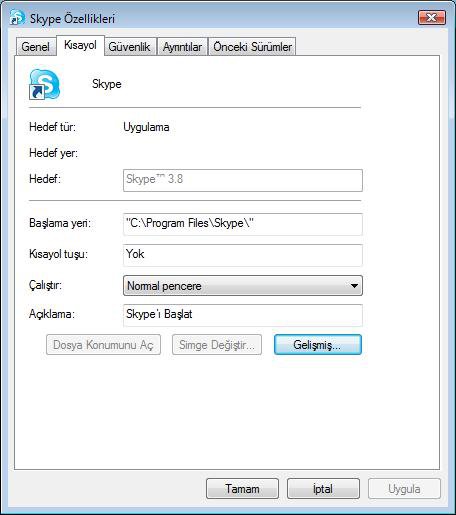
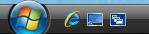
EXAMPLE: Quick Launch on the Taskbar
 OPTION ONE
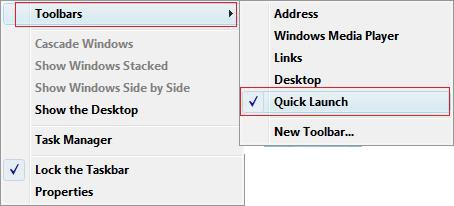
1. Right click on the taskbar.
2. Click on Toolbars and Quick Launch. (See screenshot below)
NOTE: Checked = ON, Unchecked = OFF
OPTION TWO NOTE: If the Quick Launch shortcut does not work when you click on it, then delete it and create a new one. The shortcut has lost it's association to the program.
1. Go to the Quick Launch folder location. (See the NOTE at the top of the tutorial)
2. Right click in a empty area and click on New and Shortcut.
3. Browse to the location of the program's .exe file and click on OK.
4. Click on Next.
5. Type in a name for the shortcut and click on Finish.
OPTION THREE METHOD ONE:
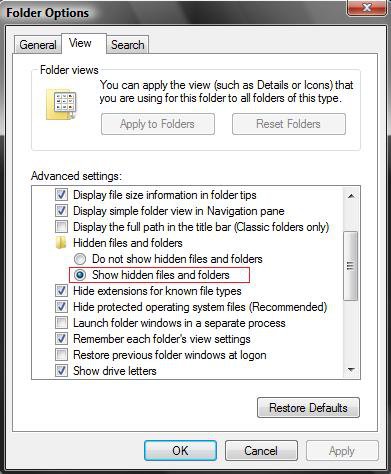
1. Open Folder Options.
2. Dot Show hidden files and folders. (See screenshot below)
3. Click on OK.
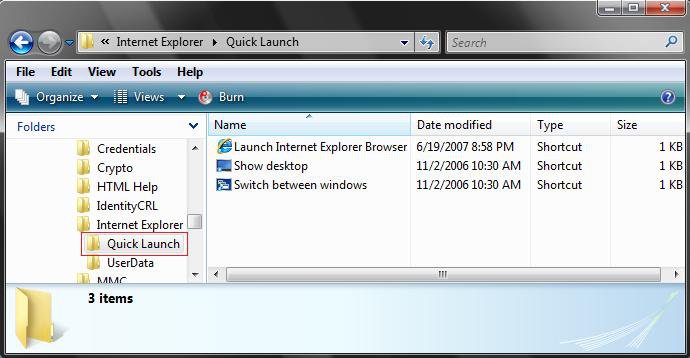
4. Go to: (See screenshot below)
C:\Users\(your username)\AppData\Roaming\Microsoft\Internet Explorer\Quick Launch
5. To Add a Shortcut
A) Drag and Drop,or Cut and Paste, the shortcut into the Quick Launch folder.
NOTE: It is best to create the shortcut directly from the program's .EXE file to prevent lost shortcut associations. See the Quick Launch Shortcut Does Not Work section above.
6. To Remove a Shortcut
A) Right click on the shortcut in the Quick Launch folder and click on Delete.
METHOD TWO:
To Add a Shortcut Icon:
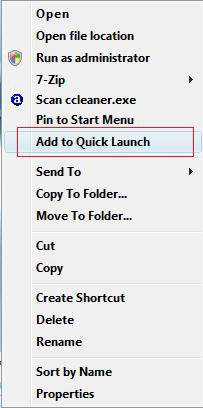
1. Right click on the program you want to add to Quick Launch.
2. Click on Add to Quick Launch. (See screenshot below)
NOTE: You may need to press and hold the Shift key and Right click on the file to see the Add to Quick Launch.
WARNING: If you move or delete the file that you clicked Add to Quick Launch with, then the shortcut in Quick Launch will lose it's association and will not work anymore.
METHOD THREE:
1. To Add a Shortcut Icon
A) Drag a program's icon or shortcut onto the Quick Launch area of the Taskbar and release. (See screenshot below)
WARNING: If you move or delete the shortcut that you dragged into Quick Launch, then the shortcut in Quick Launch will lose it's association and will not work anymore.
2. To Remove a Shortcut Icon
A) Right click on the shortcut in Quick Launch and click on Delete.
OPTION FOUR 1. To restore the Launch Internet Explorer Browser shortcut -
2. To restore the Show Desktop shortcut -
3. To restore the Switch Between Windows (Flip 3D) shortcut -
That's it,
Shawn
Related Tutorials
- How to Add or Remove a Toolbar to the Taskbar in Vista
- How to Add or Remove a Toolbar to the Desktop in Vista
- How to Use and Create a Flip 3D Shortcut in Vista
- How to Create a Fully Functional IE7 Shortcut Icon in Vista
- How to Create a Show Desktop Shortcut in Vista
- How to Change the Quick Launch Icon Size in Vista
- How to Create a Keyboard Shortcut for a Program in Vista
- How to Turn Group Similar Taskbar Buttons On or Off in Vista
- How to See the Date and Time on the Taskbar in Vista
- How to Enable or Disable Taskbar Toolbars in Vista
- How to Enable or Disable Adding and Removing Taskbar Toolbars in Vista
- How to Create a Drive Shortcut in Vista
- How to Show or Hide Folder Full Path in the Vista Taskbar Buttons
- How to Enable or Disable Taskbar Always on Top in Vista
- How to Turn Taskbar Auto-hide On or Off in Vista
- How to Add Quick Launch to the "Send to" Context Menu in Vista, Windows 7, and Windows 8
Attachments
Last edited: