
How to Fix a Slow Windows Mail
 Information
This will show you how to fix four different causes for Windows Mail being slow.
 Note
NoteCheck for each of these causes and follow the steps below for how to fix the issue for each of these.
[TABLE=class:-grid,-width:-700][TR][TD]
Known Causes
[/TD]
[TD]
Description
[/TD][/TR]
[TR][TD]
Antivirus Program
[/TD]
[TD]
You have the email scanning options turned on in your antivirus program or your antivirus program is not compatible with Vista or Windows Mail.
[/TD][/TR]
[TR][TD]
Restricted Sites List
[/TD]
[TD]
Some programs (ex:anti-Spyware) may add a large number of entries to the Internet Explorer restricted sites list. This can cause a severe performance problem in Windows Mail after installing the KB931768 Windows update before SP1 is installed. The slowness comes from Windows Mail having some kind of conflict with the update and the spy program making it read through the long list of restricted sites first.
[/TD][/TR]
[TR][TD]
To Many Contacts
[/TD]
[TD]
For each 100 contact files in your Contact folder (name and email address totaling 2KB) there is a 0.25 second delay imposed by Vista for when you Create, Reply, Forward, or AutoFill a message. (EX: A 2 to 3 second delay for every 1000 contacts) The timing delay will vary due to processor speed and size of contact file.
[/TD][/TR]
[TR][TD]
To Many Messages
[/TD]
[TD]
If you store or have a ton of messages in a mailbox folder (EX: Inbox), it can cause a delay while opening it.
[/TD][/TR]
[TR][TD]
Large Attachment
[/TD]
[TD]
If you try to attach or receive a large file size attachment, then this can cause a slow receive or send depending on your internet speed.
[/TD][/TR]
[TR][TD]
Database Issues
[/TD]
[TD]
The Windows Mail database may need to be compacted and repaired.
[/TD][/TR][/TABLE]
[TABLE=class:-grid,-width:-700][TR][TD]
Known Causes
[/TD]
[TD]
Description
[/TD][/TR]
[TR][TD]
Antivirus Program
[/TD]
[TD]
You have the email scanning options turned on in your antivirus program or your antivirus program is not compatible with Vista or Windows Mail.
[/TD][/TR]
[TR][TD]
Restricted Sites List
[/TD]
[TD]
Some programs (ex:anti-Spyware) may add a large number of entries to the Internet Explorer restricted sites list. This can cause a severe performance problem in Windows Mail after installing the KB931768 Windows update before SP1 is installed. The slowness comes from Windows Mail having some kind of conflict with the update and the spy program making it read through the long list of restricted sites first.
[/TD][/TR]
[TR][TD]
To Many Contacts
[/TD]
[TD]
For each 100 contact files in your Contact folder (name and email address totaling 2KB) there is a 0.25 second delay imposed by Vista for when you Create, Reply, Forward, or AutoFill a message. (EX: A 2 to 3 second delay for every 1000 contacts) The timing delay will vary due to processor speed and size of contact file.
[/TD][/TR]
[TR][TD]
To Many Messages
[/TD]
[TD]
If you store or have a ton of messages in a mailbox folder (EX: Inbox), it can cause a delay while opening it.
[/TD][/TR]
[TR][TD]
Large Attachment
[/TD]
[TD]
If you try to attach or receive a large file size attachment, then this can cause a slow receive or send depending on your internet speed.
[/TD][/TR]
[TR][TD]
Database Issues
[/TD]
[TD]
The Windows Mail database may need to be compacted and repaired.
[/TD][/TR][/TABLE]
 Tip
TipA Workaround:
- Open Windows Calendar from within Windows Mail. (Tools -> Windows Calendar)
- Close Windows Calendar after a minute.
 CAUSE ONE
1. For how, see the section titled FIRST in Problem One of this link below:
CAUSE TWO 1. To Fix the Restricted Sites Issue
A) Click the Download button below to download the file below, and save it to your desktop.
SlowWinmail_Fix.reg

B) Go to step 3.
2. To Undo the Restricted Sites Fix
A) Click the Download button below to download the file below, and save it to your desktop.
Undo_SlowWinmail_Fix.reg
3. Right click on the downloaded .reg file, and click on Merge.
4. Click on the Run, Continue, Yes, OK if prompted.
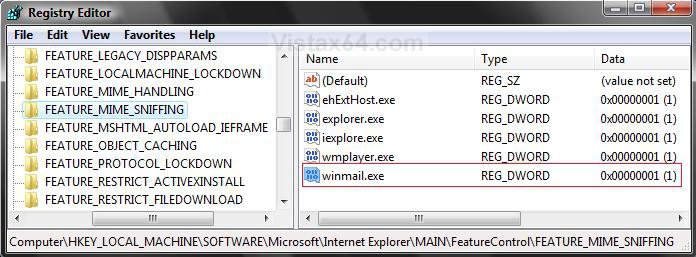
NoteThis will add or remove the winmail.exe value in the registry location:
Note
Code:
HKEY_LOCAL_MACHINE\SOFTWARE\Microsoft\Internet[/INDENT][/INDENT][/INDENT][/INDENT]
[INDENT][INDENT][INDENT][INDENT]Explorer\MAIN\FeatureControl\FEATURE_MIME_SNIFFING
CAUSE THREE NOTE: This is more of a workaround than a fix, but it works.
1. Simply go the Contacts folder and reduce how many you have. You can either delete or relocate these contacts to a different or new personal folder. (EX: C:\Users\(your username)\Contacts2)
NOTE: The default Contacts folder is located here: C:\Users\(your username)\Contacts
2. You can then just simply browse to this new location when you click on Tools and Windows Contacts in Windows Mail to navigate to and select your other contacts.
CAUSE FOUR 1. Simply delete the messages when done with them.
OR
2. If you want to store messages, then use Windows Mail Import and Export Messages feature to save the messages in a separate new folder on the desktop or in a personal user folder.
NOTE: For how, see: Windows Mail - Messages
CAUSE FIVE 1. For Sending
A) Make the attachment smaller by putting it in a ZIP file.
B) Break the attachment up and send it in separate messages.
2. For Receiving
A) Ask the sender to do step 1.
CAUSE SIX 1. If open, close Windows Mail.
2. Open Task Manager, and End Proccess any instance of winmail.exe if listed.
NOTE: You will use OPTION TWO at that link.
3. Do the Compact Database and Repair Database with the free program WMUtil.
NOTE: Be sure to follow all directions for the program at that website.
That's it,Shawn
Attachments

Last edited by a moderator:


