Windows Vista Forums
Vista Forums Home Join Vista Forums Windows 7 Forum Vista Tutorials Tags
Welcome to Windows Vista Forums. Our forum is dedicated to helping you find solutions with any problems, errors or issues you are experiencing with Windows Vista. The Vista forum also covers news and updates and has an extensive Windows Vista tutorial section that covers a wide range of tips and tricks.

Go Back   Vista Forums > Vista Forums > Tutorials

Vista - System Restore Point - Shortcut

Comment
 
Old 06-23-2007  
Brink


Vista x64 Ultimate SP2, Windows 7 Ultimate x64


System Restore Point - Shortcut

How to Make a Create System Restore Point Shortcut in Vista
...

My System SpecsSystem Spec
Old 06-08-2008  
TheShadow


XP-Pro-SP3-32bit, Vista Ultimate-64bit


Cool Re: System Restore Point - Shortcut

Quote  Quote: Originally Posted by Brink View Post
Thank you The Shadow for posting the script. I'm sure people will find it useful.

LOL, I make so many backups it's not even funny with all of the experimenting I do.

Shawn
Well, Shawn,
It looks like we're kind of in the same boat.
I have to rely on a Restore Point at least once every week to recover from some little Ooooops or another. Nothing would be worse than not having a good one when I need it.
For those really big "AwShuckz!", I can always fall back on my latest Ghost backup Image. A full restore of C: takes less than ten minutes and then everything is back up and running again, just as if nothing ever happened at all.

Once set up, getting a daily Restore point is absolutely seamless.
Like my daily cleanup batch file..... I never even think about it.
It's just there, every time I reboot, getting rid of the junk that windows saved in the last session.
It's sort of like FREE Daily maid service!

I have some customers that wouldn't do their weekly maintenance or get program updates if you paid them or beat them with a willow switch.
But with the computer programmed to do auto-restore points, Auto-Cleanup and Auto Updates to AVG every day, the computers stay pretty much clean and safe.
As good as can be expected anyway.

The new AVG 8.0 incorporates so much more protection than previous versions, it's not necessary to have several active scanners running all the time. I'm updating my customers to ver. 8.0 as fast as I can.

Thanks again for a great forum.
The Shadow

My System SpecsSystem Spec
Old 07-26-2008  
Bare Foot Kid


Vista 64-bit Ultimate Win7 64-bit Ultimate XP SP3 32-bit Pro


Re: System Restore Point - Shortcut

Hello Brink.

As you may recall a few weeks ago we discussed a script someone
else wrote and this excellent tutorial written by you.
Since then I have had time to 'experiment' with both of them.
I find yours far and away the better script. I like the option
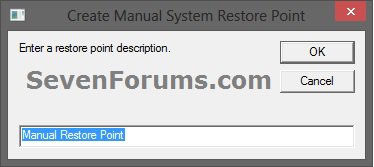
to add a "Restore Point Name" in yours that the other one lacked.
I also added the script to the "Start Menu", "Startup Folder" this takes
care of this problem Create A Task for me.

Thanks Shawn.


Later Ted
My System SpecsSystem Spec
Old 07-26-2008  
Brink


Vista x64 Ultimate SP2, Windows 7 Ultimate x64


Re: System Restore Point - Shortcut

You're welcome Ted. I'm happy to hear that it solved your problem from the other link.

Shawn
My System SpecsSystem Spec
Old 09-11-2008  
William Dempsey


Vista Home Premium 32bit. on a 64bit system...thx dell :( @&%$ers


Thumbs up Re: System Restore Point - Shortcut

Awesome!!!! Thanks Skill Level? AI would be 0...lol
Attached Images
 
My System SpecsSystem Spec
Old 09-11-2008  
Brink


Vista x64 Ultimate SP2, Windows 7 Ultimate x64


Re: System Restore Point - Shortcut

LOL, you're welcome William, and welcome to Vista Forums.

Shawn
My System SpecsSystem Spec
Old 09-12-2008  
staghorn99


Vista Home Premium 32 bit


Re: System Restore Point - Shortcut

Shawn, you're THE BOMB! I'm not that mechanically inclined but with your great instructions even I was able to create the system restore shortcut and it works great! Thanks a bunch!
Carl
My System SpecsSystem Spec
Old 09-12-2008  
Brink


Vista x64 Ultimate SP2, Windows 7 Ultimate x64


Re: System Restore Point - Shortcut

You're welcome Carl, and welcome to Vista Forums.

Shawn
My System SpecsSystem Spec
Old 09-16-2008  
mrgcav


Ultimate x32 & x64


Re: System Restore Point - Shortcut

Good shortcut but I want to have a system properties shortcut.
My System SpecsSystem Spec
Old 09-16-2008  
Brink


Vista x64 Ultimate SP2, Windows 7 Ultimate x64


Re: System Restore Point - Shortcut

Hello mrgcav, and welcome to Vista Forums.

You can right click on a blank area of the desketop and click on New and Shortcut. Use C:\Windows\System32\rundll32.exe Shell32.dll,Control_RunDLL Sysdm.cpl,,4 for the location, and whatever you like for a name.

This will open System Properties with the System Protection tab open.

Hope this helps,
Shawn
My System SpecsSystem Spec
Old 11-11-2008  
f1charlie


Vista Home Premium


Re: System Restore Point - Shortcut

Just added your useful shortcut to my desktop. I assume it only generates a restore point for those disks which are selected if you take the long way round?

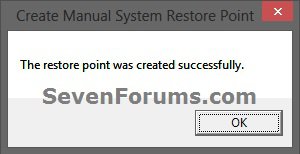
Also, is there any way of adding a confirmation when the restore point has been successfully created?
My System SpecsSystem Spec
Comment

Tutorial Tools


Similar Threads
Tutorial Category
System Restore Task - Change Automatic Restore Point Schedule Tutorials
System Restore error (create restore point), event ID: 8193 Vista General
System Restore Not Saving Restore Point Vista General
System restore hasn't held a restore point since I installed Vista Vista General
Deleting System Restore Point Vista General


Vista Forums is an independent web site and has not been authorized,
sponsored, or otherwise approved by Microsoft Corporation.
"Windows Vista", the Start Orb, and related materials are trademarks of Microsoft Corp.
© Designer Media Ltd
Tutorial powered by GARS 2.1.8m ©2005-2006

1 2 3 4 5 6 7 8 9 10 11 12 13 14 15 16 17 18 19 20 21 22 23 24 25 26 27 28 29 30 31 32 33 34 35 36 37 38 39 40 41 42 43 44 45 46