
How to Change the Schedule for Disk Defragmenter in Vista
 Information
This will show you how to turn the Disk Defragmenter automatic Run on a schedule on or off, and how to change the schedule to run Disk Defragmenter when you want it to run.
 Note
NoteThe Disk Deframenter .exe file is located at C:\Windows\System32\dfrgui.exe .
 Tip
TipFor a faster alternative that includes a progress graph, you can use the free Auslogics Disk Defrag.
 Warning
Solid State Drives (SSD) do not need to be defragmented. Doing so may lower the lifespan.
 OPTION ONE
1. Open the Start Menu.
A) In the white line (Start Search) area, type dfrgui and press Enter.
B) Go to step 3.
OR
2. Open the Start Menu.
A) Click on All Programs, Accessories, System Tools, and then on Disk Defragmenter.
3. Click on Continue in the UAC prompt.
NOTE: If will take a little bit while Disk Defragmenter analyzes the disks.
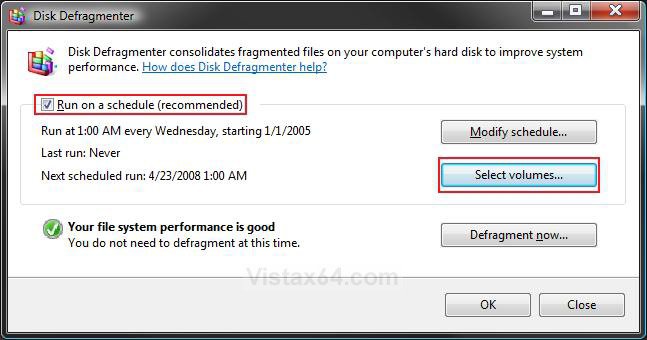
4. To Turn On the Disk Defragmenter Schedule
A) Check Run on a Schedule. (See screenshot above)
B) Go to step 6.
5. To Turn Off the Disk Defragmenter Schedule
A) Uncheck Run on a Schedule. (See screenshot below step 2)
B) Go to step 9.
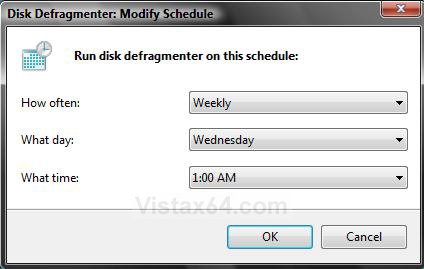
6. To Modify the Schedule Time
A) Click on the Modify Schedule button. (See screenshot below step 3)
B) Make your time adjustments: (See screenshot below step 6C)
- How Often: Daily, Weekly, or Monthly
- What Day: Pick a day, Sunday to Saturday.
- What Time: Select a time from list.
TipRecommended Schedule of Times to Defrag
TipNOTE: The more you save and delete items off your hard drive, the more often you should defrag. Adjust to your needs.
Schedule | Description |
Once a Month | For a user that is only on the computer a few hours a week and does not do much file saving and deleting. You rarely install and uninstall programs. |
Once a Week | For most average users that use the computer for a few hours on a daily basis and does a lot more file saving and deleting. You only do a few installing and uninstalling of programs. |
Once a Day | For your power user that uses the computer for several hours a day and does an unbelievable amount of file saving and deleting. You do a lot of installing and uninstalling of programs. |
C) Click on OK.
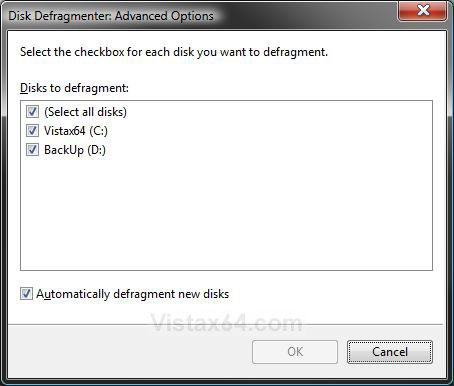
7. To Select Volumes to Defragment
NOTE: This option is only added when you install the Vista SP1.
A) Click on the Select volumes button. (See screenshot below step 3)
B) Check the drives you want to be included in the defrag and uncheck the drives you do not want to be included. (See screenshot below)
C) Click on OK.
9. To Manually Run Disk Defragmenter Now
A) Click on the Defragment now button. (See screenshot below step 3)
B) Do steps 7B and 7A.
NOTE: If you need to stop Disk Defragmenter, click on the Cancel defragmentation button.
10. When done, click on OK, if it is not grayed out, or Close if it is. (See screenshot below step 3)
OPTION TWO NOTE: By default Disk Defragmenter will only run when the computer is running and during low or idle usage in the background unless you run it manually, and not when the computer is in sleep mode or turned off. This will show you how to set Disk Defragmenter to wake the computer from sleep mode to run. This way you can schedule it to run when you are not using the computer in Option One above.
1. Open the Start Menu.
A) In the white line (Start Search) area, type taskschd.msc and press Enter.
B) Go to step 3.
OR
2. Open the Control Panel (Classic view).
A) Click on the Administrative Tools Icon.
B) Click on Task Scheduler.
3. In the left pane, click on the arrow next to Task Scheduler Library, Microsoft, and Windows to expand the folders. (See screenshot below step 4)
4. Click on the Defrag folder.
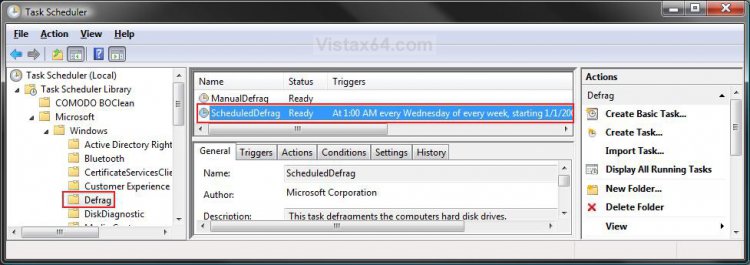
5. In the middle pane right click on ScheduledDefrag and click on Properties. (See screenshot above)
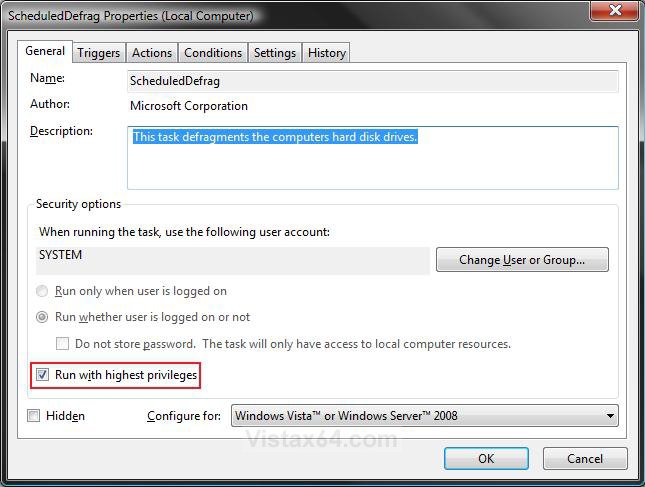
6. Click on the General tab. (See screenshot below step 7)
7. Check the Run with highest privileges box.
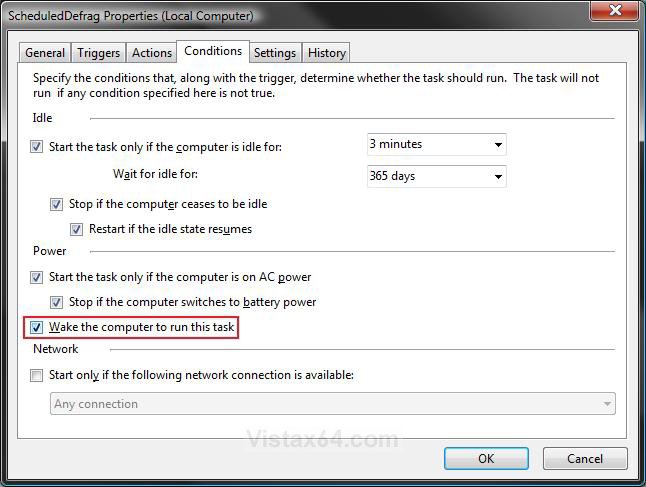
8. Click on the Conditions tab. (See screenshot below step 9)
9. Check the Wake the computer to run this task box, and click on OK.
10. Close Task Scheduler.
That's it,Shawn
Related Tutorials
- How to Run Disk Defragmenter from the Command Prompt in Vista
- How to Enable or Disable Defrag of Boot Files at Startup in Vista
- How to Create a Defragment Boot Files Shortcut in Vista
- How to Have a Task Wake up the Computer to Run in Vista Task Scheduler
- How to Add Defragment to Context Menu in Windows 7 and Vista
Attachments

Last edited by a moderator:


