
How to Enable or Disable the Recycle Bin Delete Confirmation Dialog in Vista
 Information
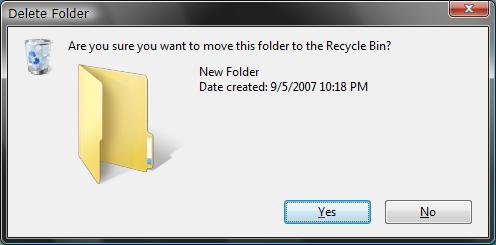
This will show you how to enable or disable the delete confirmation dialog box for the Recycle Bin when you delete something. It is enabled by default.
 Note
NoteYou can press and hold Shift key, right click on the file or folder you wanted to delete, click on Delete, and release Shift to permanently delete items.
EXAMPLE: Recycle Bin Delete Confirmation Dialog Box
Here's How:
1. Right click on the Recycle Bin desktop icon.
2. Click on Properties.
3. To Enable
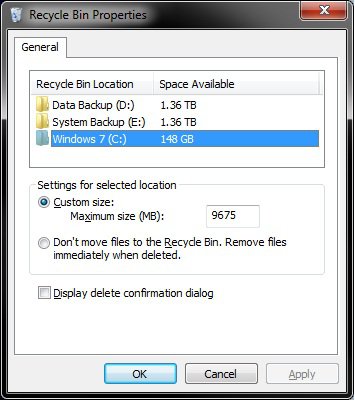
A) Check the Display delete confirmation dialog box. (See screenshot below step 5)
B) Go to step 6.
4. To Disable
A) Uncheck the Display delete confirmation dialog box. (See screenshot below step 5)
5. Click on OK. (See screenshot below)
That's it,
Shawn
Related Tutorials
- How to Change the Recycle Bin Storage Size in Vista
- How to Replace Delete in the Recycle Bin Context Menu in Vista
- How to Set Recycle Bin to Permanently Delete a Item Immediately in Vista
- How to Customize the Recycle Bin Context Menu in Vista
- How to Fix the Recycle Bin Icon Not Refreshing When Emptied
- How to Restore and Change a Desktop Icon in Vista
- How to Restore Previous Versions of a File and Folder in Vista
- How to Fix a Corrupted Recycle Bin in Vista
- How to Restore the Recycle Bin back to the Desktop in Vista
Attachments

Last edited:


