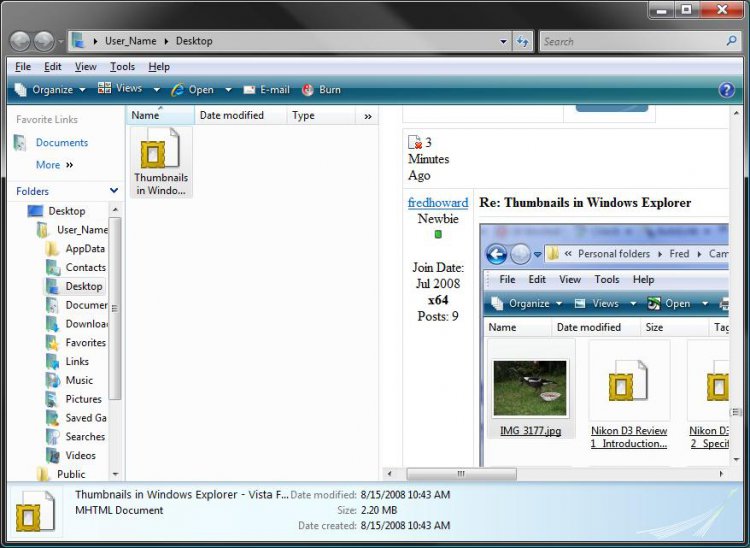
How to Turn Preview Thumbnails On or Off in Windows Explorer in Vista
 Information
This will show you how to turn file and folder preview thumbnails on or off in all Windows Explorer windows. A thumbnail is a reduced image of a graphic, used to display multiple images at once.
 Note
NoteYou will need to click on View or Views, on Windows Explorer window Menu bar, and have it set to either Medium Icons, Large Icons, or Extra Large Icons to see a thumbnail preview of the file image as the icon.
 Tip
TipIf thumbnails will still not show on the file icon even with thumbnails turned on from below, then check to make sure that Windows Photo Gallery is set as the default program with all of it's associations set to it.
 Warning
Thumbnails can cause navigating through a Windows Explorer window to be to slow for you while your waiting for the thumbnails to load if there is a lot of image files. Turning the thumbnails off can speed up how fast a Windows Explorer window will open.
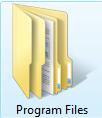
EXAMPLE: Thumbnails On

EXAMPLE: Thumbnails Off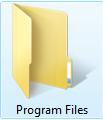

 METHOD ONE
1. Open Folder Options.
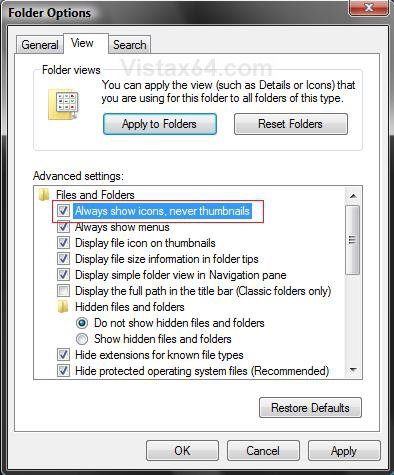
2. Click on the View tab. (See screenshot below)
3. To Turn OFF Folder and File Preview Thumbnails
A) Check Always show icons, never thumbnails. (See screenshot above)
B) Go to step 5.
4. To Turn ON Folder and File Preview Thumbnails
A) Uncheck Always show icons, never thumbnails. (See screenshot below step 2)
5. Click on OK. (See screenshot below step 2)
METHOD TWO 1. Open Visual Effects Performance Options.
2. Click on the Visual Effects tab. (See screenshot below)
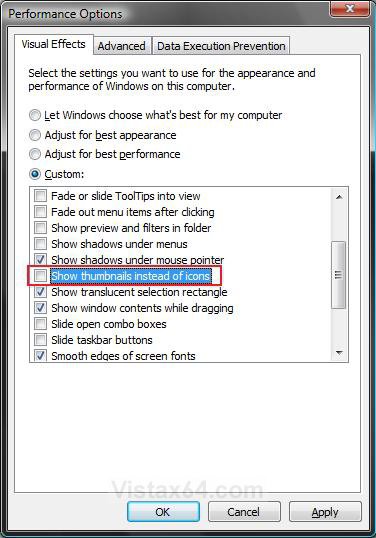
3. To Turn OFF Folder and File Preview Thumbnails
A) Uncheck Show thumbnails instead of icons. (See screenshot above)
B) Go to step 5.
4. To Turn ON Folder and File Preview Thumbnails
A) Check Show thumbnails instead of icons. (See screenshot below step 2)
5. Click on OK. (See screenshot below step 2)
METHOD THREE NOTE: This method is only available for the Vista Business, Ultimate, and Enterprise editions. See Method Four or Method Five below for the Vista Basic and Home Premium editions.
1. Open the all users, specific users or groups, or all users except administrators Local Group Policy Editor for how you want this policy applied.
2. In the left pane, click on User Configuration, Administrative Templates, Windows Components, and Windows Explorer. (See screenshot below)
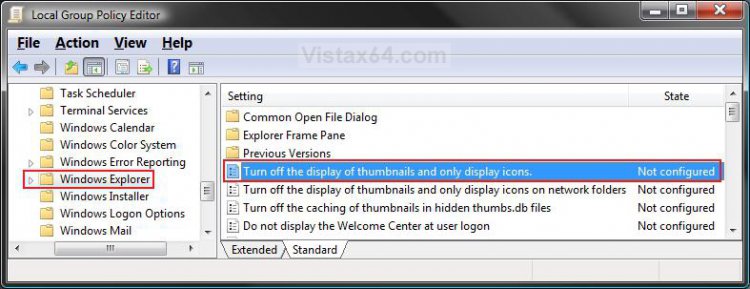
3. In the right pane, right click on Turn off the display of thumbnails and only display icon and click on Properties. (See screenshot above)
4. To Enable Windows ExplorerThumbnails
A) Select (dot) Disabled or Not Configured and click on OK. (See screenshot below step 5A)
B) Go to step 6.
5. To Disable Windows Explorer Thumbnails
A) Select (dot) Enabled and click on OK.
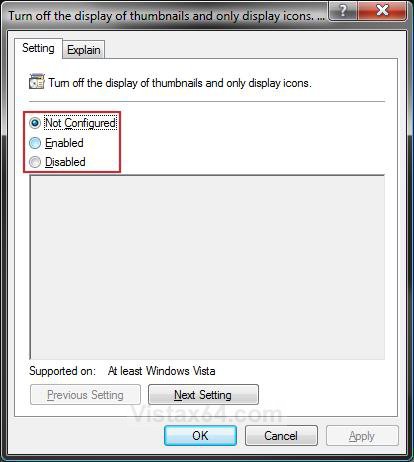
6. Close the Local Group Policy Editor window. Your done.
METHOD FOUR NOTE: This will work for all Vista versions.
1. To Disable Windows Explorer Thumbnails
A) Click on the Download button below to download the file below.
Disable_Explorer_Thumbnails.reg

B) Go to step 3.
2. To Enable Windows Explorer Thumbnails
A) Click on the Download button below to download the file below.
Enable_Explorer_Thumbnails.reg
3. Click on Save, and save the .reg file to the Desktop.
4. Right click on the downloaded .reg file and click on Merge.
5. Click on Run, Continue (UAC), Yes, and then OK when prompted.
6. When done, you can delete the .reg file if you like.
7. Log off and log on, or restart the computer to apply changes.
METHOD FIVE NOTE: This will work for all Vista versions.
1. Open the Start Menu.
2. In the white line (Start Search) area, type regedit and press Enter.
3. Click on the Continue button in the UAC prompt.
4. In regedit, go to: (See screenshot below)
HKEY_CURRENT_USER\Software\Microsoft\Windows\CurrentVersion\Policies\Explorer
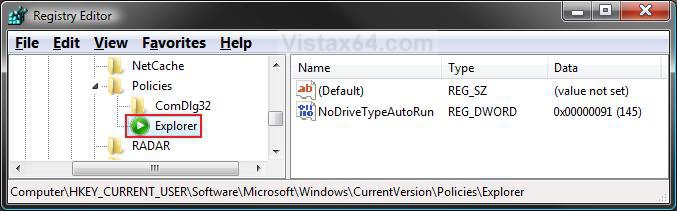
]
5. To Disable Windows Explorer Thumbnails
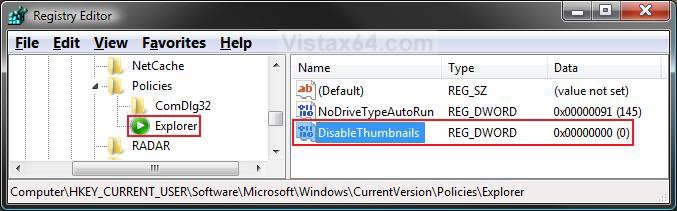
A) In the right pane of Explorer, right click on a empty area and click on New and DWORD (32-bit) Value and type DisableThumbnails and press Enter. (See screenshot below)
B) Right click on DisableThumbnails and click on Modify.
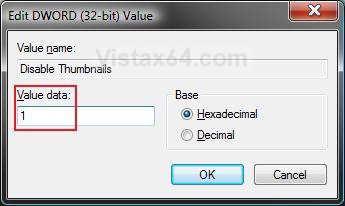
C) Type 1 and click on OK. (See screenshot below)
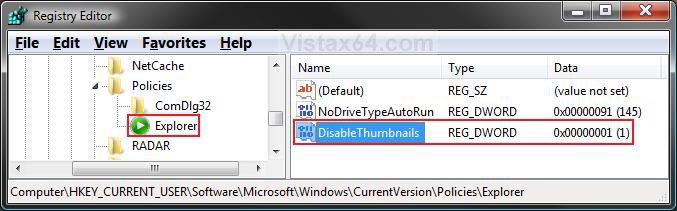
D) The registry will now look like this. (See screenshot below)
E) Go to step 7.
6. To Enable Windows Explorer Thumbnails
A) In the right pane of Explorer, right click on DisableThumbnails and click on Delete. (See screenshot above)
B) Click on Yes to confirm deletion.
7. Close regedit.
8. Log off and log on, or restart the computer to apply changes.
That's it,Shawn
Related Tutorials
- How to Clear the Thumbnail Cache in Vista
- How to Change a Folder Preview Picture in Vista
- How to Turn Open Window Thumbnail Previews On or Off for the Taskbar in Vista
- How to Enable or Disable the Taskbar Thumbnail Previews in Vista
- How to Change the Visual Effects Options for Appearance and Performance in Vista
- How to Rebuild the Icon Cache in Vista
- How to Turn the Preview Pane On or Off in Vista
- How to Change the Border for Thumbnail Previews in Vista
- How to Add "Enable/Disable Thumbnails" to Context Menu in Vista and Windows 7
Attachments
Last edited by a moderator:




 Shawn, thank you for your fast response and my apologies for my slow thank you.
  a replacement with XP!