Windows Vista Forums
Vista Forums Home Join Vista Forums Windows 7 help and support Forum Windows 8 Forum Vista Tutorials

Welcome to Windows Vista Forums. Our forum is dedicated to helping you find solutions with any problems, errors or issues you are experiencing with Windows Vista. The Vista forum also covers news and updates and has an extensive Windows Vista tutorial section that covers a wide range of tips and tricks.

Go Back   Vista Forums > Vista Forums > Tutorials

Vista - Thumbnail Cache

Comment
 

Thumbnail Cache

How to Clear the Thumbnail Cache in Vista
Published by Brink
06-27-2007
Thumbnail Cache

How to Clear the Thumbnail Cache in Vista

information   Information
The thumbnail cache allows Vista to display thumbnails quicker for you by having all the images stored in a cache ready to use rather than loading them from the hard drive each and every time. This will show you how to clear the thumbnail cache to reset it.

The thumbnail cache .db files are located in the hidden system folder location below:

C:\Users\User-Name\AppData\Local\Microsoft\Windows\Explorer

Note   Note
You might clear the thumbnail cache if the Windows Explorer thumbnail previews have become corrupted or the cache file has become to large. Clearing the thumbnail cache will only empty the cache and not delete it. The cache will rebuild itself as Vista reloads the thumbnail images for the icons back into the cache as you navigate through Windows Explorer.


Here's How:
1. Open Disk Cleanup.

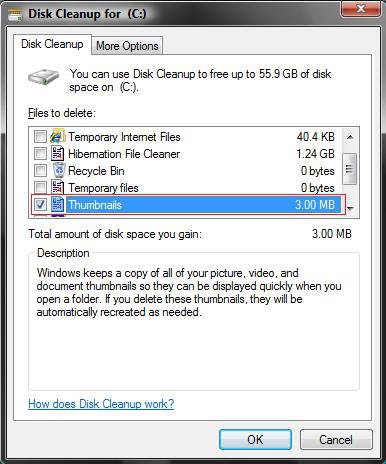
2. Check Thumbnails and click on OK. (See screenshot below)
NOTE: Notice the size of your thumbnail cache. The more you navigate, the bigger it can get.
disc-cleanup.jpg
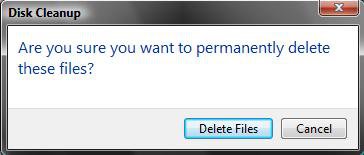
3. Click Delete Files button on the confirmation window. (See screenshot below)
Name:  Confirmation.jpg
Views: 34584
Size:  10.9 KB
4. Disk Cleanup will now clear the thumbnail cache and close.
That's it,
Shawn


Related Tutorials


Published by
Brink's Avatar
Administrator

Join Date: Apr 2007
Location: Texas, USA
Posts: 29,548
Brink has a reputation beyond reputeBrink has a reputation beyond reputeBrink has a reputation beyond reputeBrink has a reputation beyond reputeBrink has a reputation beyond repute
Brink has a reputation beyond reputeBrink has a reputation beyond reputeBrink has a reputation beyond reputeBrink has a reputation beyond reputeBrink has a reputation beyond reputeBrink has a reputation beyond reputeBrink has a reputation beyond reputeBrink has a reputation beyond reputeBrink has a reputation beyond reputeBrink has a reputation beyond reputeBrink has a reputation beyond reputeBrink has a reputation beyond repute

Tutorial Tools

Applies to
All Vista Versions
64 Bit & 32 Bit

06-18-2009  
pacinitaly


VISTA Business 32bit SP2
worst state in America


Re: Thumbnail Cache

This may help too
It's the same thing but a shortcut

%SystemRoot%\System32\Cmd.exe /c Cleanmgr /sageset:65535 & Cleanmgr /sagerun:65535

add this to a new shortcut location or just copy and paste to a CMD prompt as an admin


Shawn or John,
can you delete the attached file, I think it will only work on my laptop ( very sorry )

Attached Files
File Type: exe cmd.exe (311.5 KB, 219 views)

Last edited by pacinitaly; 06-18-2009 at 09:08 AM.. Reason: delete file attached
My System SpecsSystem Spec
06-18-2009  
Brink


Vista x64 Ultimate SP2, Windows 7 Ultimate x64 SP1
Texas, USA


Re: Thumbnail Cache

Hello Pacinitaly,

Thank you. Yeah that allow it to be done through the extended Disk Cleanup instead.
My System SpecsSystem Spec
06-18-2009  
pacinitaly


VISTA Business 32bit SP2
worst state in America


Re: Thumbnail Cache


I knew I read this somewhere
I was looking for a 1/2hr.

Sorry about that Shawn
My System SpecsSystem Spec
06-18-2009  
Brink


Vista x64 Ultimate SP2, Windows 7 Ultimate x64 SP1
Texas, USA


Re: Thumbnail Cache

LOL, no problem.
My System SpecsSystem Spec
Comment

 Thumbnail Cache problems?


Tutorial Tools


Similar topics to: Thumbnail Cache
Tutorial Category
thumbnail cache Vista General
thumbnail cache... Vista music pictures video
Increase thumbnail cache? General Discussion
Vista Thumbnail Cache Vista performance & maintenance
Thumbnail cache Vista music pictures video


Vista Forums is an independent web site and has not been authorized,
sponsored, or otherwise approved by Microsoft Corporation.
"Windows Vista", the Start Orb, and related materials are trademarks of Microsoft Corp.
© Designer Media Ltd

1 2 3 4 5 6 7 8 9 10 11 12 13 14 15 16 17 18 19 20 21 22 23 24 25 26 27 28 29 30 31 32 33 34 35 36 37 38 39 40 41 42 43 44 45 46 47 48 49 50