
How to Assign a Keyboard Shortcut to Open a Program and Shortcuts in Vista and Windows 7
 Information
This will show you how to assign a keyboard shortcut (hotkey) to use to open or run a shortcut of your choice in Vista and Windows 7. This can be used on a shortcut of a file, folder, drive, library (Windows 7 only), program's .exe file, etc......
 Note
NoteQuick Launch shortcuts in Vista have their own keyboard shortcuts to use instead.
In Windows 7, each program pinned to the taskbar can be opened by pressing the Windows key + 1 to 0 (1-10) keyboard shortcut instead. You would use a number for how the program icons are ordered on the taskbar from left to right (for top or bottom taskbar) or top to bottom (for left or right taskbar) desktop location.
In Windows 7, each program pinned to the taskbar can be opened by pressing the Windows key + 1 to 0 (1-10) keyboard shortcut instead. You would use a number for how the program icons are ordered on the taskbar from left to right (for top or bottom taskbar) or top to bottom (for left or right taskbar) desktop location.
 Warning
The shortcut must be located in either the Start Menu All Programs area, on the desktop, pinned to the taskbar (Windows 7 only), or pinned to the Start Menu for the keyboard shortcut you assign to it will work.
Here's How:
1. Right click on a shortcut that you want to assign a keyboard shortcut to open or run it with, and click on Properties.
NOTE: For an example here, I'm using a Shutdown shortcut.
2. In the Start in: field, make sure the full path of the folder that the program .exe for this shortcut is located is correct here.
NOTE: For more about this, see: Microsoft Help and Support: KB283065 Article
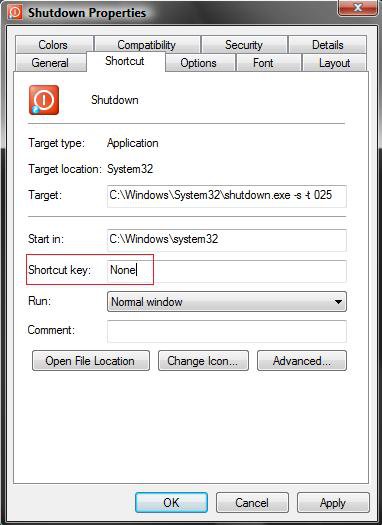
3. Click on the None area next to Shortcut Key: . (see screenshot below)
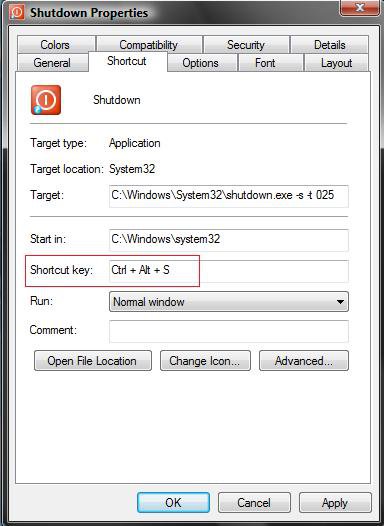
4. Type in a key (letter, number, arrow key, character key, or F1 to F12 key) that you want to be used as the keyboard shortcut. (see screenshot below)
For example: I typed the letter S to get Ctrl+Alt+S as the shortcut keys to press to open/run the Shut Down shortcut.
NoteType a left key below to have what's on the right to use as the keyboard shortcut.
Note
0-9 numbers = Ctrl + Alt + (number)
A-Z letters = Ctrl + Alt + (letter)
F1-F12 function keys = (function key)
Characters (ex: =,) = Ctrl + Alt + (character)
NOTE: You will only be able to use the bottom character on a key. You will not be able to use Shift to use the upper character on a key.
Arrow keys = Ctrl + Alt + (direction of arrow)
5. Click on OK to apply.
6. Now you press the Ctrl + Alt + (key) or function key to open or run the shortcut for the program or action.
That's it,Shawn
Related Tutorials
- How to Underline Keyboard Shortcuts in Vista
- List of All Keyboard Shortcuts in Vista
- How to Remove or Change the Shortcut Arrow in Vista
- How to Change a Default Open Window Size for a Shortcut in Vista
- How To Remove The Shortcut Prefix On The Shortcut Name in Vista
- How to Change the Target Path Location of a Shortcut in Vista
- How to Change a Shortcut Folder or File Icon in Vista
Attachments
Last edited by a moderator:


 ... I have this site bookmarked to stay updated on these Vista issues. (I uninstalled IE8 too after reading one of the threads.)

