
How to Change the Visual Effects Options for Appearance and Performance in Vista
 Information
The Visual Effects include most of the special effects in Vista. Select the settings you want to use for the appearance and performance of Vista. You can choose which visual effects to turn off, one by one, or you can let Windows choose a bunch for you. There are 20 visual effects you can control, such as the transparent glass look, the way menus open or close, and whether shadows are displayed.
 Tip
TipIf Vista is running slowly, you can speed it up by disabling some of its visual effects. It comes down to appearance versus performance. Would you rather have Vista run faster or look prettier? If your PC is fast enough, you don’t have to make this tradeoff, but if your computer is just barely powerful enough for Windows Vista, it can be useful to scale back on the visual bells and whistles to gain some performance.
 Warning
MINIMUM SYSTEM REQUIREMENTS FOR VISTA :
Vista Home Basic
- Processor: 1GHz (32 or 64 bit)
- System Memory (RAM): 512MB
- Hard Drive: 20GB with 15GB available for Vista
- Video Card: 32MB Memory and DirectX 9 Support
- DVD-ROM Drive
- Processor: 1GHz (32 or 64 bit)
- System Memory (RAM): 1GB
- Hard Drive: 40GB with 15GB available for Vista
- Video Card: 128MB Memory, DirectX 9 Support with: WDDM Driver, Pixel Shader 2.0, 32bits per pixel
- DVD-ROM Drive
Here's How:
WarningIf you make any changes in the Ease of Access Center in the Control Panel (Classic View), then the visual effects settings will automatically be reset to the default settings. You will then need to make any changes that you have made to the visual effects settings below again. 
1. Open Control Panel. (Classic View)
2. Click on the System icon.
A) Go to step 5.
OR
3. Open the Start Menu.
4. Right click on Computer and click on Properties.
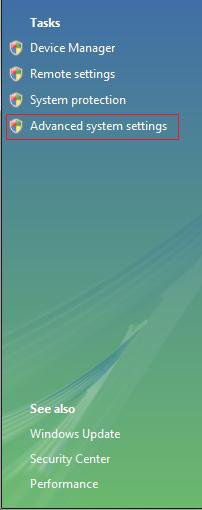
5. Click on the Advanced system settings link. (See screenshot below)
6. Click on Continue in the UAC prompt.
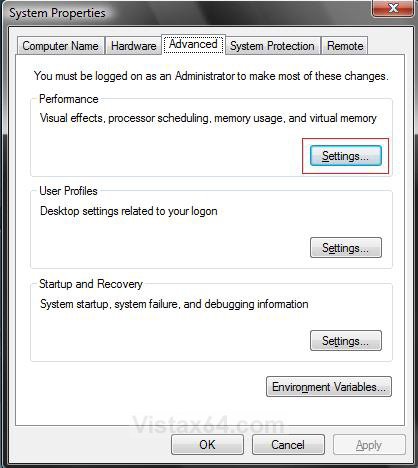
7. Under Performance, click on the Settings button. (See screenshot below)
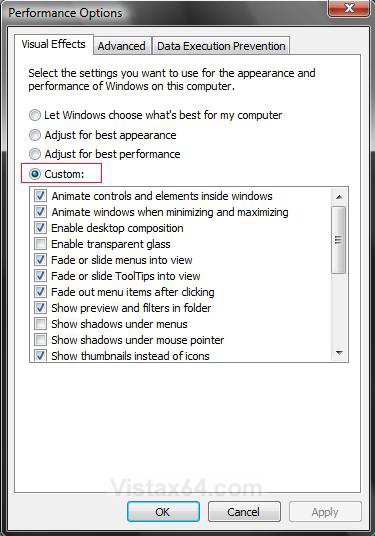
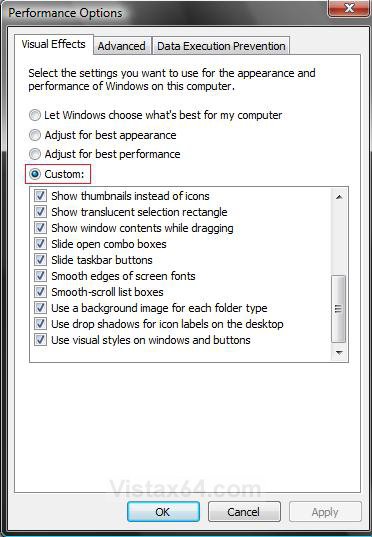
8. Under Visual Effects, dot Custom: and check the ones you want, and uncheck the ones you do not want. (See screenshots below)
NOTE: If you dot Adjust for best perfomance, then you may have to turn ClearType font smoothing on again.
Tip
TipIf you want to help improve performance, then these are the most common ones to uncheck:
Tip- Animate windows when minimizing and maximizing
- Fade or slide menus into view
- Fade or slide tooltips into view
- Fade out menu items after clicking
- Show shadows under menus
- Slide open combo boxes
- Slide taskbar buttons
- Use a background image for each folder type
Top and Bottom half of list:
9. Click on Apply and on OK to apply changes.
10. Click on OK to close window from below step 7.
11. Close window from below step 5.
That's it,Shawn
Related Tutorials
- How to Create a Visual Effects Performance Options Shortcut in Windows
- How to Open and Change Folder Options in Vista
- How to Change the Advanced Appearance Settings in Vista
- How to Open Each Folder in the Same or it's Own Separate Window in Vista
- How to Change a Default Open Window Size for a Shortcut in Vista
- How to Enable or Disable Aero Glass Transparency
- How to Change the Color Scheme in Vista
- How to Change a Computer Event Sound in Vista
- How to Change the Desktop Theme in Vista
- How to Change the ClearType Font Settings in Vista
- How to Enable or Disable the Translucent Selection Rectangle in Vista
- How to Display Small or Large Icons in the Vista Start Menu
- How to Change the Color Bit Depth Settings in Vista
- How to "Turn off all unnecessary animations" in Windows 7 and Vista
Attachments
Last edited:


