Vista Forums
Vista Forums Home Join Vista Forums Donate Vista Tutorials Tags

Welcome to Vista Forums we are your forum to discuss Windows Vista x64 and x86 systems. Whether you need help or just want to post an idea you have on Vista, this is the forum for you.
Register at Vista forums...the world biggest Windows Vista resource Join Vista Forums

Go Back   Vista Forums > Vista Forums > Tutorials

Favorite Links

Poll: Did this Tutorial help and work for you?
Poll Options
Did this Tutorial help and work for you?

Comment
 
Tutorial Tools Display Modes
<!-- google_ad_section_start -->Favorite Links<!-- google_ad_section_end -->
Favorite Links
How to Open and Use Favorite Links in Vista
Published by Brink
07-08-2007

How to Open and Use Favorite Links in Vista

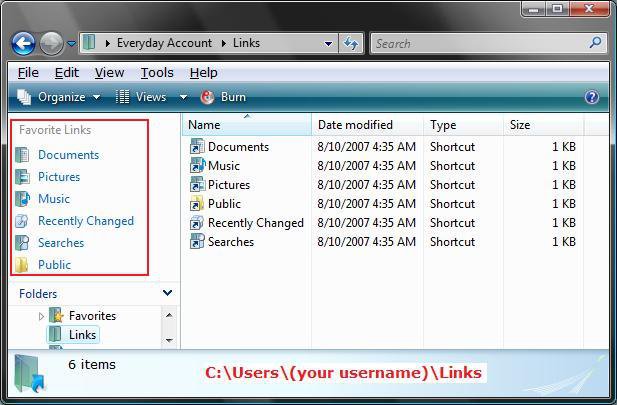
INFO: Favorite Links is inside the Navigation Pane in a Windows Explorer window. It contains shortcuts to the Documents, Pictures, Music, Recently Changed, Searches, and Public folders by default.
For more information see: Microsoft Help and Support: Article KB926167

NOTE: You can add any shortcut you like here as well. See below for how.

FOLDER LOCATION: C:\Users\(your username)\Links

RELATED LINKS:
1. How to Turn the Navigation Pane On or Off in Vista

2. How to Change the Open Folder Icon in Vista

3. How to Hide Favorite Links in a Windows Explorer Window in Vista

4. How to Turn the Preview Pane On or Off in Vista

5. How to Fix Favorite Links Empty in Vista Windows Explorer


How to Open Favorite Links :
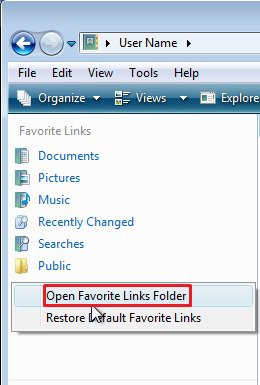
NOTE: This is how to open the Favorite Links folder location.
METHOD ONE:
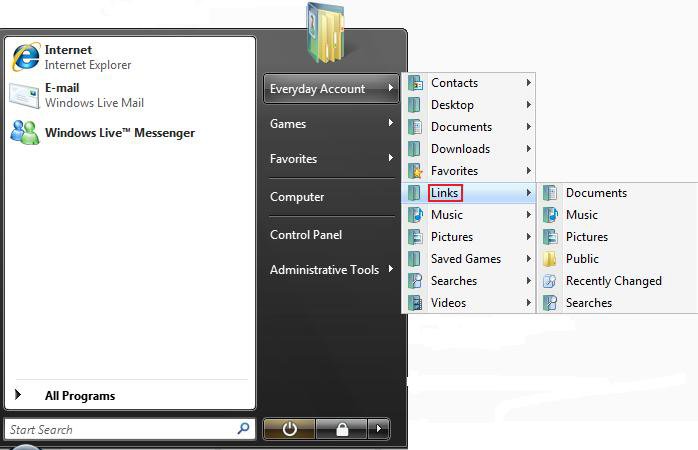
1. In the Start Menu :
NOTE: This is the same as typing shell:links in the white line (Start Search) area of the Start menu and pressing Enter.

Start_Menu.jpg

METHOD TWO:
2. In a Windows Explorer window :
NOTE: This is the Favorite Links section in the Navigation Pane. If the Favorite Links section is empty, then see:How to Fix Favorite Links Empty in Vista Windows Explorer

Links.jpg


How to Add or Remove a Shortcut :
1. Open the Favorite Links folder location.
NOTE: See section above for how.

2. To Add a Shortcut -
A) Drag the shortcut into the Favorite Links section or folder location to copy it there.
B) Copy or Paste the shortcut into the Favorite Links section or folder location.

3. To Remove a Shortcut -
A) Right click on the shortcut in the Favorite Links section and click Remove Link.
or
B) Right click on the shortcut in the folder location and click Delete.


Default Favorite Links Location :
1. Documents - C:\Users\(your username)\Documents
NOTE: This is the Documents folder for your user account.

2. Music - C:\Users\(your username)\Music
NOTE: This is the Music folder for your user account.

3. Pictures - C:\Users\(your username)\Pictures
NOTE: This is the Pictures folder for your user account.

4. Public - C:\Users\Public
NOTE: This is the folder that is shared by all users.

5. Recently Changed - C:\Users\(your username)\Searches\Recently Changed
NOTE: You must turn on Recent Items in the Start Menu's Properties for this to display recent files. See: How to Turn the Recent Items List On or Off in Vista

6. Searches - C:\Users\(your username)\Searches
NOTE: This is a search shortcut for recent Documents, E-mail, Music, Pictures and Videos, Changed items, and Shared by me.


That's it,
Shawn
Published by
Brink's Avatar
Administrator
Join Date: Apr 2007
Location: Texas, USA
Posts: 12,904
Rep Power: 200
Brink has a reputation beyond reputeBrink has a reputation beyond reputeBrink has a reputation beyond reputeBrink has a reputation beyond reputeBrink has a reputation beyond reputeBrink has a reputation beyond reputeBrink has a reputation beyond reputeBrink has a reputation beyond reputeBrink has a reputation beyond reputeBrink has a reputation beyond reputeBrink has a reputation beyond repute

Tutorial Tools

Applies to
All Vista Versions
64 Bit & 32 Bit

Rating
Skill Level
20%20%20%
1

Page copy protected against web site content infringement by Copyscape

Old 02-29-2008  
cosmin2007
Vista Enthusiast
cosmin2007 has a spectacular aura aboutcosmin2007 has a spectacular aura aboutcosmin2007 has a spectacular aura about
 
cosmin2007's Avatar
 
Join Date: Feb 2008
Vista Home Premium 64 bit Service Pack 1
Posts: 23

Location: Earth
Thumbs up Re: Favorite Links

I find the favorite links pane one of the best new features in Vista. Actually the favorite links pane was available in XP too, but you could not make it stay always on and it had another major disadvantage - the folder was for IE favorites by default. But one could have made a separate folder for local folders and use it very much the same as the links folder in Vista.
The best thing about links folder in Vista is that you can use saved search folders saved in there to quickly open file lists made by your own criteria using search folders. Actually I copied the pre-defined search folders into the links folder and now they are available everywhere on explorer windows. You might not realize this from the very first moment, but this is a huge productivity boost in working with files and folders on your computer. Just try poking around with search folders, then save the most useful searches and copy the saved searches inside your links folder. You'll be finding your most frequently needed files A LOT FASTER without conducting too many separate searches.

The idea of using links pane for saved searches came from browsing trough Paul Thurrott's website and viewing early Longhorn UI screen shots. I was browsing to look for removed features in the final version when this idea stroke me last night...

Use the directions here to create personalized searches

Last edited by cosmin2007; 02-29-2008 at 12:56 PM. Reason: Adding some details

Vista rocks. All you need is the right hardware and an open mind
cosmin2007 is offline   Reply With Quote
Old 02-29-2008  
cosmin2007
Vista Enthusiast
cosmin2007 has a spectacular aura aboutcosmin2007 has a spectacular aura aboutcosmin2007 has a spectacular aura about
 
cosmin2007's Avatar
 
Join Date: Feb 2008
Vista Home Premium 64 bit Service Pack 1
Posts: 23

Location: Earth
Re: Favorite Links


Vista rocks. All you need is the right hardware and an open mind
cosmin2007 is offline   Reply With Quote
Old 02-29-2008  
Brink
Administrator
Brink has a reputation beyond reputeBrink has a reputation beyond reputeBrink has a reputation beyond reputeBrink has a reputation beyond reputeBrink has a reputation beyond reputeBrink has a reputation beyond reputeBrink has a reputation beyond reputeBrink has a reputation beyond reputeBrink has a reputation beyond reputeBrink has a reputation beyond reputeBrink has a reputation beyond repute
 
Brink's Avatar
 
Join Date: Apr 2007
Vista x64 Ultimate SP1
Posts: 12,904

Location: Texas, USA
Re: Favorite Links

LOL, now there's some Favorite Links cosmin2007.

Shawn

There are no dumb questions, just the people that do not ask them.
Please post feedback to help others.
Brink is offline   Reply With Quote
 
Comment

Tags
links, favorite

Tutorial Tools
Display Modes


Vistax64.com is an independent web site and has not been authorized,
sponsored, or otherwise approved by Microsoft Corporation.
"Windows Vista", the Start Orb, and related materials are trademarks of Microsoft Corp.
© Vistax64.com 2005-2008
Tutorial powered by GARS 2.1.8m ©2005-2006

1 2 3 4 5 6 7 8 9 10 11 12 13 14 15 16 17 18 19 20 21 22 23 24 25 26 27 28 29 30 31 32 33 34 35 36 37 38 39 40 41 42 43 44 45 46 47 48