
How to Open and Use Favorite Links in Vista
 Information
Favorite Links is inside the Navigation Pane in a Windows Explorer window. It contains shortcut links to the Documents, Pictures, Music, Recently Changed, Searches, and Public folders by default.
For more information see:
Microsoft Help and Support: Article KB926167
For more information see:
Microsoft Help and Support: Article KB926167
 Note
NoteYou can add any shortcut you like to use here as well. See below for how.
 Tip
TipDefault Favorite Links Locations
- Documents - C:\Users\(your username)\Documents
NOTE: This is the Documents folder for your user account. - Music - C:\Users\(your username)\Music
NOTE: This is the Music folder for your user account. - Pictures - C:\Users\(your username)\Pictures
NOTE: This is the Pictures folder for your user account. - Public - C:\Users\Public
NOTE: This is the folder that is shared by all users. - Recently Changed - C:\Users\(your username)\Searches\Recently Changed
NOTE: You must turn on Recent Items in the Start Menu's Properties for this to display recent files. - Searches - C:\Users\(your username)\Searches
NOTE: This is a search shortcut for recent Documents, E-mail, Music, Pictures and Videos, Changed items, and Shared by me.
 OPTION ONE
METHOD ONE:
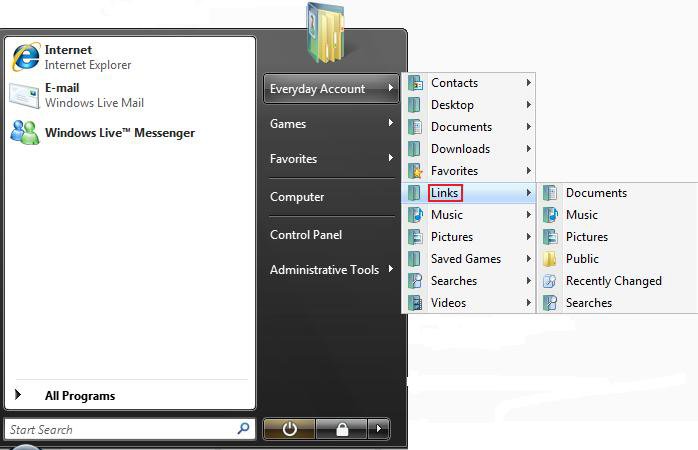
1. Open the Start Menu. (See screenshot below)
NOTE: This is the same as typing shell:links in the white line (Start Search) area of the Start menu and pressing Enter.
METHOD TWO:
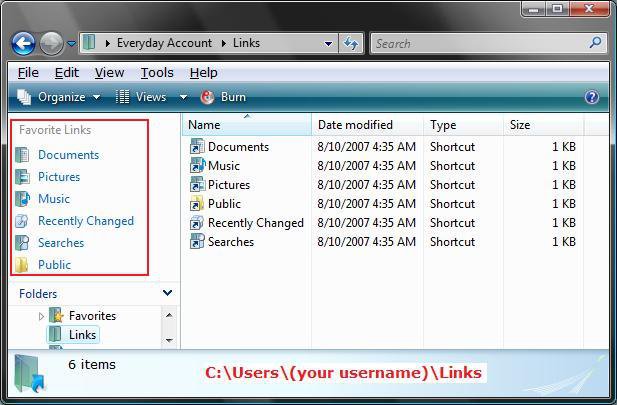
2. Navigate to C:\Users\(User Name)\Links in a Windows Explorer window.
NOTE: This is the Favorite Links section in the Navigation Pane. If the Favorite Links section is empty, then see: How to Fix Favorite Links Empty in Vista Windows Explorer
METHOD THREE:
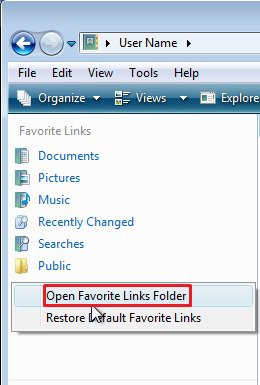
3. Right click on a empty space in Favorite Links (Navigation Pane), and click on Open Favorite Links Folder.
OPTION TWO 1. To Add a Folder Favorite Link
A) Drag the folder to a empty area of the Favorite Links section (Navigation Pane) until you see the Create link in links message, then drop it to create a shortcut link for tha. (See screenshot below Method Three in OPTION ONE)
OR
B) Copy or Paste a folder shortcut into the Favorite Links folder location. (See screenshot below Method Two in OPTION ONE)
2. To Remove a Folder Link
A) Right click on a folder in the Favorite Links section (Navigation Pane) and click on Remove Link. (See screenshot below Method Three in OPTION ONE)
OR
B) Right click on the folder in the folder location and click on Delete. (See screenshot below Method Two in OPTION ONE)
That's it,
Shawn
Attachments

Last edited by a moderator:

