Vista Forums
Vista Forums Home Join Vista Forums Donate Vista Tutorials Tags

Welcome to Vista Forums we are your forum to discuss Windows Vista x64 and x86 systems. Whether you need help or just want to post an idea you have on Vista, this is the forum for you.
Register at Vista forums...the world biggest Windows Vista resource Join Vista Forums Now

Go Back   Vista Forums > Vista Forums > Tutorials

Vista Tutorial Categories Network & Internet Tutorials File & Folder Settings Tutorials Taskbar & Start Menu Tutorials Performance & Maintenance Tutorials General Tips Tutorials Programs & Features Tutorials Context Menu Tutorials Shortcut Tutorials Security & System Tools Tutorials Parental Controls Tutorials User Account Tutorials Hardware & Drivers Tutorials Appearance & Personalization Tutorials Backup & Restore Tutorials Music, Photo, Video and Media Tutorials Power Management Tutorials

System Restore - disk space

Poll: Did this Tutorial help and work for you?
Poll Options
Did this Tutorial help and work for you?

Comment
 
Tutorial Tools Display Modes
Old 05-29-2007  
Brink
Administrator
Brink has a reputation beyond reputeBrink has a reputation beyond reputeBrink has a reputation beyond reputeBrink has a reputation beyond reputeBrink has a reputation beyond reputeBrink has a reputation beyond reputeBrink has a reputation beyond reputeBrink has a reputation beyond reputeBrink has a reputation beyond reputeBrink has a reputation beyond reputeBrink has a reputation beyond repute
 
Brink's Avatar
 
Join Date: Apr 2007
Vista x64 Ultimate SP1
Posts: 14,743

Location: Texas, USA
System Restore - disk space

How to Change the System Restore Disk Space Usage Amount in Vista


There are no dumb questions, just the people that do not ask them.
Please post feedback to help others.
Brink is offline   Reply With Quote
Old 06-16-2008  
Sound_Asleep
Junior Member
Sound_Asleep is on a distinguished road
 
Join Date: May 2008
Vista Home Premium 32bit
Posts: 15

Re: System Restore - disk space

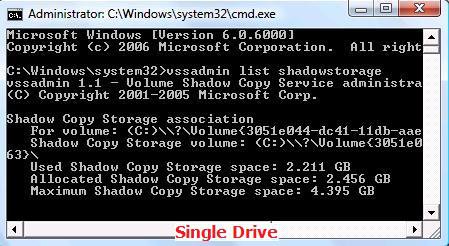
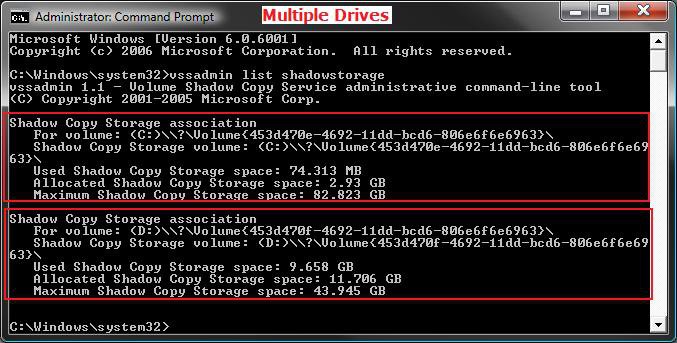
Used Shadow Storage space: 9.785 GB
Allocated Shadow Copy Storage space: 10.026 GB
Maximum Shadow Copy Storage space: 10.412 GB

that's sounds big
Sound_Asleep is offline   Reply With Quote
Old 06-16-2008  
Brink
Administrator
Brink has a reputation beyond reputeBrink has a reputation beyond reputeBrink has a reputation beyond reputeBrink has a reputation beyond reputeBrink has a reputation beyond reputeBrink has a reputation beyond reputeBrink has a reputation beyond reputeBrink has a reputation beyond reputeBrink has a reputation beyond reputeBrink has a reputation beyond reputeBrink has a reputation beyond repute
 
Brink's Avatar
 
Join Date: Apr 2007
Vista x64 Ultimate SP1
Posts: 14,743

Location: Texas, USA
Re: System Restore - disk space

Hi Sound_Asleep,

What is the size of your hard drive? By default this is 15% of the hard drive's size. It looks like you are using the space though with 9.785 GB used so far.

I suppose it depends on how many Restore Points you like to keep on hand to go back to. Check to see how many System Restore Points you have now. Method One in this tutorial will show you how to. Be sure to check Show Restore points older than 5 days. Plus, do not actually do a system restore.

System Restore - How to


You can then adjust the storage size up or down depending on if you want less or more restore points.

Hope this helps,
Shawn

There are no dumb questions, just the people that do not ask them.
Please post feedback to help others.
Brink is offline   Reply With Quote
Old 06-16-2008  
Sound_Asleep
Junior Member
Sound_Asleep is on a distinguished road
 
Join Date: May 2008
Vista Home Premium 32bit
Posts: 15

Re: System Restore - disk space

60 GB C Drive
5GB D Drive


Sound_Asleep is offline   Reply With Quote
Old 06-18-2008  
cabrón
Newbie
cabrón is on a distinguished road
 
Join Date: Jun 2008
Vista Ultimate x64 SP1
Posts: 3

Re: System Restore - disk space

Hi Brink/Shawn:

Not sure how you want to be addressed.

In the tutorial above, I had a couple questions.

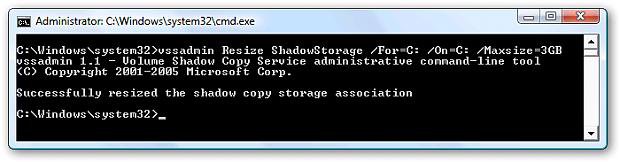
1. In same command prompt window from above, type for EX:
vssadmin Resize ShadowStorage /For=C: /On=C: /Maxsize=3GB and press Enter.
NOTE:
/For= Your main drive (EX: C: )
/On= Destination drive of backup
Maxsize= Size you want to limit it to, # + GB or MB

I'm not clear on what /For and /On means. Does this mean that if I chose a different drive for /On, it will allocate space on that drive instead of the drive with my OS (the C drive)? Or is it referring to a backup of the restore points, meaning there will be a copy?

I was set to restore to previous point and found that I only had 8 restore points going back 5 days. I wondered where the earlier ones were and did a search and read about the 5 day check box but I don't have any 5 day check box. I then found this forum thread and ran the command line and it shows:

Used: 6.149 GB
Allocated: 6.367 GB
Maximum: 8.587

If the OS had allocated the maximum, I might have been able to go back further to where I wanted to. As it is, it looks like I bumped up against the allocated space and my older restore points were deleted. I am guessing that the fact they only go back 5 days is a co-incidence and that there are none older than that because I hit the allocated limit.

So my 2nd question is why wasn't the allocated space set to the maximum?
cabrón is offline   Reply With Quote
Old 06-19-2008  
Brink
Administrator
Brink has a reputation beyond reputeBrink has a reputation beyond reputeBrink has a reputation beyond reputeBrink has a reputation beyond reputeBrink has a reputation beyond reputeBrink has a reputation beyond reputeBrink has a reputation beyond reputeBrink has a reputation beyond reputeBrink has a reputation beyond reputeBrink has a reputation beyond reputeBrink has a reputation beyond repute
 
Brink's Avatar
 
Join Date: Apr 2007
Vista x64 Ultimate SP1
Posts: 14,743

Location: Texas, USA
Re: System Restore - disk space

Hi Cabrón,

Welcome to Vista Forums.

You have it correct. The /On= is for what drive the restore points and shadow copies are stored on. The /For= is for the drive Vista is installed on.

The Allocated size is controlled by Vista and should auto adjust up to the MAX size if needed if the size of the restore point doesn't exceed the MAX size.

If you are wanting more restore points, then increasing the MAX size will give you more storage space for them. You might double the size to 17.174GB to see how that works for you.

Hope this helps,
Shawn

There are no dumb questions, just the people that do not ask them.
Please post feedback to help others.
Brink is offline   Reply With Quote
Old 06-19-2008  
cabrón
Newbie
cabrón is on a distinguished road
 
Join Date: Jun 2008
Vista Ultimate x64 SP1
Posts: 3

Re: System Restore - disk space

Thanks for the explanation, Shawn.

I am a little confused about shadow copies. Are they created as part of the restore point or are they made every time a file changes. I was envisioning 2 scenarios; one where I am changing a large spreadsheet several times a day and another where an application program was changing a file. For example, every time you update headers with a newsreader client, the file storing that header data would be changed, but you wouldn't necessarily want to keep previous versions of that file.

Sorry, I don’t' know much about this "previous version of a file" feature since this is the first I've heard about it.

If shadow copies are made apart from the restore point creation process, are the latest copies then rolled into the next restore point that is created and the in-between copies deleted, assuming such exist?
cabrón is offline   Reply With Quote
Old 06-19-2008  
Brink
Administrator
Brink has a reputation beyond reputeBrink has a reputation beyond reputeBrink has a reputation beyond reputeBrink has a reputation beyond reputeBrink has a reputation beyond reputeBrink has a reputation beyond reputeBrink has a reputation beyond reputeBrink has a reputation beyond reputeBrink has a reputation beyond reputeBrink has a reputation beyond reputeBrink has a reputation beyond repute
 
Brink's Avatar
 
Join Date: Apr 2007
Vista x64 Ultimate SP1
Posts: 14,743

Location: Texas, USA
Re: System Restore - disk space

Cabrón,


They are sorta intermangled together. Previous Versions will save copies of the file until it runs out of the MAX space. It will then start deleting the oldest copy of the file as a newer copy is added like restore points. System Restore uses these same Previous Versions, but instead are all grouped by date for the whole system instead of individual files. They work separately but use the same stored information basically, which affects both of them.

Hope this helps,
Shawn

There are no dumb questions, just the people that do not ask them.
Please post feedback to help others.
Brink is offline   Reply With Quote
Old 06-24-2008  
cabrón
Newbie
cabrón is on a distinguished road
 
Join Date: Jun 2008
Vista Ultimate x64 SP1
Posts: 3

Re: System Restore - disk space

I tried to change my storage to other drives where I have more space, but the command didn't work for me.

Click the image to open in full size.
cabrón is offline   Reply With Quote
Old 06-24-2008  
Brink
Administrator
Brink has a reputation beyond reputeBrink has a reputation beyond reputeBrink has a reputation beyond reputeBrink has a reputation beyond reputeBrink has a reputation beyond reputeBrink has a reputation beyond reputeBrink has a reputation beyond reputeBrink has a reputation beyond reputeBrink has a reputation beyond reputeBrink has a reputation beyond reputeBrink has a reputation beyond repute
 
Brink's Avatar
 
Join Date: Apr 2007
Vista x64 Ultimate SP1
Posts: 14,743

Location: Texas, USA
Re: System Restore - disk space

Cabrón,

You can change the drive location by checking the drive you want them stored on instead in the System Properties window. Step 6 in this tutorial will show you how to if needed.

System Restore

Hope this helps,
Shawn

There are no dumb questions, just the people that do not ask them.
Please post feedback to help others.
Brink is offline   Reply With Quote
Old 07-10-2008  
eejit
New fool
eejit is on a distinguished road
 
eejit's Avatar
 
Join Date: Jul 2008
Vista Ultimate x64
Posts: 12

Location: Dublin
Re: System Restore - disk space

Hey,
eh sorry when i type in the command line(in step 1) i get "No items found that satisfy the query"
does that mean i have no shadow copy space at all? or have i just done something very stupid?

ok here we go for €500(at the time) still in use(barely!!!)
x2 AMD Turion 62
x1 Toshiba SATA 80gb
1 Gb DDR2
ATi Raedeon Express 1150 (512mb) chipset
15.4" inch Truebrite LCD
x1 Burnt out usb port
x16 DVD
Fujitsu Wifi card
Boot time 5:09min

But seriously it would be faster to bring my desktop around with me, i built my own, see my profile for details!
eejit is offline   Reply With Quote
Comment

Tags
backup & restore, disk, space, system

Tutorial Tools
Display Modes


Similar Threads
Tutorial Tutorial Starter Category Comments Last Post
disk space Vs restore points t-4-2 Vista performance & maintenance 5 04-21-2008 12:08 PM
>31 GB disk space missing eating up all the HD w/ restore OFF Bryan Vista General 4 06-16-2007 04:07 AM
How To: Reduce Disk Space Used By Windows Vista System Restore Former captain of the Enterprise Vista General 2 04-24-2007 01:01 PM
system restore space usage Lou Vista General 6 03-16-2007 12:14 PM
System Restore increase disk space used Bronskimac Vista General 0 06-17-2006 09:49 AM


Vistax64.com is an independent web site and has not been authorized,
sponsored, or otherwise approved by Microsoft Corporation.
"Windows Vista", the Start Orb, and related materials are trademarks of Microsoft Corp.
© Designer Media 2005-2008
Tutorial powered by GARS 2.1.8m ©2005-2006

1 2 3 4 5 6 7 8 9 10 11 12 13 14 15 16 17 18 19 20 21 22 23 24 25 26 27 28 29 30 31 32 33 34 35 36 37 38 39 40 41 42 43 44 45 46 47 48 49