Vista Forums
Vista Forums Home Join Vista Forums Donate Vista Tutorials Store Tags

Welcome to Vista Forums we are your forum to discuss Windows Vista x64 and x86 systems.

Go Back   Vista Forums > Vista Forums > Tutorials

System Restore - disk space

Poll: Did this Tutorial help and work for you?
Poll Options
Did this Tutorial help and work for you?

Comment
 
Tutorial Tools Display Modes
<!-- google_ad_section_start -->System Restore - disk space<!-- google_ad_section_end -->
System Restore - disk space
How to Change the System Restore Disk Space Usage Amount in Vista
Published by Brink
05-29-2007

How to Change the System Restore Disk Space Usage Amount in Vista

Information
  By default Vista allocates 15% of your selected hard drive volume to storing System Restore points after installation. If System Restore is turned on much later, it may only allocate a minimum of 30% of the available free space instead. When the allocated space fills up with restore points, System Restore will delete the older restore points to make room for the new ones. System Restore needs at least 300 MB allocated to it to run, and will not run on a hard drive smaller than 1 GB. In the Vista Business and Ultimate versions, this area is also where backup copies of deleted or changed files are stored and made available through the Previous Versions feature (Shadow Copy). For more information about the Vssadmin command, see: Microsoft Technet: Vssadmin
NOTE
  System Restore needs to be turned on to be able to change it's storage size. To turn on System Restore and select what drives Vista is to create restore points for, see: How to Turn System Restore On or Off in Vista
WARNING
 
  • If you shrink the available storage space for a selected drive, Vista will kick out the system restore points and backups on a first-in, first-out basis. The oldest restore point will be deleted as the new one is saved when out of available max space. This will, of course, leave you with fewer restore options.
  • If you dual boot with Windows XP, then everytime you start in XP the System Restore Points and all except the most recent Complete PC Backup files in Vista get deleted. For how, see: How to Stop System Restore Points from being Deleted in Vista when Dual Booting with XP
Tip
  If you just want to free up some space, then you can run Disk Cleanup instead.
RELATED LINKS:


STEP ONE:
How to See the Current Allocated System Restore Size
1. Open the Start Menu.
2. In the white line (Start Search) area, type cmd.
3. Right click on cmd (at top), and click on Run as administrator. (See screenshot below)

cmd_Start_Menu.jpg

4. Click Continue button for UAC prompt.
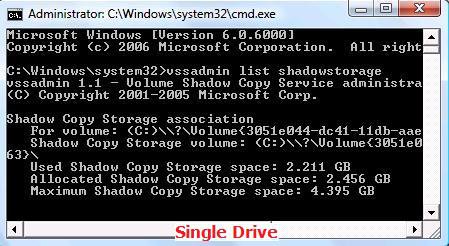
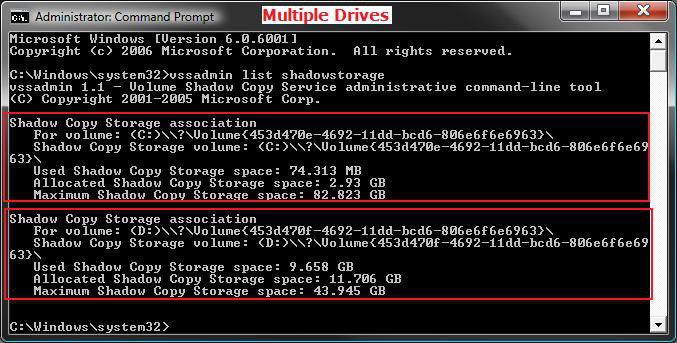
5. In the command prompt, type vssadmin list shadowstorage and press Enter. (See screenshots below)
NOTE: This will give your the details on the Used, Allocated, and Maximum spaces of Shadow Copies for the available disks that you selected to have restore points created for in step 6 here: How to Turn System Restore On or Off in Vista . The left screenshot is for just one drive selected, and the right screenshot is for two drives (C & D ) selected.

Shadow.jpgCMD_Multiple.jpg


STEP TWO:
How to Change the Maximum System Restore Size
NOTE
  If you disable or enable System Restore for a selected drive, the original default values will be set back and the restore points will be deleted. For how, see: How to Disable or Enable System Restore in Vista
1. In same command prompt window from above, type for EX:
WARNING: If you change the MAX size to a smaller size than the current Used size shown in METHOD ONE above, then the older restore points will be deleted to adjust to the new size. Nothing will happen to the restore points if you make the MAX size larger than the current Used size shown in METHOD ONE above.
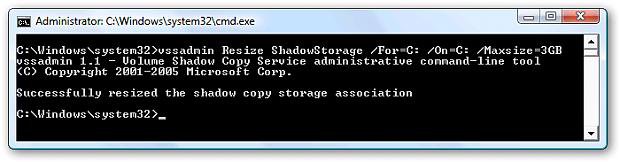
A) For the listed C: drive: vssadmin Resize ShadowStorage /For=C: /On=C: /Maxsize=3GB and press Enter.

B) For the listed D: drive: vssadmin Resize ShadowStorage /For=D: /On=D: /Maxsize=3GB and press Enter.
NOTE
 
See the screenshots below step 5 in OPTION ONE above under the Shadow Copy Storage association line for each drive listed.
Command Description
/For= The For volume: listed. (Ex: C or D above)
/On= The Shadow Copy Storage volume: listed. (Ex: C or D above)
/Maxsize= What you want to limit the maximum storage size of Shadow Copies (restore points) to. For example, # + GB or MB (Ex: 3GB or 3MB) This must be 1MB or larger.


2. You will get a Successfully resized the shadow copy storage association
3. If not, repeat step 1.
4. If yes, then check with STEP ONE above to confirm the change for the selected drive.
5. Close command prompt when done.

resize.jpg
That's it,
Shawn
Published by
Brink's Avatar
Administrator
Join Date: Apr 2007
Location: Texas, USA
Posts: 13,545
Rep Power: 200
Brink has a reputation beyond reputeBrink has a reputation beyond reputeBrink has a reputation beyond reputeBrink has a reputation beyond reputeBrink has a reputation beyond reputeBrink has a reputation beyond reputeBrink has a reputation beyond reputeBrink has a reputation beyond reputeBrink has a reputation beyond reputeBrink has a reputation beyond reputeBrink has a reputation beyond repute

Tutorial Tools

Applies to
All Vista Versions
64 Bit & 32 Bit

Rating
Skill Level
40%40%40%
2

Page copy protected against web site content infringement by Copyscape

Old 06-08-2007  
Clark1221
Enthusiast
Clark1221 is on a distinguished road
 
Join Date: Jun 2007
Vista HP
Posts: 11

Location: Seattle
Wow.......when I ran this command, the maxsize was 15.779 gigs. That's a lot of space for System Restore.
Read something like this:

Used = 286 mgs.
Allocated = 700 mgs.
Max Size = 15.779 gigs

Re-sized max size to 3 gigs.

Thanks for that tip.

Also......question:

Was wondering why 're-size SR' is basically hidden in Vista? XP and previous versions have all had the slider for re-sizing space used, making it very simple.
Clark1221 is offline   Reply With Quote
Old 06-09-2007  
Brink
Administrator
Brink has a reputation beyond reputeBrink has a reputation beyond reputeBrink has a reputation beyond reputeBrink has a reputation beyond reputeBrink has a reputation beyond reputeBrink has a reputation beyond reputeBrink has a reputation beyond reputeBrink has a reputation beyond reputeBrink has a reputation beyond reputeBrink has a reputation beyond reputeBrink has a reputation beyond repute
 
Brink's Avatar
 
Join Date: Apr 2007
Vista x64 Ultimate SP1
Posts: 13,545

Location: Texas, USA
Re: System Restore

Hi Clark,

It was an effort in dummy proofing Vista. In actuality, it made it harder on advanced users. Vista can use a lot of space on System Restore. If you have a big hard drive, I suppose one could afford the space.

Your Welcome,
Shawn

There are no dumb questions, just the people that do not ask them.
Please post feedback to help others.
Brink is offline   Reply With Quote
Old 01-04-2008  
DEANREILY
Newbie
DEANREILY is on a distinguished road
 
Join Date: Dec 2007
Vista Home Premium 32 Bit
Posts: 6

Re: System Restore - disk space

I have my Vista computer for a month and already have 17 GB used for restore points. I am very surprised how quickly my 160 GB drive is filling up. I only have about 1/3 of that free. What is a reasonable size for a restore point allocation. How may restore points does Vista keep before it begins to eliminate some?
DEANREILY is offline   Reply With Quote
Old 01-04-2008  
Brink
Administrator
Brink has a reputation beyond reputeBrink has a reputation beyond reputeBrink has a reputation beyond reputeBrink has a reputation beyond reputeBrink has a reputation beyond reputeBrink has a reputation beyond reputeBrink has a reputation beyond reputeBrink has a reputation beyond reputeBrink has a reputation beyond reputeBrink has a reputation beyond reputeBrink has a reputation beyond repute
 
Brink's Avatar
 
Join Date: Apr 2007
Vista x64 Ultimate SP1
Posts: 13,545

Location: Texas, USA
Re: System Restore - disk space

Hi Dean,

System Restore needs a minimum 300 MB of space for restore points. By default it is set to use 15 % maximum of your hard drive. When that runs out, it will then start deleting the oldest restore points one by one as new ones are added.

I would give it a 3 GB size to have room for enough restore points and shadow copies to be safe with multiple one to choose from.

Shawn

There are no dumb questions, just the people that do not ask them.
Please post feedback to help others.
Brink is offline   Reply With Quote
Old 01-04-2008  
DEANREILY
Newbie
DEANREILY is on a distinguished road
 
Join Date: Dec 2007
Vista Home Premium 32 Bit
Posts: 6

Re: System Restore - disk space

So the restore point allocation is 15% of 160 GB in my case? I think my report says 21+ GB is the maximum. They must be using the 141 GB they show for that partition where the 7 or 8 GB recovery partition and something else takes up the short fall from 160 GB. What is using up the other 11 or 12 GB? I will try the 3 GB you recommended and expanded it only if I make a major change in applications used.
DEANREILY is offline   Reply With Quote
Old 01-04-2008  
Brink
Administrator
Brink has a reputation beyond reputeBrink has a reputation beyond reputeBrink has a reputation beyond reputeBrink has a reputation beyond reputeBrink has a reputation beyond reputeBrink has a reputation beyond reputeBrink has a reputation beyond reputeBrink has a reputation beyond reputeBrink has a reputation beyond reputeBrink has a reputation beyond reputeBrink has a reputation beyond repute
 
Brink's Avatar
 
Join Date: Apr 2007
Vista x64 Ultimate SP1
Posts: 13,545

Location: Texas, USA
Re: System Restore - disk space

Dean,

If you had System Restore off, then turned it on later it may allocate a minimum of 30% of the available free space on the hard drive.

If you have a HP computer, then HP has it's own version of System Restore installed called HP Recovery Manager. You can uninstall this in Programs and Features.

Shawn

There are no dumb questions, just the people that do not ask them.
Please post feedback to help others.
Brink is offline   Reply With Quote
Old 01-04-2008  
DEANREILY
Newbie
DEANREILY is on a distinguished road
 
Join Date: Dec 2007
Vista Home Premium 32 Bit
Posts: 6

Re: System Restore - disk space

After I change my restore allocation is Vista likely to change the allocation without my knowing it or will Vista give me a warning if it has less allocated space than needed for setting a restore point?

I have an HP dv6449 with Vista Home Premium and the recovery sector is thought to be corrupted. I couldn't create a recovery set so HP sent me a recovery DVD. That 7 or 8 GB partition is not very useful unless I can easily put it in the primary Vista boot partition or use it for data or restore points. Is the latter possible? Does Vista Home Premium have disk image software?
DEANREILY is offline   Reply With Quote
Old 01-04-2008  
Brink
Administrator
Brink has a reputation beyond reputeBrink has a reputation beyond reputeBrink has a reputation beyond reputeBrink has a reputation beyond reputeBrink has a reputation beyond reputeBrink has a reputation beyond reputeBrink has a reputation beyond reputeBrink has a reputation beyond reputeBrink has a reputation beyond reputeBrink has a reputation beyond reputeBrink has a reputation beyond repute
 
Brink's Avatar
 
Join Date: Apr 2007
Vista x64 Ultimate SP1
Posts: 13,545

Location: Texas, USA
Re: System Restore - disk space

Dean,

Q1) If you turn System Restore off, it will reset back to it's default maximum size when you turn it back on the next time without any notice. Otherwise, it should not change without your assistance.


Q2) HP may have that partition protected. If they do, then you will only be able to get rid of it the next time you reinstall. During the installation process you can delete all partitions and create one big instead. If it is not protected, then this will show you how to delete it and extend the other partition into it to make one partition on the drive.

How to Delete and Extend a Partition with Disk Management in Vista

Shawn

There are no dumb questions, just the people that do not ask them.
Please post feedback to help others.
Brink is offline   Reply With Quote
Old 04-06-2008  
DjLevel9
DJ
DjLevel9 has a spectacular aura aboutDjLevel9 has a spectacular aura aboutDjLevel9 has a spectacular aura about
 
DjLevel9's Avatar
 
Join Date: Dec 2007
Vista 32 Ultimate SP1
Posts: 110

Location: Toronto Ontario Canada
Re: System Restore - disk space

Microsoft Windows [Version 6.0.6001]
Copyright (c) 2006 Microsoft Corporation. All rights reserved.

C:\Windows\system32>vssadmin list shadowstorage
vssadmin 1.1 - Volume Shadow Copy Service administrative command-line tool
(C) Copyright 2001-2005 Microsoft Corp.

Shadow Copy Storage association
For volume: (C\\?\Volume{9707de3c-9d94-11dc-bb54-806e6f6e6963}\
Shadow Copy Storage volume: (C\\?\Volume{9707de3c-9d94-11dc-bb54-806e6f6e69
63}\
Used Shadow Copy Storage space: 65.193 GB
Allocated Shadow Copy Storage space: 67.45 GB
Maximum Shadow Copy Storage space: 68.427 GB


on this Machine 500GB HD The Other 1 Teribyte.
do I need to fix this one ?
DjLevel9 is offline   Reply With Quote
 
Comment

Tags
space, disk, restore, system

Tutorial Tools
Display Modes


Vistax64.com is an independent web site and has not been authorized,
sponsored, or otherwise approved by Microsoft Corporation.
"Windows Vista", the Start Orb, and related materials are trademarks of Microsoft Corp.
© Designer Media 2005-2008
Tutorial powered by GARS 2.1.8m ©2005-2006

1 2 3 4 5 6 7 8 9 10 11 12 13 14 15 16 17 18 19 20 21 22 23 24 25 26 27 28 29 30 31 32 33 34 35 36 37 38 39 40 41 42 43 44 45 46 47 48