
How to Create a Shutdown Computer Shortcut in Vista
 Information
This will show you how to create a shortcut to Shutdown the computer with an optional time delay and notice before it shutdowns. This can be useful if you need to abort the shutdown.
 Note
NoteWhen you shut down the operating system, the OnShutdown method is called. However, the OnShutdown method does not change the system state to the Stop state. This behavior causes the service to appear unresponsive. Therefore, the shutdown process is delayed. If you have this problem, see: Microsoft Help and Support: KB943412 Hotfix Be sure to download the correct 32 or 64 bit version.
 Tip
TipIf you would like to create a keyboard shortcut key for this shortcut, then see: How to Create a Keyboard Shortcut for a Program in Vista
 METHOD ONE
NOTE: The shortcut in this method does not have the time delay on it. See the yellow TIP box below for how to add the time delay manually.
1. Click on the download button below to download the Shutdown.zip file.

2. Click on Save and save it to the Desktop.
3. Right click on the Shutdown.zip (on desktop) and click on Open.
4. Click Allow for UAC prompt.
5. Extract the Shutdown shortcut to the desktop.
6. Move the shortcut where you like for easy use of it.
7. You can now delete the Shutdown.zip file on the desktop if you like.
METHOD TWO 1. Right click on a empty area of the desktop.
2. Click on New and Shortcut.
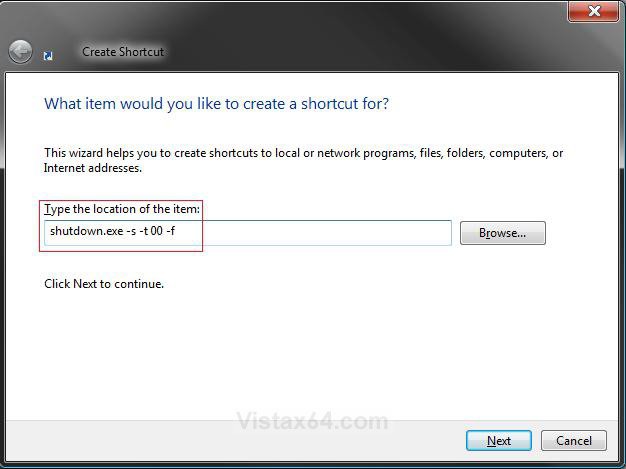
3. Type shutdown.exe -s -t 00 -f into the location field. (See screenshot below)
NOTE: If you want a delay and notification before shutdown, replace the number 0 at the end above with a number between 0 to 600 in seconds. 0 by itself gives you an immediate shutdown.
EX: If you want shutdown to wait 15 seconds before shutdown, you would type:
shutdown.exe -s -t 15 -f instead.
EX: If you want shutdown to wait 5 minutes before shutdown, you would type:
shutdow.exe -s -t 300 -f instead.
4. Click on the Next button.
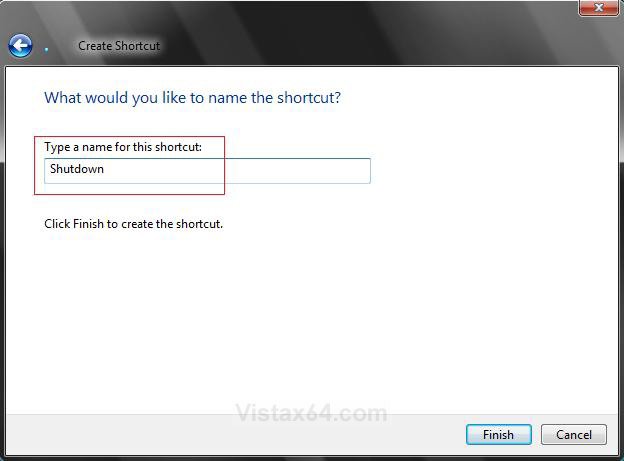
5. Type Shutdown for the name. (See screenshot below)
NOTE: You can name it anything you would like.
6. Click on the Finish button.
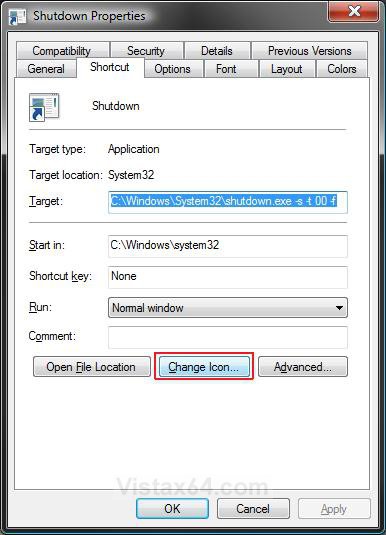
7. Right click on new Shutdown shortcut (On desktop) and click on Properties.
8. Click on the Change Icon button. (See screenshot below)
9. Click on OK at the pop-up window. (See screenshot below)
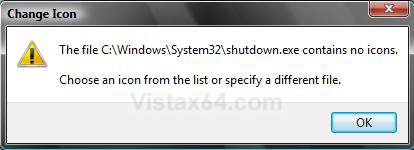
10. Click on the icon highlighted in blue below. (See screenshot below step 11)
NOTE: If you have your own icon you would rather use, then just navigate to where you have it saved. Vista needs a 256 bit icon for best viewing results.
11. Click on OK.
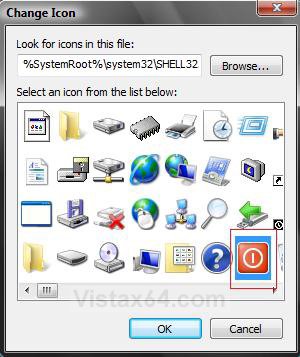
12. Click on OK to apply. (See screenshot for step 8)
13. Place or copy the new Shutdown shortcut to wherever you like it to be.
TipHow to Change or Add a Delay Time Until Shutdown to the Shortcut
1. Right click on new Shutdown shortcut (On desktop) and click Properties.
2. Under Shortcut tab, click in Target: area. (See screenshot from below step 8 in the above section)
3. Replace the number behind -t with a number in seconds between 0 to 600.
NOTE: 0 by itself gives you an immediate shutdown.
1. Right click on new Shutdown shortcut (On desktop) and click Properties.
2. Under Shortcut tab, click in Target: area. (See screenshot from below step 8 in the above section)
3. Replace the number behind -t with a number in seconds between 0 to 600.
NOTE: 0 by itself gives you an immediate shutdown.
EX: If you want shutdown to wait 15 seconds before shutdown, you would replace it with:
C:\Windows\System32\shutdown.exe -s -t 15 -f instead.
NOTE: See Target: in screenshot from below step 8 in the above section.
EX: If you want shutdown to wait 5 minutes before shutdown, you would replace it with:
C:\Windows\System32\shutdown.exe -s -t 300 -f instead.
4. Click on OK to apply.That's it,
Shawn
Related Tutorials
- How to Create a Hibernate Shortcut in Vista
- How to Create a Log Off Shortcut in Vista
- How to Create a Lock Computer Shortcut in Vista
- How to Shutdown, Restart, Switch User, Log Off, Sleep, or Lock Vista from the Keyboard
- How to Create a Restart Computer Shortcut in Vista
- How to Create a Abort Shortcut in Vista
- How to Remove or Show the Start Menu Shutdown Options in Vista
- How to Change Power Button Settings for the Start Menu and Case in Vista
- How to Create a Search Desktop Shortcut on Vista
- How to Speed Up Shutdown in Vista
- How to Create a Switch User Desktop Shortcut in Vista
- How to Create a Power Options Shortcut in Vista
- How to Restore the Administrative Tools Shortcuts in Vista
- How to Create a Sleep Shortcut on the Desktop in Vista
- How to Remove or Restore the Vista Log On Shutdown Options
- Enable or Disable Detailed Logon, Logoff, and Shutdown Status Messages in Vista
Attachments

Last edited:
