How to Do a System Restore in Vista
 Information
This will show you how to do a System Restore to help you restore your computer's system files, programs, and registry settings to an earlier point in time. It will not affect your personal files, such as e‑mail, documents, or photos, so it cannot help you restore a deleted file.
 Tip
Tip- Be sure to use a restore point dated before the problem started or it will not help you.
- If this System Restore did not help or made things worse and you need or want to undo it, then see: How to Undo the Last System Restore in Vista
 Note
NoteSystem Restore uses this Service with this setting: Volume Shadow Copy
This service is set to Manual by default.
This service is set to Manual by default.
 Warning
- If you dual boot with Windows XP, then everytime you start in XP the System Restore Points and all except the most recent Complete PC Backup files in Vista get deleted. For how, see: How to Stop System Restore Points from being Deleted in Vista when Dual Booting with XP
- If you have missing restore points, then also see: System Restore "restore points" are missing or deleted
 METHOD ONE
  Note
Note- If you have not done a system restore before, you will not have the two options below in the first screen of the video below. Just click Next to see your restore point choices.
- If the System Restore was unsuccessfully completed, then you can try to do a System Restore in Safe Mode or use Method Two below instead.
1. Open the Start Menu.
2. Click All Programs - Accessories - System Tools - System Restore.
2. In the white line (Start Search) area, type rstrui and press Enter.
NOTE: rsrui is the EXE file for System Restore. C:\Windows\System32\rstrui.exe
NOTE: After you click Choose a different restore point, make sure you check Show Restore points older than 5 days, if this is displayed, to see your older restore points.
2. Click All Programs - Accessories - System Tools - System Restore.
A) Go to step 3.
OR
2. In the white line (Start Search) area, type rstrui and press Enter.
NOTE: rsrui is the EXE file for System Restore. C:\Windows\System32\rstrui.exe
A) Click Continue for UAC prompt.
3. Click on the Click to Play button in the video below.
NOTE: After you click Choose a different restore point, make sure you check Show Restore points older than 5 days, if this is displayed, to see your older restore points.
[media]http://www.vistax64.com/download/flash/system_restore.swf[/media]
METHOD TWO 1. Boot from either your retail Vista installation disc or created Vista repair disc into the System Recovery Options screen.
2. Click on the System Restore option. (See screenshot below)
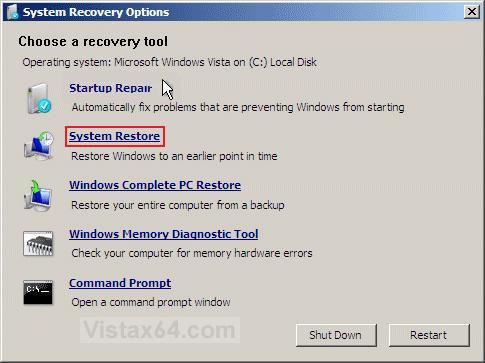
3. Follow the rest of the instructions in the video at step 3 on in METHOD ONE above for how to do the rest.
That's it,2. Click on the System Restore option. (See screenshot below)
Shawn
Related Tutorials
- How to Create a System Restore Shortcut in Vista
- How to Create a Create System Restore Point Shortcut in Vista
- How to Create a System Restore Point in Vista
- How to Undo the Last System Restore in Vista
- How to Change the System Restore Disk Space Usage in Vista
- How to Turn System Restore On or Off in Vista
- How to Restore the Complete Computer from a Complete Backup and Restore Image in Vista
- How to Restore Backup Files in Vista
- How to Restore Previous Versions of a File and Folder in Vista
- How to Start Vista in Safe Mode
- How to Perform a Repair Installation for Vista
- How to Stop System Restore Points from being Deleted in Vista when Dual Booting with XP
- How to Create a Vista Recovery Disc
- How to Restore Missing Default Start Menu Shortcuts in Vista
- How to Restore TrustedInstaller as Owner of a File in Vista
- How to Change the Automatic System Restore Point Settings in Vista Task Scheduler
- How to Enable or Disable Create Vista System Restore Point when New Device Driver is Installed
- How to Enable or Disable Create Vista System Restore Point when a Application is Installed
- How to Backup and Restore the Registry in Windows 7 and Vista
- How to Extract Files from the Vista Installation DVD
Last edited: