
How to Restart Explorer in Vista
 Information
The executable module in Vista that contains the Start Menu, Taskbar, desktop and file manager user interfaces. EXPLORER.EXE is a Windows process that runs automatically at startup and remains an active process. If you have a Explorer error, or you made a change to the system that requires a computer restart to apply, and you do not want to wait for the whole computer to restart to do it, then this gives you a quick restart without restarting the whole system.
 Note
Note If you are using Windows Dreamscene or Stardock DeskScapes, then you will get a Dreamscene failure error and the desktop background will go blank when Explorer.exe is restarted. To fix this, simply select any normal wallpaper, then select a Windows Dreamscene or Stardock Deskscapes Dream.
 Tip
TipDoing a log off and log on also acts as a quick restart.
 Warning
Do not use these methods for a required restart after a program or Windows Update installation. A full computer restart is usually necessary for this.
 OPTION ONE
1. To Close Explorer.exe
A) Open the Start Menu.
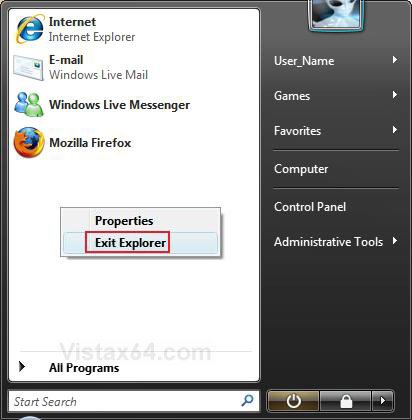
B) Press and hold Ctrl+Shift and right click on a empty area of the Start menu. (See screenshot below)
C) Releas Ctrl+Shift and click on Exit Explorer.
2. To Restart Explorer.exer
A) Do steps 1 and 3 in Option Two below.
OPTION TWO 1. Open Task Manager.
NOTE: Press Ctrl+Shift+Esc, or right click on the taskbar and click Task Manager.
2. To Close Explorer.exe
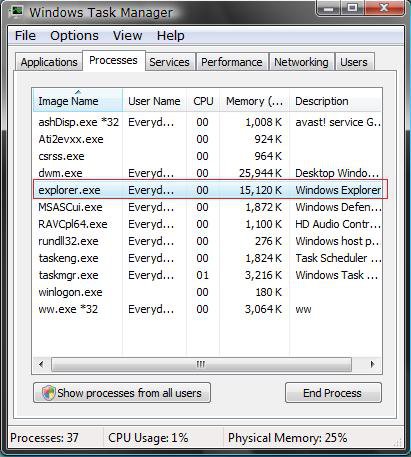
A) Click on the Processes tab. (See screenshot below)
B) Click on explorer.exe and click on the End Process button.
C) Click on End Process in the confirmation prompt. (See screenshot below)
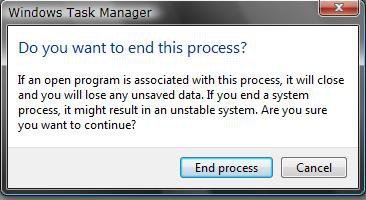
D) You will now notice that Explorer has stopped.
NOTE: The taskbar, deskop icons, and any open Windows Explorer windows are now gone.
3. To Restart Explorer.exe
A) Click on File in Task Manager. (See screenshot for step 3 above)
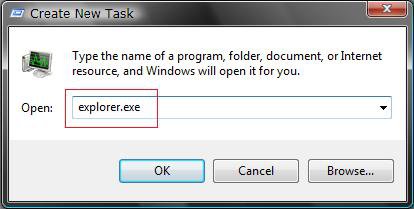
B) Click on New Task (Run...).
C) Type explorer.exe and click OK. (See screenshot below)
D) You will notice Explorer restarting.
NOTE: The taskbar and desktop icons will be back.
4. Close Task Manager.
That's it,Shawn
Related Tutorials
- How to Add "Restart Explorer" to the Desktop Context Menu
- How to Shutdown, Restart, Switch User, Log Off, Sleep, or Lock Vista from the Keyboard
- How to Create a Restart Computer Shortcut in Vista
- How to Enable or Disable Task Manager in Vista
- How to Switch Between Regular and Small Footprint Mode in Vista Task Manager
- How to Open and Close a Application and Process in Vista Task Manager
- How to Use the Resource Monitor in Vista
Attachments
Last edited:
