Windows Vista Forums
Vista Forums Home Join Vista Forums Windows 7 Forum Vista Tutorials Tags
Welcome to Windows Vista Forums. Our forum is dedicated to helping you find solutions with any problems, errors or issues you are experiencing with Windows Vista. The Vista forum also covers news and updates and has an extensive Windows Vista tutorial section that covers a wide range of tips and tricks.

Go Back   Vista Forums > Vista Forums > Tutorials

Vista - Keyboard Shortcuts - Underline

Comment
 

Keyboard Shortcuts - Underline

How to Underline Keyboard Shortcuts in Vista
Published by Brink
07-15-2007

How to Underline Keyboard Shortcuts in Vista
Information
  This will show you how to temporarily or always have the Alt + key shortcuts underlined in all of the Vista menus. This can make it easier for you to use the keyboard shortcuts for these menu options.
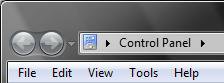
RELATED LINKS:EXAMPLE: Not Underlined and Underlined
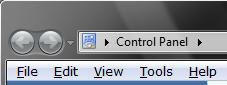
Name:  Before.jpg
Views: 1826
Size:  5.1 KBName:  Example.jpg
Views: 1849
Size:  5.6 KB


METHOD ONE:
To Temporarily Underline the Keyboard Shortcuts
NOTE
  This way will only temporarily underline the shortcut keys for the menu options until you use the shortcut, press the Alt key again, or click on anything else.
1. Press the Alt key.


METHOD TWO:
To Turn Underlined Keyboard Shortcuts On or Off
NOTE
  This way will underline the shortcut keys for the menu items until you turn it off again.
1. Open the Control Panel. (Classic View)

2. Click on the Click to play button in the video below.

That's it,
Shawn

Published by
Brink's Avatar
Administrator

Join Date: Apr 2007
Location: Texas, USA
Posts: 25,924
Rep Power: 150
Brink has a reputation beyond reputeBrink has a reputation beyond reputeBrink has a reputation beyond reputeBrink has a reputation beyond reputeBrink has a reputation beyond reputeBrink has a reputation beyond reputeBrink has a reputation beyond reputeBrink has a reputation beyond reputeBrink has a reputation beyond reputeBrink has a reputation beyond reputeBrink has a reputation beyond repute

Tutorial Tools

Applies to
All Vista Versions
64 Bit & 32 Bit

Comment

Tutorial Tools


Similar Threads
Tutorial Category
keyboard shortcuts Vista General
Keyboard shortcuts Vista file management
Always show menu underline (keyboard accelerators) Vista General
Keyboard shortcuts for program's shortcuts do not work Vista General
Keyboard shortcuts for Shortcuts does not work on next logon Vista General


Vista Forums is an independent web site and has not been authorized,
sponsored, or otherwise approved by Microsoft Corporation.
"Windows Vista", the Start Orb, and related materials are trademarks of Microsoft Corp.
© Designer Media Ltd
Tutorial powered by GARS 2.1.8m ©2005-2006

1 2 3 4 5 6 7 8 9 10 11 12 13 14 15 16 17 18 19 20 21 22 23 24 25 26 27 28 29 30 31 32 33 34 35 36 37 38 39 40 41 42 43 44 45 46