
How to Change the Advanced Appearance Settings in Vista
 Information
This will show you how to change the Advanced Appearance settings that affect the size, color, and text for all windows in Vista.
Here's How:
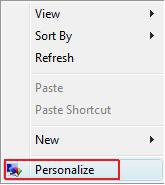
1. Right click on a empty area of your desktop and click on Personalize. (See screenshot below)
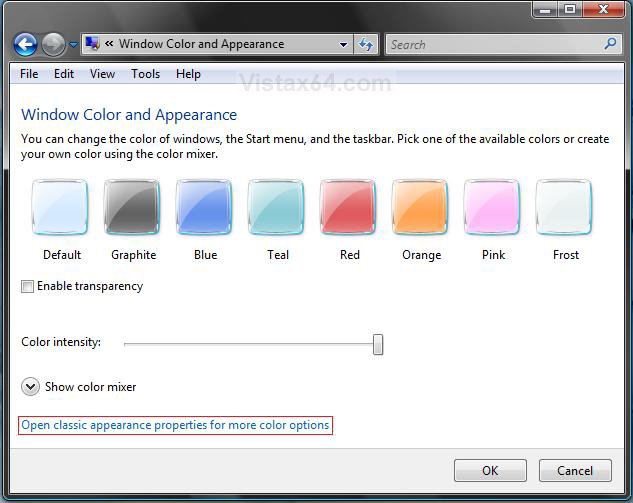
2. Click on Window Color and Appearace. (See screenshot below)

3. Click Open classic appearance properties for more color options. (See screenshot below)
NOTE: If the color scheme Windows Aero (All Vista editions except Home Basic) or Windows Vista Standard (Only Vista Home Basic) is not running, then you will not see this screen. Instead you will see the screen below step 4 instead. To change the clor scheme, see: How to Change the Color Scheme in Vista
A) Click on a color you want to use for the windows, Start menu, and Taskbar.
B) Adjust the Color intensity by sliding the bar to the left to decrease the intensity and to the right to increase the intensity.
NOTE: If the Color intensity is set to far to the right, then the window borders and taskbar may be to dark to be transparent if enabled.
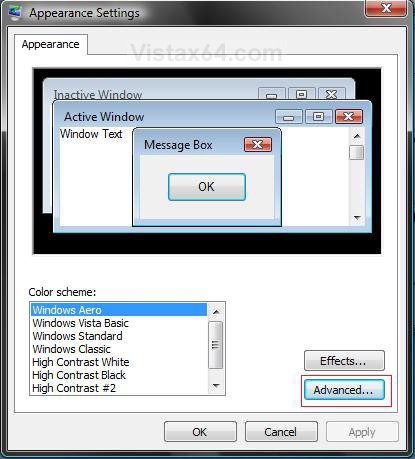
4. Click on the Advanced button. (See screenshot below)
NOTE: The Windows Aero color scheme is not available for the Vista Home Basic version. The Vista Home Basic edition will have the Windows Vista Standard color scheme instead.
5. You will now see the Advanced Appearance settings window.
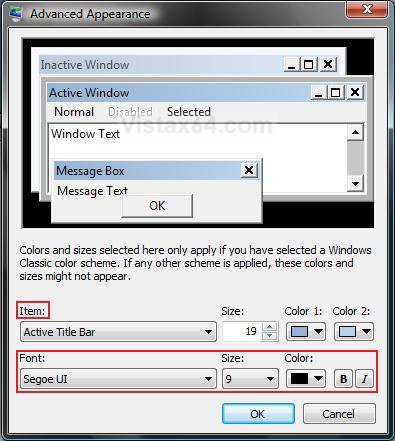
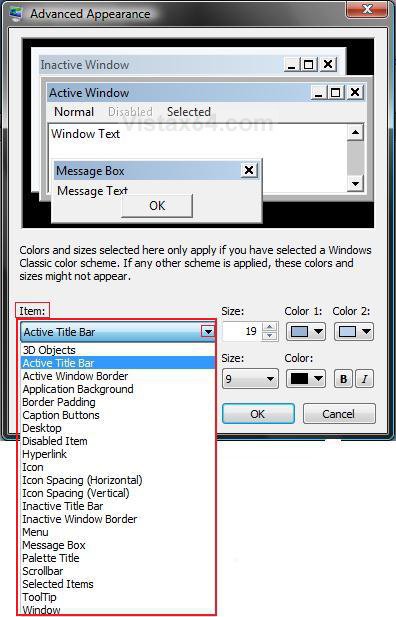
6. To Change a Window Item Setting : (See screenshots above)
A) To Select a Item - Click on the Item drop down menu and select a window item you want to change.
NOTE: You can also click on the different displayed windows at the top of the Advanced Appearance window to select a Item to.
B) To Change the Item Size - Change the Size number to what you want.
C) To Change the Item Color - Click on the Color 1 and Color 2 drop down menu and select a color.
NOTE: The Color 1 and Color 2 refer to items like the title bar and how it fades from Color 1 to Color 2 across the bar. However, the color change will only work in the Windows Classic theme. See: How to Change the Color Scheme in Vista
7. To Change the Font Settings for the Selected Item - (See screenshots below step 5)
NOTE: The font settings that are grayed out are not available with the selected color scheme. See: How to Change the Color Scheme in Vista and How to Change the Default Vista Fonts
A) To Change the Item Font - Click on the Font drop down menu and select a font. (See screenshot below)
B) To Change the Item Font Size - Click on the Size drop down menu and select a number for the size. The higher the number, the larger the size.
C) To Change the Item Font Color - Click on the Color drop down menu and select a color.
D) To Have the Item Font in Bold - Click the B button to highlight it. If it is not highlighted, then the font will not be in bold.
E) To Have the Item Font in Italic - Click on the I button to highlight it. If it is not highlighted, then the font will not be in italic.
8. Repeat steps 6 and 7 until you change all the Items you wanted.
9. Click OK when done. (See screenshot below step 5)
10. Click OK to apply. (See screenshot below step 4)
11. Close the Personalization window. (See screenshot below step 3B)
That's it,Shawn
Related Tutorials
- How to Backup and Restore Advanced Appearance Settings in Windows
- How to Change the Size of Window Borders in Vista
- How to Change the Visual Effects Options for Appearance and Performance in Vista
- How to Open and Change Folder Options in Vista
- How to Open Each Folder in the Same or it's Own Separate Window in Vista
- How to Change a Default Open Window Size for a Shortcut in Vista
- How to Change the ClearType Font Settings in Vista
- How to Enable or Disable Aero Glass Transparency
- How to Change the Color Scheme in Vista
- How to Change the DPI Scale in Vista
- How to Change the Screen Resolution in Vista
- How to Change the Default Vista Fonts
- How to Change a Computer Event Sound in Vista
- How to Change the Desktop Theme in Vista
- How to Enable or Disable the Translucent Selection Rectangle in Vista
- How to Display Small or Large Icons in the Vista Start Menu
- How to Change the Color Bit Depth Settings in Vista
- How to Allow or Prevent the Color Scheme to be Changed in Vista
Attachments

Last edited by a moderator:


 mona
mona ps I don't know who set up these smileys, but I'm one of the goofballs that love them!! Except for the ones that have bad things attached and mess up the computer when you download them..
