
How to Add or Delete a Shortcut or Folder From the Start Menu in Vista
 Information
This will show you how to add or delete items from both the Normal and Classic Start Menu All Programs area to help organize it.
 Note
NoteThis is the location for the two Start menu folders. You will need to have Show hidden files and folders checked in Folder Options to see these locations.
[TABLE=class:-grid,-width:-700][TR][TD]
Account
[/TD]
[TD]
Location
[/TD][/TR]
[TR][TD]
All Users
[/TD]
[TD]
C:\ProgramData\Microsoft\Windows\Start Menu\Programs
[/TD][/TR]
[TR][TD]
Specific User
[/TD]
[TD]
C:\Users\(user name)\AppData\Roaming\Microsoft\Windows\Start Menu\Programs
[/TD][/TR][/TABLE]
[TABLE=class:-grid,-width:-700][TR][TD]
Account
[/TD]
[TD]
Location
[/TD][/TR]
[TR][TD]
All Users
[/TD]
[TD]
C:\ProgramData\Microsoft\Windows\Start Menu\Programs
[/TD][/TR]
[TR][TD]
Specific User
[/TD]
[TD]
C:\Users\(user name)\AppData\Roaming\Microsoft\Windows\Start Menu\Programs
[/TD][/TR][/TABLE]
 Warning
If you place a folder shortcut in the Start Menu, it will not expand like a folder when clicked on. Instead, it will only open in a new window when clicked on. You will need to create a New Folder in the Start Menu for the folder to expand in it.
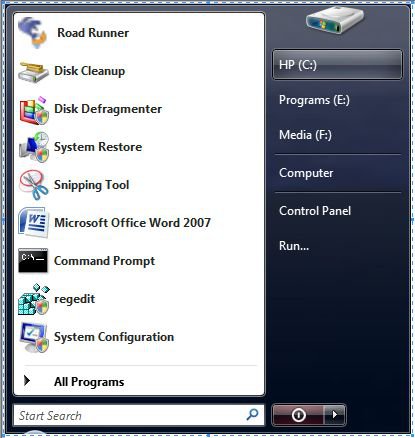
NOTE: The shortcuts and folders are in the All Programs part of the left white side of the Start Menu. (See left screenshot below)
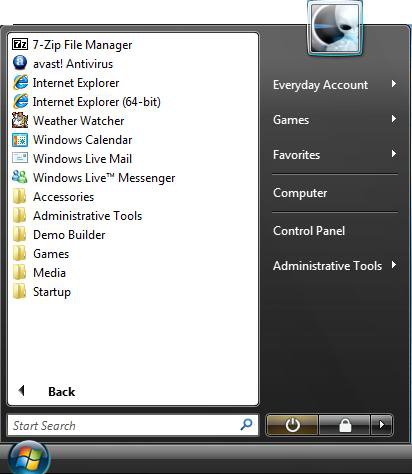
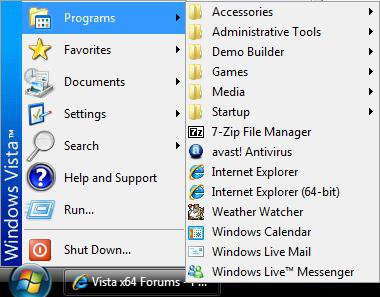
 OPTION ONE
1. Open the Start Menu.
2. Click on All Programs.
NOTE: You will click on Programs instead for the Classic Start Menu.
3. Right click on the shortcut or folder and click on Delete.
NOTE: If the folder or shortcut came from the All Users location above, then you will need to approve the deletion first.
OPTION TWO
For Only the Classic Start Menu
1. Right click on the Start button and click on Customize.
2. Click on Properties.
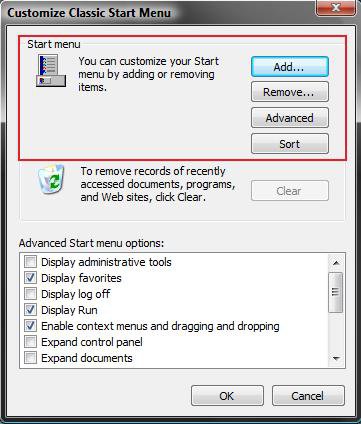
3. Choose your action: (See screenshot below table)
[TABLE=class:-grid,-width:-700][TR][TD]Action
[/TD]
[TD]
Description
[/TD][/TR]
[TR][TD]
Add
[/TD]
[TD]
Browse to a program .exe file location to create a shortcut.
[/TD][/TR]
[TR][TD]
Remove
[/TD]
[TD]
Delete a shortcut from the Classic Start Menu.
[/TD][/TR]
[TR][TD]
Advanced
[/TD]
[TD]
Takes you to the window in the section below for both versions.
[/TD][/TR]
[TR][TD]
Sort
[/TD]
[TD]
Just sorts the shortcuts in order.
[/TD][/TR][/TABLE]
For Both the Normal and Classic Start Menu
1. Right click on the Start button.
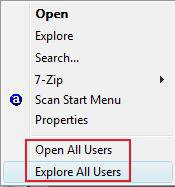
2. To Open the Start Menu Used by All Users
A) Click on Open All Users or Explore All Users. (See screenshot below)
NOTE: They open to the same location of: C:\ProgramData\Microsoft\Windows\Start Menu\Programs
B) Go to step 4.
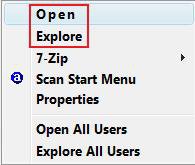
3. To Open the Start Menu Used by the Current Single User Only
A) Click on Explore or Open. (See screenshot below)
NOTE: They open to the location of:
C:\Users\(user name)\AppData\Roaming\Microsoft\Windows\Start Menu\Programs
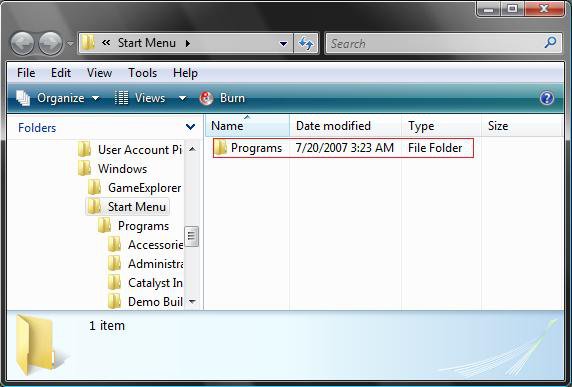
4. Click on the Programs folder. (See screenshot below)
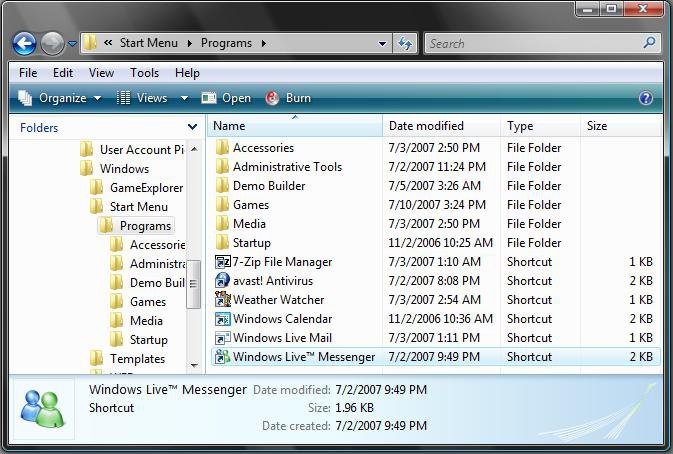
5. Add or delete the shortcut or folder for the Start Menu like you would any other file in a Explorer window. (See screenshot below)
A)To Delete a Folder or Shortcut - Right click on the folder or shortcut and click on Delete.
WARNING: Deleting a folder will also delete any shortcuts that were in the folder.
B)To Add a Shortcut - Drag and drop or cut/copy and paste the shortcut into this location.
NOTE: To prevent the shortcut from easily losing it's correct Target (Program that it opens), create a shortcut directly from the program's .exe file (EX: C:\Program Files). Right click the .exe and click on Send To and Desktop
(create shortcut), and then move the shortcut into this location.
C)To Add a Folder - Right click an empty area in the window and click on New and Folder.
NOTE: See the Warning at the top of the tutorial.
That's it,
Shawn
Related Tutorials
- How to Pin a Program Icon to the Start Menu in Vista
- How to Change the Start Menu to Classic View in Vista
- How to Customize the Start Menu in Vista
- How to Turn the Recent Items List On or Off in Vista
- How to Customize the Context Menu for the Start Menu in Vista
- How to Pin a Folder Icon to the Start Menu in Vista
- How to Change the Windows Explorer Columns in Vista
- How to Display Small or Large Icons in the Vista Start Menu
- How to Enable or Disable the All Programs List in the Vista Start Menu
- How to Add or Remove Help from the Normal and Classic Vista Start Menu
- How to Restore the Start Menu Search Button after Installing the Vista SP1
- How to Enable or Disable the Taskbar and Start Menu Properties Window in Vista
- How to Restore Missing Default Start Menu Shortcuts in Vista
Attachments

Last edited by a moderator:


 Ted
Ted


