How to Check and Change the Startup Programs in Vista
 Information
These are the programs that load when Vista starts. This will show you how to add, remove, enable, or disable a startup program. For a list and description of startup programs with recommendations to have your listed program startup or not, see: SystemLookup - Startup List
 Note
NoteTo test if you have a startup program issue, startup in Safe Mode. If you startup into Safe Mode without any problems, then it could be a startup program. You can then disable the startup programs one by one until you find the one causing the problem.
You can also view the startup logs in Event Viewer (C:\Windows\system32\eventvwr.msc) under Applications and Services Logs, Microsoft, Windows, Diagnostics-Performance, and Operational. The logs will be in the middle to show you what ran at startup, how long it took, and more.
You can also view the startup logs in Event Viewer (C:\Windows\system32\eventvwr.msc) under Applications and Services Logs, Microsoft, Windows, Diagnostics-Performance, and Operational. The logs will be in the middle to show you what ran at startup, how long it took, and more.
 Warning
- First, check the program itself to see is it has an option to allow or not allow it to load or start when Vista starts. Most programs that startup with Vista will have this option.
- It is a good idea to check the startup programs list every once in awhile to help make sure that some malware is not starting up with Vista too.
 Tip
TipWHY ARE ELEVATED PROGRAMS BLOCKED BY UAC AT STARTUP ?
CREDIT TO: jimmah.com: "Windows has blocked some startup programs"
A program or shortcut is listed as a startup program in either your startup folder, your run registry key, or the system-wide startup folder or run key, It will run at startup when you log on to your user account.
Because your startup folder and personal run registry key can be written to by non-administrative (non-elevated) programs, Windows cannot allow elevated (Run as administrator) programs to run at startup from these locations without prompting you with UAC first. Not doing so would allow untrusted non-administrative programs to place malware in these locations that would be started with Run as administrator privileges when you next logged on.
However, it is also inconvenient to be prompted by UAC every time you startup your computer or log on for each elevated program in the startup program list. Besides being extremely annoying, a malicous program could potentially put hundreds of malicious administrative programs in these locations, creating an endless series of prompts for you to deal with, creating a denial-of-service scenario.
Since neither option is desirable, Microsoft has decided to not allow elevated applications from running at startup automatically from these locations without prompting you with a UAC prompt to allow it permission to run first.
It would also not be a good idea to allow elevated programs to be launched from the machine-wide startup folder and run registry location, since elevated programs can only be started inside of administrative accounts, or from a standard user account with an administrator's credentials entered on-demand from a UAC prompt.
The reason the task scheduler solution (See Method Two inOPTION ONEbelow in tutorial) is allowed to work is because non-administrative programs cannot create scheduled tasks automatically, so there is no way for malware to abuse this task service in the way that is possible with the other startup methods by being in the one of the default startup program list locations.
CREDIT TO: jimmah.com: "Windows has blocked some startup programs"
A program or shortcut is listed as a startup program in either your startup folder, your run registry key, or the system-wide startup folder or run key, It will run at startup when you log on to your user account.
Because your startup folder and personal run registry key can be written to by non-administrative (non-elevated) programs, Windows cannot allow elevated (Run as administrator) programs to run at startup from these locations without prompting you with UAC first. Not doing so would allow untrusted non-administrative programs to place malware in these locations that would be started with Run as administrator privileges when you next logged on.
However, it is also inconvenient to be prompted by UAC every time you startup your computer or log on for each elevated program in the startup program list. Besides being extremely annoying, a malicous program could potentially put hundreds of malicious administrative programs in these locations, creating an endless series of prompts for you to deal with, creating a denial-of-service scenario.
Since neither option is desirable, Microsoft has decided to not allow elevated applications from running at startup automatically from these locations without prompting you with a UAC prompt to allow it permission to run first.
It would also not be a good idea to allow elevated programs to be launched from the machine-wide startup folder and run registry location, since elevated programs can only be started inside of administrative accounts, or from a standard user account with an administrator's credentials entered on-demand from a UAC prompt.
The reason the task scheduler solution (See Method Two inOPTION ONEbelow in tutorial) is allowed to work is because non-administrative programs cannot create scheduled tasks automatically, so there is no way for malware to abuse this task service in the way that is possible with the other startup methods by being in the one of the default startup program list locations.
 OPTION ONE
METHOD ONE:
Through the Startup Folder
1. For the Current User Account Only
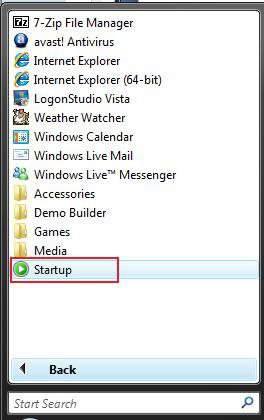
A) Open the Start Menu.
NOTE: You can also open the Startup folder by typing shell:startup in the white line (Start Search) area and pressing Enter.
B) Click on All Programs.
C) Right click the Startup folder and click Open. (See screenshot below)
NOTE: This hidden folder is also located at:
C:\Users\(Username)\AppData\Roaming\Microsoft\Windows\Start Menu\Programs\Startup
D) Go to step 3.
2. For All User Accounts
NOTE: This will need to be done while logged on to a administrator account.
A) In Windows Explorer, go to the hidden folder below.
C:\ProgramData\Microsoft\Windows\Start Menu\Programs\Startup
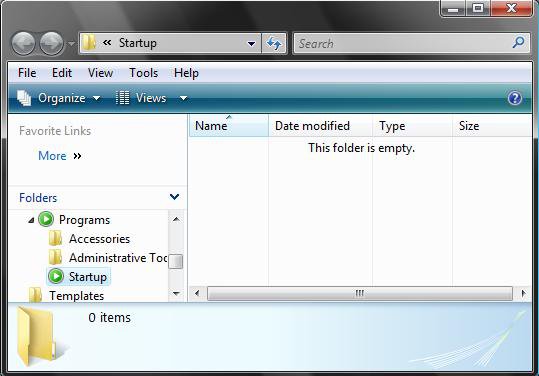
3. Cut/Copy and Paste a shortcut for the program you want to start at startup inside the Startup folder window. (See screenshot below)
NOTE: If you already added a program by this method here, then you can also delete it here to remove it from startup as well. It would be best to use a shortcut that was created straight from the .EXE of the program.
4. Close Window when done.
METHOD TWO:
Through Task Scheduler
NoteVista will block a startup program that requires it to Run as administrator from running at startup with a UAC prompt in Vista. To get around this, you can create a task in Task Scheduler. See the WHY ARE ELEVATED PROGRAMS BLOCKED BY UAC AT STARTUP ? in the yellow TIP box section at the top for more on this.
1. For how, see: How to Create a Task in Vista Task Scheduler.
NOTE: Create a task to Start a program (Step 20) with the program's EXE file, check Run with highest privileges (Step Four), and have it set to be triggered at startup (Step Five).
OPTION TWO NoteThere are three methods: Windows Defender, System Configuration (msconfig), or the Registry Editor. First check the program itself to see is it has a option to allow or not allow it to load or start when Vista starts and uncheck it. Most programs will have this option.
METHOD ONE:
With Windows Defender
1. Open Control Panel. (Classic View)
2. Click on the Windows Defender icon.
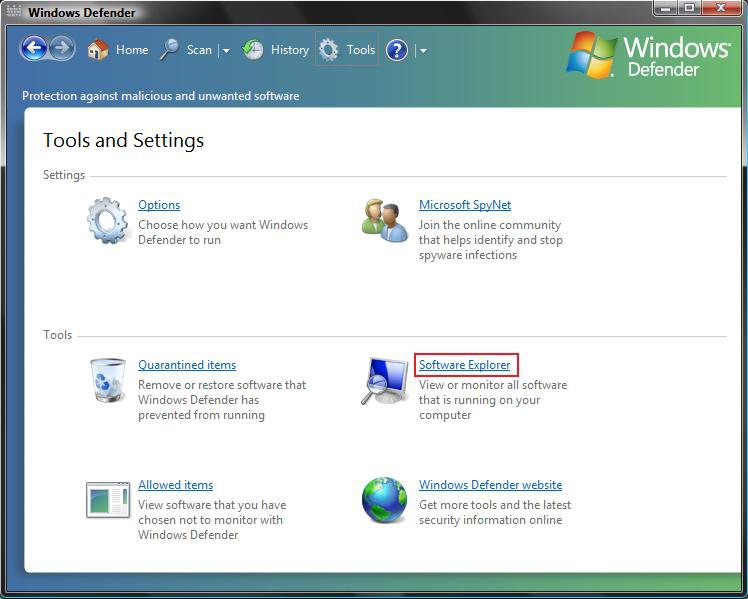
3. In Windows Defender, click on Tools at top.
4. Click on Software Explorer. (See screenshot below)
5. Click on the Show for all users button. (See screenshot below)
6. Click on Continue in the UAC prompt.
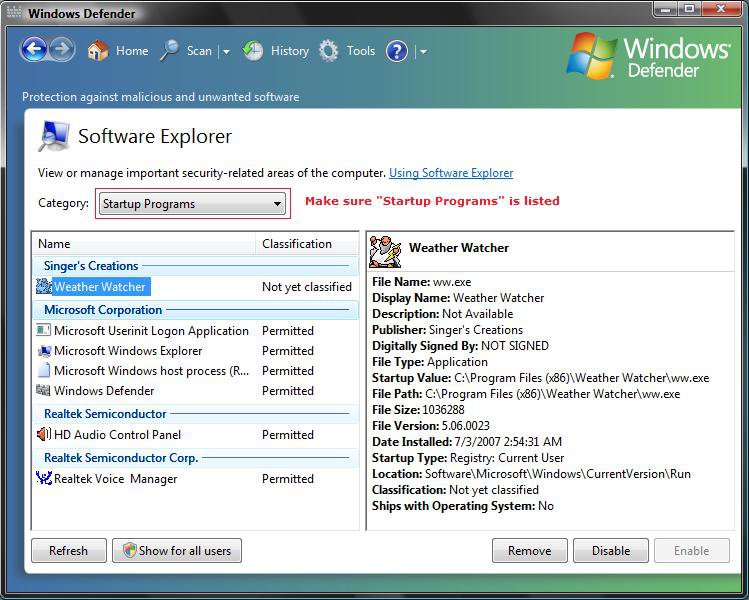
7. Under Category:, make sure that Startup Programs is selected. (See screenshot below)
8. Select the startup program you want to change.
NOTE: The Remove, Disable, and Enable buttons will be grayed out for Vista system programs and device drivers to prevent changes to them. You can use Device Manager for the driver programs, and also msconfig in METHOD TWO below for these. If the program is blocked, then click Quarantined items in the screenshot below step 4 to see if it is listed to be approved by you. Also check in MSCONFIG in METHOD TWO below to see if it unchecked there.
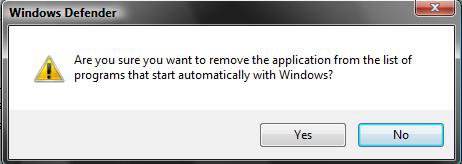
9. To Remove a Startup Program
A) Click on the Remove button. (See screenshot above)
B) Click on Yes to the confirmation prompt. (See screenshot below)
C) The startup program is now removed.
10. To Disable a Startup Program
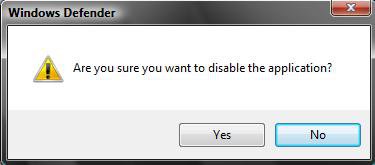
A) Click on the Disable button. (See screenshot above step 9)
B) Click on Yes to the confirmation prompt. (See screenshot below)
C) The startup program is now disabled.
11. To Enable a Startup Program
A) Click the Enable button. (See screenshot above step 9)
NOTE: This will only be available if you have only disabled the startup program and not removed it.
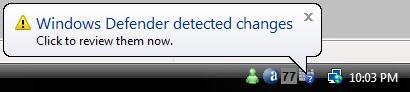
B) Click on the Windows Defender notification dialog box or icon on the taskbar. (See screenshot below)
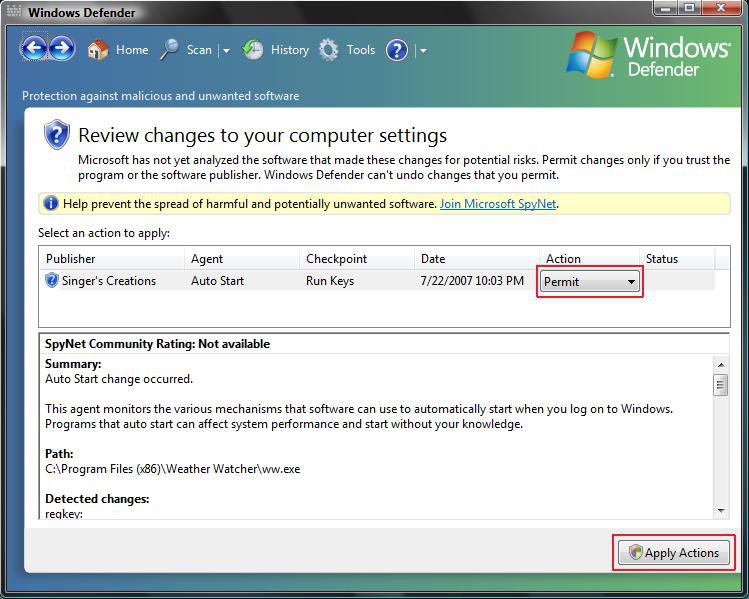
C) Under Action column, confirm that Permit is listed. If not, then change it. (See screenshot below)
D) Click on the Apply Actions button.
E) The startup program is now enabled again.
12. Close Windows Defender.
METHOD TWO:
With System Configuration - msconfig
NoteThis does not close the startup program until the next restart. You must close it yourself or restart the computer to apply. You should look in msconfig (Option Two, Method Two above) to help you determine what each startup program listed in the registry is for.
1. Open System Configuration.
NOTE: In Administrative Tools in Control Panel or Start Menu.
A) Click on System Configuration.
2. Go to step 3 below.
OR
1. Open the Start Menu.
2. In the white line (Start Search) area, type msconfig and press Enter.
3. Click on Continue in the UAC prompt.
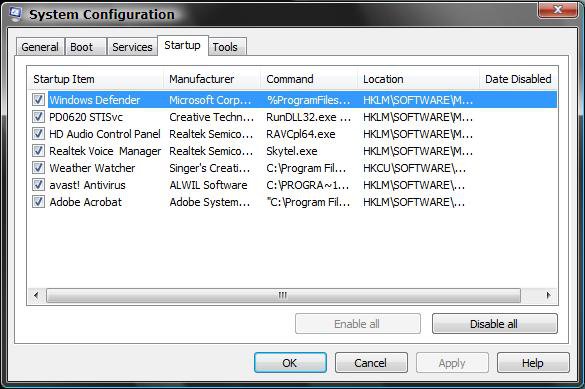
4. Click on the Startup tab. (See screenshot below)
5. To Disable a Startup Program
A) Uncheck the startup program.
NOTE: Click Disable all button to uncheck all startup programs.
6. To Enable a Startup Program
A) Check the startup program you already disabled (unchecked) before.
NOTE: Click Enable all button to check all startup programs.
7. Click on OK.
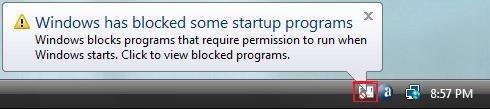
8. When the computer restarts next. You will get this message below. (See screenshot below)
9. Click on the tray icon.
NOTE: You will get this blocked notification everytime you restart until you check this box (Step 12 below), or Enable or Remove the startup program. Checking the box will only stop the blocked notification for these changes to the startup program. If you make more changes to the startup programs, then this blocked notification will reappear until you check the box again.
10. You will now see this menu box. (See screenshot below)
NOTE: If you want to go to Windows Defender Software Explorer menu (See screenshot from the above section's step 8), then click Show or remove blocked startup programs.
11. Click on Run blocked program and click on System Configuration Utility.

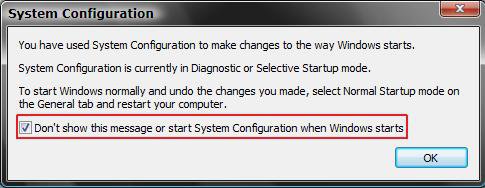
12. To Stop the "Windows has Blocked Some Startup Programs" and leave the startup program disabled -
A) Check the box and click on OK. (See screenshot below step 13)
NOTE: You will get this blocked notification (Step 9 above) everytime you restart until you check this box, or Enable or Remove the startup program. Checking the box will only stop the blocked notification for these changes to the startup program. If you make more changes to the startup programs, then this blocked notification will reappear until you check the box again.
13. To just Open System Configuration again -
A) Leave the box unchecked and click on OK. (See screenshot below)
B) Go to back step 4 to make any changes
again.
METHOD THREE:
With the Registry Editor
NoteIf you want to modify only the list of legacy programs that run at Startup, use Registry Editor. If you want to add a startup program, then do the OPTION ONE section above. It is safer.
1. Open the Start Menu.
2. In the white line (Start Search) area, type regedit and press Enter.
3. Click on Continue in the UAC prompt.
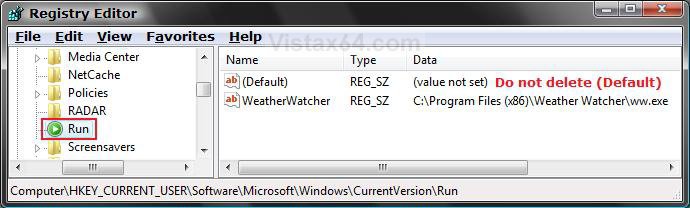
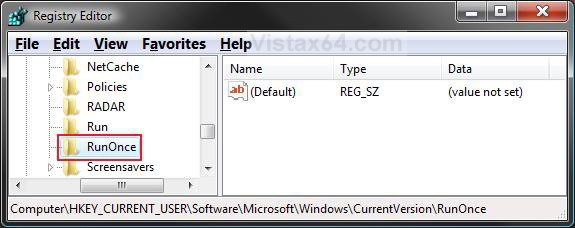
4. For Current User Only:
A) In regedit, go to: (See screenshots below step 5)
HKEY_CURRENT_USER\Software\Microsoft\Windows\CurrentVersion\Run
AND
HKEY_CURRENT_USER\Software\Microsoft\Windows\CurrentVersion\RunOnce
5. To Delete a Startup Program
A) In the right pane, right click on the program listed that you do not want to run at startup and click Delete.
B) Click on Yes to confirm the deletion.
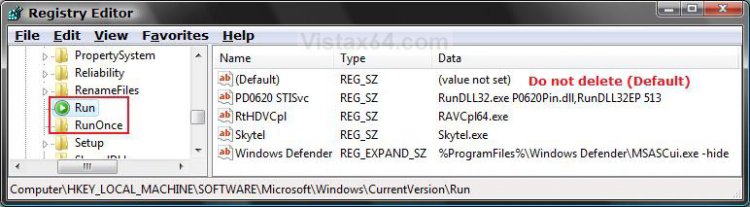
6. For All User Accounts:
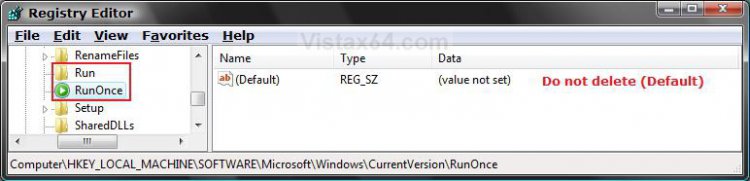
A) In regedit, go to: (See screenshots below step 7)
HKEY_LOCAL_MACHINE\SOFTWARE\Microsoft\Windows\CurrentVersion\Run
AND
HKEY_LOCAL_MACHINE\SOFTWARE\Microsoft\Windows\CurrentVersion\RunOnce
7. To Delete a Startup Program
A) In the right pane, right click on the program listed that you do not want to run at startup and click on Delete.
B) Click on Yes to confirm the deletion.
8. Close regedit when done.
METHOD FOUR:
With CCleaner
1. If you have not already, download and install the free program CCleaner.
2. Open CCleaner, and click on the Tools icon (left side) and on the Startup button. (See screenshot below)
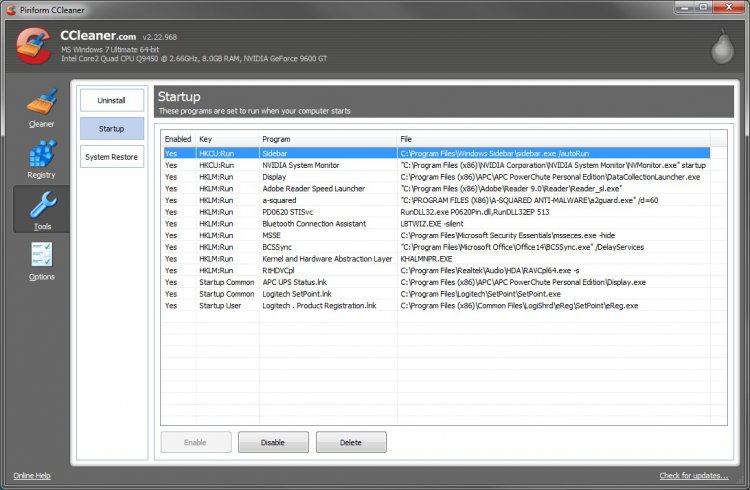
3. Select a startup item, then either enable, disable, or delete it from the Vista startup programs list.
That's it,
Shawn
Related Tutorials
- How to Do a Startup Repair in Vista
- How to Speed Up Vista Boot Up
- How to Disable or Enable Vista Services With a Advice Guide
- How to Speed Up the Performance of Vista
- How to Change Windows Defender Notification Options
- How to Open and Close a Application and Process in Vista Task Manager
- How to Boot Up in and Use Advanced Boot Options in Vista
- How to Start Vista in Safe Mode
- How to Turn Narrator On or Off in Vista
- How to Turn Magnifier On or Off in Vista
- How to Create a Task in Vista Task Scheduler
- How to Have a Task Wake up the Computer to Run in Vista Task Scheduler
- How to Enable or Disable the Vista Welcome Center at Startup
- How to Enable or Disable the Vista Welcome Center for All Users Startup
- How to Run Specific Programs and Documents at User Logon in Windows 7 and Vista
- How to Turn On or Off Bing Desktop to Run at Windows Startup
Attachments
Last edited by a moderator: