Windows Vista Forums
Vista Forums Home Join Vista Forums Windows 7 Forum Vista Tutorials Tags
Welcome to Windows Vista Forums. Our forum is dedicated to helping you find solutions with any problems, errors or issues you are experiencing with Windows Vista. The Vista forum also covers news and updates and has an extensive Windows Vista tutorial section that covers a wide range of tips and tricks.

Go Back   Vista Forums > Vista Forums > Tutorials

Vista Tutorial - Logon screen - Change

Comment
 

Logon screen - Change

How to Change the Logon Screen in Vista
Published by Brink
07-24-2007

How to Change the Logon Screen in Vista


Information
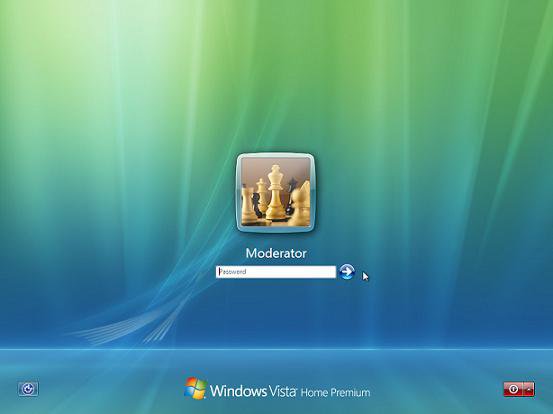
  The Logon screen is the screen that shows the accounts on your computer when you are logging on. This consists of the Welcome, Shutdown, Lock Computer, Switch User, Logon, and Logoff screens. The Logon screens are saved as a .logonvista file.
Tip
  For free LogonStudio screens to download, see:
www.wincustomize.com/skins.aspx?libid=65&c=1
RELATED LINKS:EXAMPLE: Default Logon Screen
logon_screen.jpg

Here's How:
1. Download and save the free Stardock LogonStudio Vista program.
NOTE: Be sure to download the Vista version of the program after you click on the Download button from the site link above.

2. Install the program.

3. Click on the LogonStudio Vista shortcut to run. (See screenshot below)
Name:  Shortcut.jpg
Views: 45932
Size:  4.1 KB
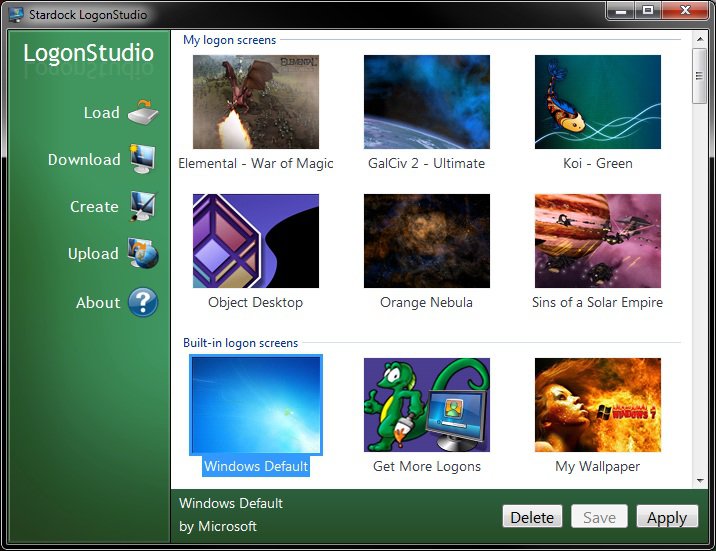
4. Click on Continue in the UAC Prompt. The main window will now open. (See screenshot below)
logon_studio.jpg
OPTIONS:
NOTE: See screenshot above. Click on these buttons to the left to do the action described.

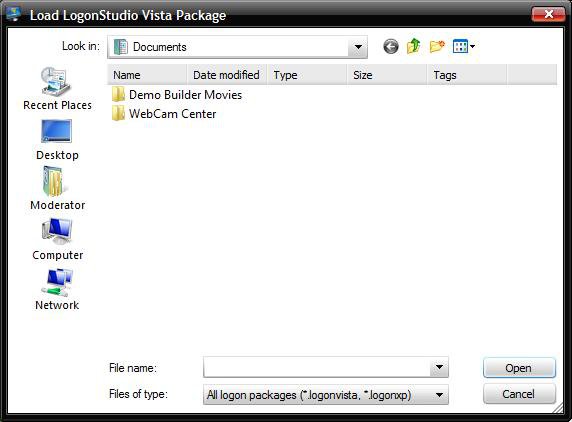
5. Load - To load a .logonvista file you already created from step 7 below or downloaded from step 6 below. (See screenshot below)
A) Navigate to the location of the saved file.

B) Select it and click on Open.

C) Go to step 10.
load.jpg
6. Download - To download a .logonvista file from:
http://www.wincustomize.com/skins.aspx?libid=65&c=1

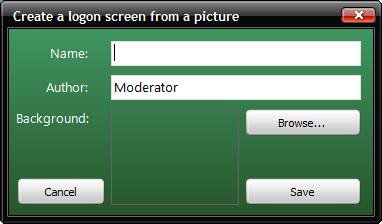
7. Create - To create a .logonvista file from any size .jpg, .png, or .bmp file you want.
NOTE: If the image you use is to small it may be distored.
A) Type in a name for the .logonvista file. (See screenshot below)

B) Click on Browse.
Name:  Create.jpg
Views: 46214
Size:  15.1 KB
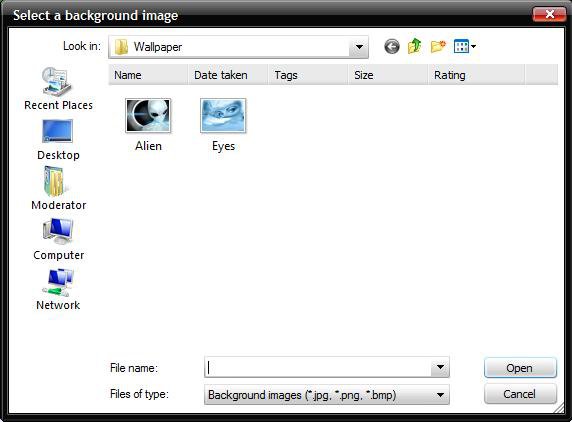
C) Navigate to the location of the .jpg, .png, or .bmp file. (See screenshot below)

D) Select it and click on Open.
browse.jpg
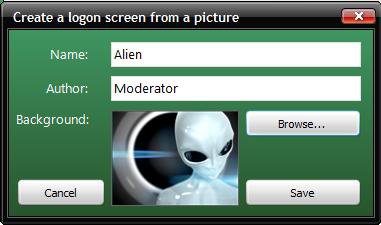
E) Click on Save to add it to the main display window. (See screenshot below)
NOTE: By default, the logon screens are saved in the hidden system folder C:\ProgramData\Stardock\LogonStudio Vista.
Name:  Alien.jpg
Views: 46189
Size:  17.5 KB
F) Go to step 10.
8. Upload - This takes you to the same website from step 6 above, except you can register and upload a logon screen you created for everyone else to be able to download and use.

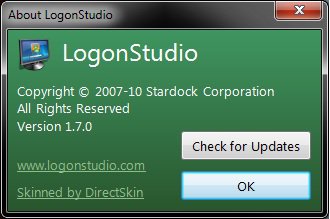
9. About - Tells you the about information for Logon Studio. (See screenshot below)
Name:  About.jpg
Views: 45776
Size:  14.6 KB
After you Loaded or Created a .logonvista file Options:
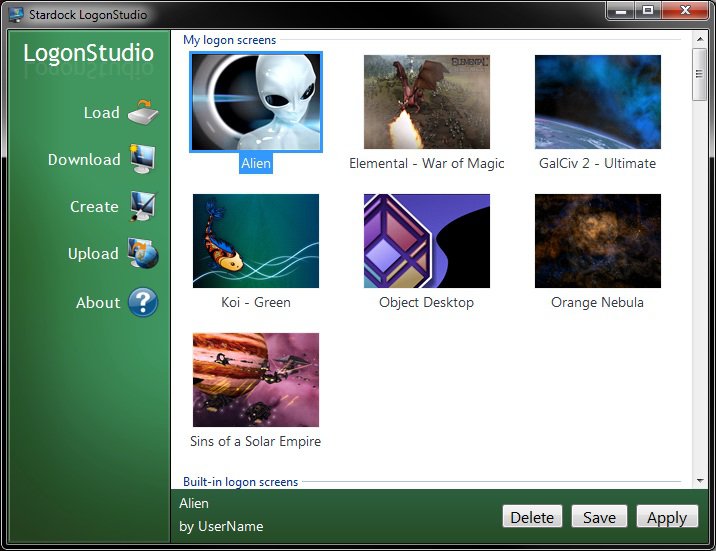
NOTE: This will now have the .logonvista file in the display window. EX: My Alien avatar (See screenshot below)

10. Save - To save the selected .logonvista file to where you want it.

11. Apply - To change the logon screen to what you have selected.
NOTE: When you click Apply, you will be taken to the logon screen with your new screen where you will need to log back on. You will be taken back to where you left off after you logon.

12. Delete - To delete a selected .logonvista file.
A) Click on Yes for the confirmation prompt.
example.jpg
That's it,
Shawn

Published by
Brink's Avatar
Administrator

Join Date: Apr 2007
Location: Texas, USA
Posts: 25,806
Rep Power: 150
Brink has a reputation beyond reputeBrink has a reputation beyond reputeBrink has a reputation beyond reputeBrink has a reputation beyond reputeBrink has a reputation beyond reputeBrink has a reputation beyond reputeBrink has a reputation beyond reputeBrink has a reputation beyond reputeBrink has a reputation beyond reputeBrink has a reputation beyond reputeBrink has a reputation beyond repute

Tutorial Tools

Applies to
All Vista Versions
64 Bit & 32 Bit

Old 08-08-2007  
Worshaw
Newbie


Join Date: Aug 2007
Vista


Re: Logon screen - Change

well thats seems simple so thanks and im gona try this

My System SpecsSystem Spec
Old 08-08-2007  
Brink
Administrator


Join Date: Apr 2007
Vista x64 Ultimate SP2, Windows 7 (7600) x64


Re: Logon screen - Change

Your welcome Worshaw,

Stardock made this a really simple program to use. I like the fact that you can use just about any image you want without it having to be a specific size.
My System SpecsSystem Spec
Old 08-09-2007  
Worshaw
Newbie


Join Date: Aug 2007
Vista


Re: Logon screen - Change

thats cool it all works fine and it was quite simple thanks once again
My System SpecsSystem Spec
Old 12-06-2007  
niGht kiD
hello KiDdy


Join Date: Dec 2007
Vista™ Business 32-bit


Re: Logon screen - Change

Yeah, this is really a cool program!
My System SpecsSystem Spec
Old 12-31-2007  
NicksonBlue
Pro


Join Date: Dec 2007
Windows Vista Ultimate


Re: Logon screen - Change

i choose to use the original one coz it looks more like vista :P
My System SpecsSystem Spec
Old 01-19-2008  
GSi-R
Member


Join Date: Jan 2008
Vista Business 32bit


Re: Logon screen - Change

Many thanks for this. Appreciated.!
My System SpecsSystem Spec
Old 01-19-2008  
Brink
Administrator


Join Date: Apr 2007
Vista x64 Ultimate SP2, Windows 7 (7600) x64


Re: Logon screen - Change

Your welcome GSi-R, and thanks to Stardock for making the free program.

Shawn
My System SpecsSystem Spec
Old 01-22-2008  
Killerchronic
Linux <3


Join Date: Jan 2008
Ultimate x64


Re: Logon screen - Change

thanks for this, didn't realise there was a free app for this!
Stardock do some really great products.
My System SpecsSystem Spec
Old 02-03-2008  
Bare Foot Kid
Technophile Wannabe


Join Date: Feb 2008
Vista 64-bit Ultimate Win7 64-bit Ultimate XP SP3 32-bit Pro


Re: Logon screen - Change

Hey Brink, I have been reading a bunch of stuff from you and
all I can say is you are too much, thanks for all your hard work.
If no one else says it you are appreaciated Bare Foot Kid
My System SpecsSystem Spec
Comment

Tutorial Tools


Similar Threads
Tutorial Category
Change logon screen General Discussion
Black Screen until Vista Logon Screen -no video signal Graphic cards
Solved How to change logon screensaver General Discussion
Logon screen change General Discussion


Vista Forums is an independent web site and has not been authorized,
sponsored, or otherwise approved by Microsoft Corporation.
"Windows Vista", the Start Orb, and related materials are trademarks of Microsoft Corp.
© Designer Media Ltd
Tutorial powered by GARS 2.1.8m ©2005-2006

1 2 3 4 5 6 7 8 9 10 11 12 13 14 15 16 17 18 19 20 21 22 23 24 25 26 27 28 29 30 31 32 33 34 35 36 37 38 39 40 41 42 43 44 45 46