
How to Change Maximum Download Sessions in Internet Explorer 7
 Information
This will show you how to change the number of simultaneous downloads from a web server to what you set them to for only the current or all user acounts. 10 is usually a good maximum. 2 is the default maximum.
 Note
Note- The current HTTP specification limits the number of simultaneous file downloads to two downloads, plus one on stand by. As connection speeds increase, the number of simultaneous downloads to a single web server may not be enough for your needs.
- If you visit a web page with lots of images (and supporting files like CSS styles and Javascript), then you can have a slower browsing experience. On average, your browser would have to make more than 40 requests to the server before it can assemble the complete page. Requesting all the files you need with the default 2 at a time is going to be slower than requesting say 10 files at a time.
 Tip
TipThis will work with any other web browser you are using as well. For example, FireFox.
 OPTION ONE
Using a REG File Download:
1. Click on the Download button below to download the file below.
Current User 10Max.reg

2. Click on Save and save the .reg file to the desktop.
3. Right click on the downloaded .reg and click on Merge.
4. Click on Run, Continue, Yes, and OK if prompted.
5. Log off and log on, or restart the computer to apply the changes.
6. When done, you can delete the downloaded .reg if you like.
Manually in Registry Editor:
1. Open the Start Menu.
2. In the white line (Start Search) area, type regedit and press Enter.
3. Click on Continue in the UAC prompt.
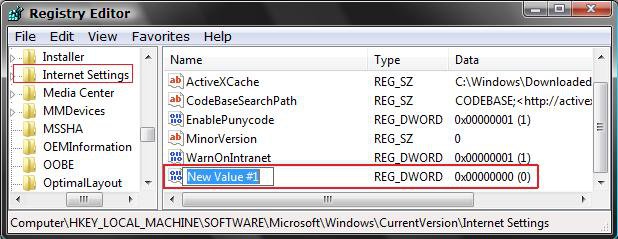
4. In regedit, go to: (See screenshot below step 5)
HKEY_CURRENT_USER\Software\Microsoft\Windows\CurrentVersion\Internet Settings
5. In right pane, right click on a empty area and click on New and DWORD (32-bit) Value.
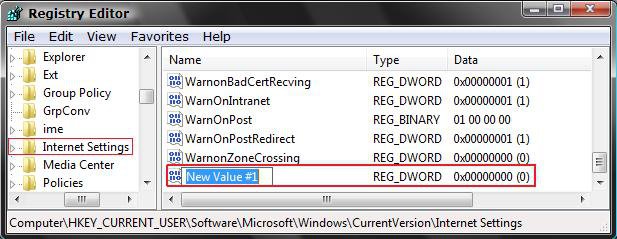
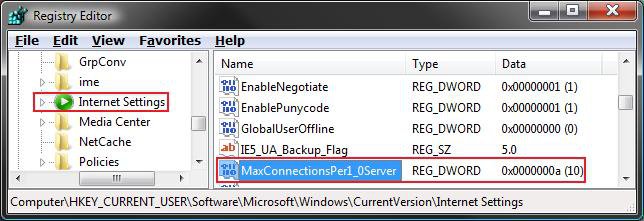
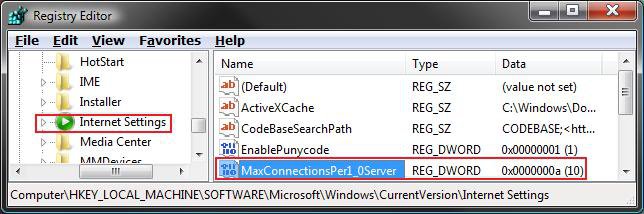
6. Type MaxConnectionsPer1_0Server and press Enter.
7. In right pane, right click MaxConnectionsPer1_0Server and click on Modify. (See screenshot below)
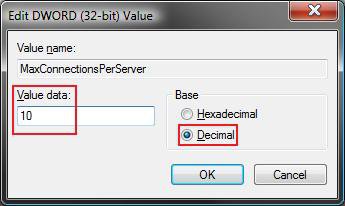
8. Dot Decimal, then type 10 and click on OK. (See screenshot below)
NOTE: The default value is 2, but you can change it to your needs.
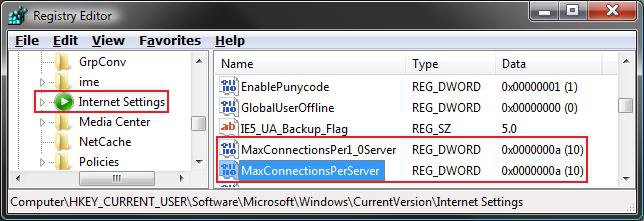
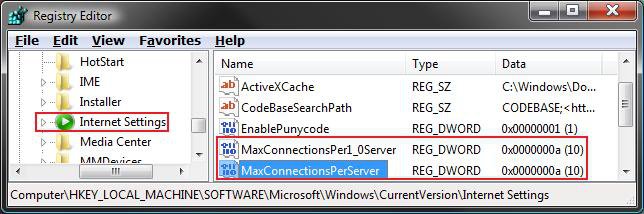
9. Repeat steps 5 to 8 above, but use MaxConnectionsPerServer instead now.
10. When done you should see this below boxed in red.
11. Close regedit.
12. Log off and log on, or restart the computer to apply the changes.
OPTION TWO For All User Accounts
Using a REG File Download:
1. Click on the Download button below to download the file below.
All Users 10Max.reg
Attachments

Last edited by a moderator:


