How to Edit a Word in the Spell Checker Custom Dictionary in Windows Mail
 Information
The custom dictionary is the secondary dictionary for Windows Mail Spell Checker. It is the dictionary that you customize by adding your own words that you would like Spell Checker to also use while spell checking your message. This can be helpful if you misspelled a word you added to the custom dictionary from Spell Checker and you want to remove or edit the word. You may also want to add a word or add a whole list without having to do it one at a time in the normal way.
 Note
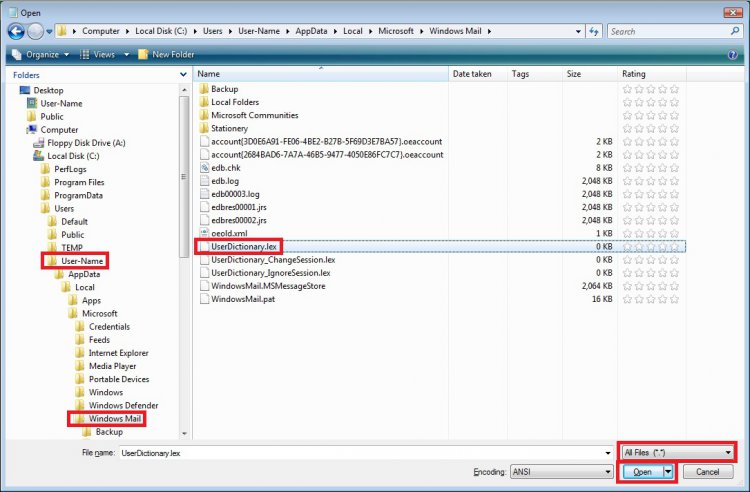
Note The custom dictionary file used by Windows Mail is located at this hidden system file location below. If you have changed the default location of the WinMail stores folder, then the UserDictionary.lex file will be located there instead.
C:\Users\(user-name)\AppData\Local\Microsoft\Windows Mail\UserDictionary.lex
C:\Users\(user-name)\AppData\Local\Microsoft\Windows Mail\UserDictionary.lex
 Tip
TipWindows Mail only has the English (US), French (France), German (Germany), Spanish (International Sort) languages available in it. If you want or need a email program for languages other than these, then you might consider using the free Mozilla Thunderbird instead.
 METHOD ONE
NOTE: This only allows you to add words one at a time to the custom dictionary from within Windows Mail.
1. While you are running a spell check in Windows Mail, it comes across a word not in it's dictionary. (See screenshot below)
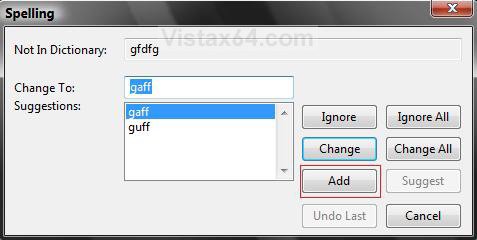
2. If this is the word you want to add to the dictionary, then click the ADD button.
3. It is now added to your custom dictionary.
METHOD TWO NOTE: This will allow you to add, delete, or edit words from the custom dictionary.
1. Open Folder Options.
A) Dot Show hidden files and folders in Folder Options.
B) Click on OK, and close Folder Options.
2. Open the Start Menu.
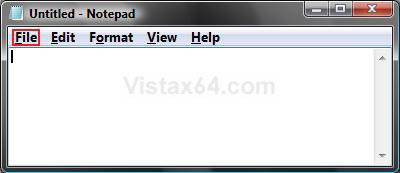
3. In the white line (Start Search) area, type notepad and press Enter.
4. In Notepad, click on File on the menu bar. (See screenshot below)
5. Click on Open. (See screenshot below)
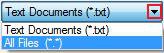
6. Click on the drop down menu arrow to the right of Text Documents (*.txt) and change it to All Files (*.*) instead in the bottom right corner of the Open window.
7. Navigate to this hidden system file location below.
C:\Users\(your username)\AppData\Local\Microsoft\Windows Mail
A) Click on the UserDictionary.lex file to highlight it, then click on Open.
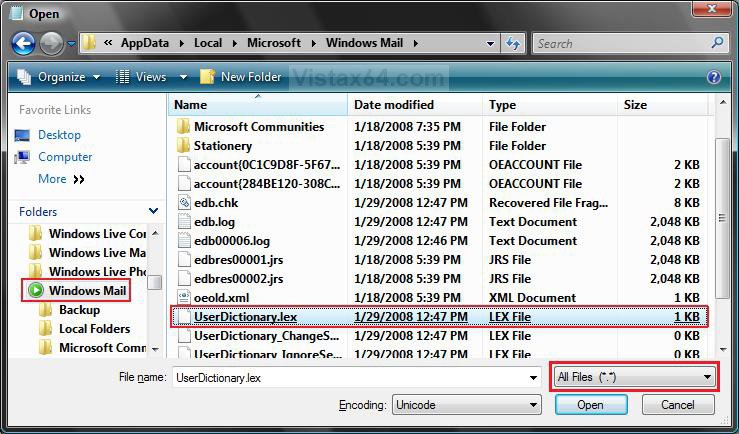
8. This will now open the Userdictionay.lex file inside of Notepad from where you can now add, delete, or edit any word(s) you choose.
(See Example screenshots below)
WARNING: Make sure that there are no blank lines left between the words by your deletions, additions, or edits.
NOTE: If you did not add any words before in Windows Mail or manually here, this will be empty.
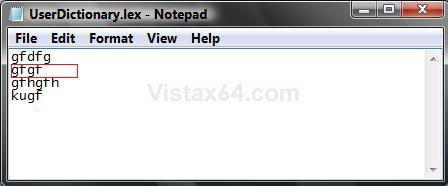
BEFORE Example
NOTE: Deleted the one boxed in red below.
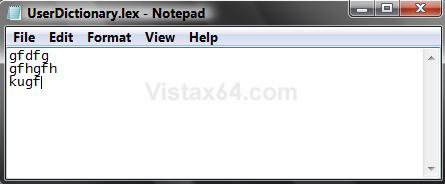
AFTER Example
NOTE: Notice not to leave a blank line inbetween the words.
9. When done, click on File in the Notepad menu bar and click on Save.
10. Don't forget to go back and dot Do not show hidden files and folders instead in Folder Options.
That's it,Shawn
Attachments
Last edited by a moderator: