
How to Change the Default Boot Partition Settings in Vista
 Information
This will show you how to select or change which operating system (OS) you would like to load as the default at startup when you dual boot with multiple operating systems. You will also see how to turn on or off and adjust how much time to display the operating system selection during boot up.
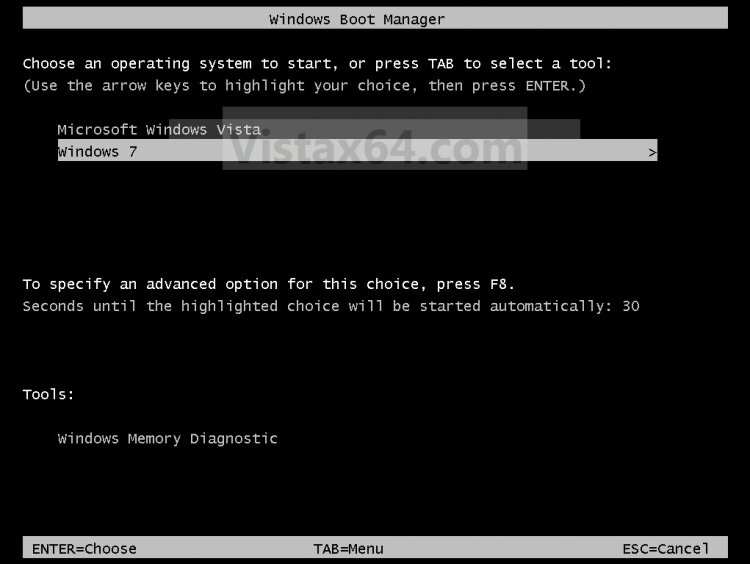
EXAMPLE: Windows Boot Manager
 METHOD ONE
1. Open the Control Panel (Classic View).
A) Click on the System icon.
B) Go to step 3.
OR
2. Open the Start Menu.
A) Right Click on Computer and click Properties.
3. Click on the Click to Play button in the video below.
4. To Change the Default Operating System to Start Up -
A) Click on the OS to highlight it. (See frame 5 in video)
B) Click on the Set as default button.
5. To Change the Amount of Time to Display the List of Operating Systems at Boot -
NOTE: Also known as the Windows Boot Manager.
A) Uncheck the Time to Display the List of Operating Systems at Boot box to turn off the display list at boot up. (See frame 4 in video)
B) Uncheck and Check the Time to Display the List of Operating Systems at Boot box to reset to the default time of 30 seconds.
C) Check the Time to Display the List of Operating Systems at Boot box to adjust the time you want to display the list.
NOTE: Typing 0 (number) will effectively remove the OS choice at boot. The default time is 30.
6. To Change the Amount of Time to Display the Recovery Options When Needed -
A) Uncheck the Time to Display the Recovery Options When Needed box to turn off the display of options at boot up. (See frame 4 in video)
B) Uncheck and Check the Time to Display the Recovery Options When Needed box to reset to the default time of 30 seconds.
C) Check the Time to Display the Recovery Options When Needed box to adjust the time you want to display options.
7. Click on OK. (See frame 6 in video)
8. Click on OK. (See frame 7 in video)
METHOD TWO 1. Open the Start Menu.
2. In the white line (Start Search) area, type msconfig and press Enter.
3. If prompted, click on Continue in the UAC prompt.
4. Click on the Boot tab. (See screenshot below)
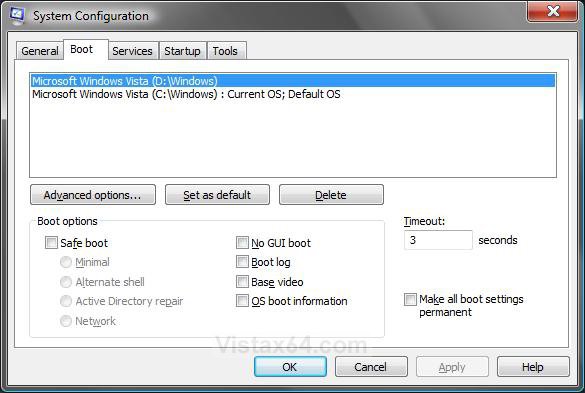
5. To Change the Default Operating System to Boot to -
A) Click on the OS to highlight it. (See screenshot above)
B) Click on the Set as default button.
C) Go to step 8.
6. To Change the Amount of Time to Display the List of Operating Systems at Boot -
A) In the Timeout field, enter a number between 3 and 999 seconds you want to have to make a OS choice at boot up. (See screenshot below step 4)
B) Check the Make all boot settings permanent box. (See screenshot below step 4)
C) Click on Yes to confirm.
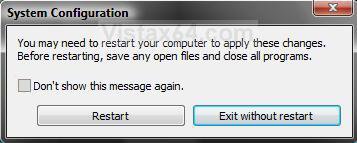
D) Click on the Restart button. (See screenshot below)
NOTE: If you do not see this box, then you have checked the Don't show this message again box at some earlier time before. Be sure to restart the computer to apply the changes anyway. To restore this Restart box, see: How to Restore the System Configuration Restart Prompt in Vista
WARNING: This will restart the computer immediately. Make sure you save and close anything open you do not want to lose.
E) If the OS selection wait time is to short or long, then just repeat these steps and make the time changes.
7. To Delete a Operating System from the Boot List -
NOTE: Vista will not let you delete the OS that is set as the Current OS; Default OS. You will need to change it to another OS listed first in step 5.
A) Click on the OS you want to remove from the boot list to highlight it. (See screenshot below step 4)
B) Click on the Delete button.
8. Click on OK. (See screenshot below step 4)
That's it,Shawn
Related Tutorials
- How to Do a Dual Boot Installation with Windows Vista and XP
- How to Do a Dual Boot Installation with Windows 7 and Vista
- How to Change the OS Name in Windows Boot Manager
- How to Shrink and Create a Partition with Disk Management in Vista
- How to Delete and Extend a Partition with Disk Management in Vista
- How to Speed Up Vista Boot Up Time
- How to Stop System Restore Points from being Deleted in Vista when Dual Booting with XP
- How to See What Your Boot Up Time is in Vista
Attachments
Last edited by a moderator:


 I don't get it. How does opening Control Panel in Classic mode change the boot partition? Are there steps missing?


