
How to Add Back and Set Windows Mail Default Associations
 Information
This will show you how set Windows Mail default associations back to it to make Windows Mail the default email program.
 Note
NoteWindows Mail can lose it's default associations when you install another email program. If you installed MS Office Outlook, it may set itself as the default email program everytime it updates. You will need to uninstall it or leave it as your default email program to stop this.
 Tip
TipSince Internet Explorer works closely with Windows Mails on a lot of features, it would be best to make sure Internet Explorer has it's default association set for it below to.
Here's How:
1. If open, close Windows Mail first before doing the steps below.
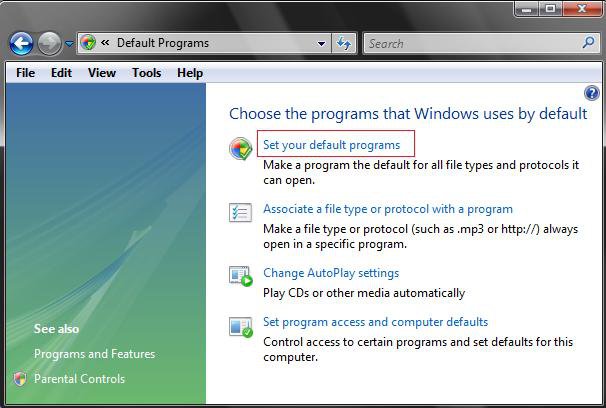
2. Open the Control Panel (Classic View), and click on the Default Programs icon.
3. Click on the Set your default programs link. (See screenshot below)
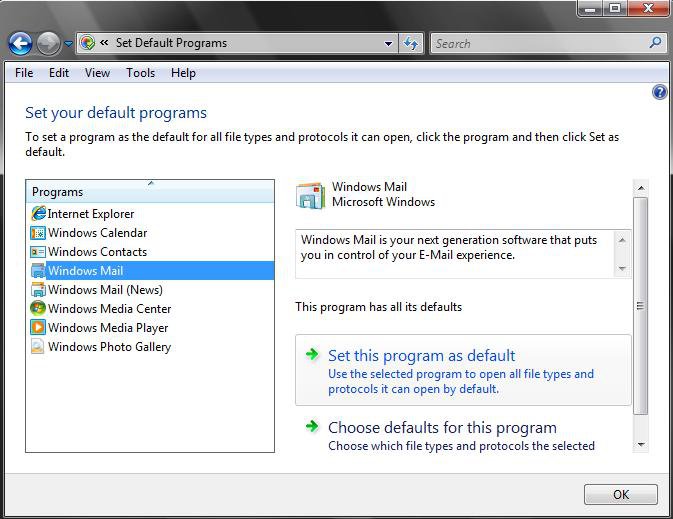
4. Click on Windows Mail in left pane list. (See screenshot below)
NOTE: If Windows Mail is not listed in the Set Default Programs list, then see: How to Restore or Remove Windows Mail from Default Programs to restore and add it back. Afterwards, repeat step 1 above.
5. To Set Windows Mail with All of it's Defaults
A) Click on Set this program as default to set all associations for Windows Mail. (See screenshot below)
NOTE: It will say, This program has all its defaults, afterwards.
B) Click on OK to apply and close window.
6. To Manually Set Windows Mail Defaults
A) Click on Choose defaults for this program to manually choose the associations for Windows Mail.
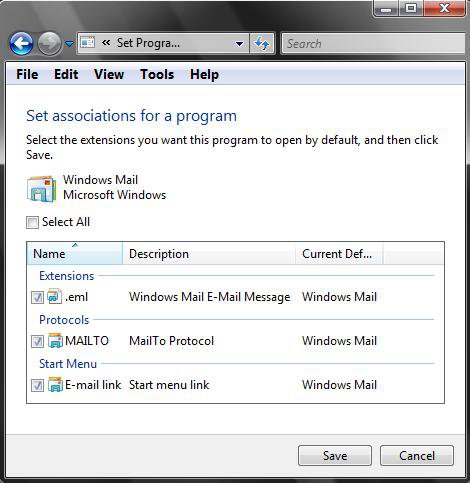
NOTE: If any of the 3 associations are missing from the screenshot in step 6D, then do the NOTE under step 4.
B) Check the associations you want Windows Mail to open. (See screenshot below)
C) Click on Save to apply.
D) Click on OK to close window.
That's it,
Shawn
Attachments
Last edited:


