Windows Vista Forums
Vista Forums Home Join Vista Forums Windows 7 help and support Forum Windows 8 Forum Vista Tutorials

Welcome to Windows Vista Forums. Our forum is dedicated to helping you find solutions with any problems, errors or issues you are experiencing with Windows Vista. The Vista forum also covers news and updates and has an extensive Windows Vista tutorial section that covers a wide range of tips and tricks.

Go Back   Vista Forums > Vista Forums > Tutorials

Vista - Default Programs - Program Default Associations

Comment
 

Default Programs - Program Default Associations

How to Set Default Associations For a Program in Vista
Published by Brink
06-11-2007
Default Programs - Program Default Associations

How to Set Default Associations For a Program in Vista

information   Information
This will show you how to automatically or manually set the default associations for a program listed in Default Programs in Vista. These associations are the file extension types and protocols that the selected program can open by default.

These Default Programs association settings are a per user setting and not applied to all users.


Here's How:
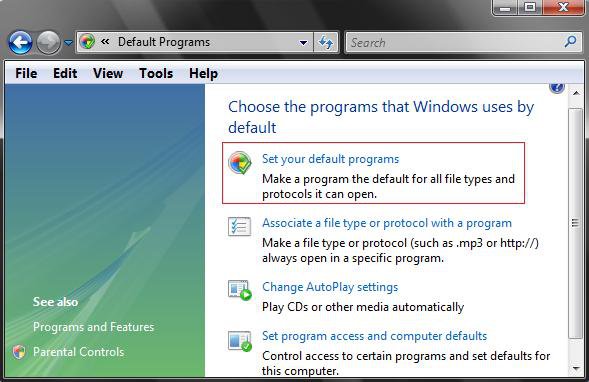
1. Open the Control Panel (Classic View).

2. Click on the Default Programs icon.

3. Click on the Set your default programs link. (See screenshot below)
NOTE: It may take a moment to load up.
default.jpg
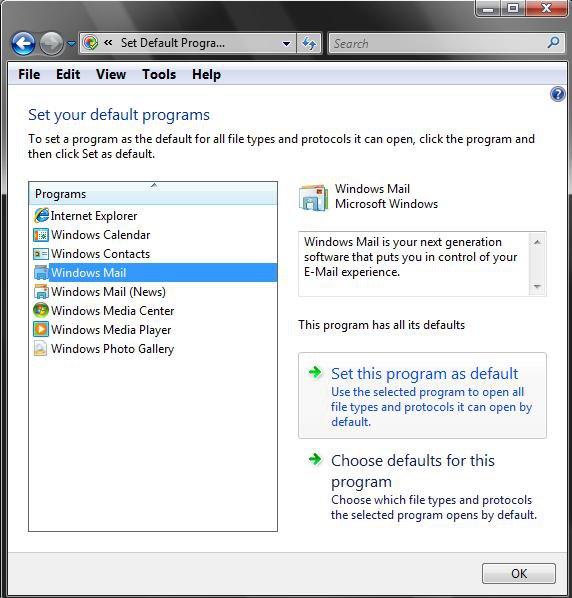
4. Select a Program in the List
A) Click on the program name in the list, that you want to set the default file extension associations for, to highlight it. (See screenshot below step 6A)
5. To Automatically Set All of the Selected Program's Default Associations to it
NOTE: To set all the default file extension associations for the program to open by default.
A) Click on Set this program as default. (See screenshot below step 6A)

B) Click on OK to apply and close window.
6. To Manually Set the Selected Program's Default Associations to it
NOTE: To only set the default file extension associations that you choose for the program to open by default.
A) Click on Choose defaults for this program to manually choose the associations for this program. (See screenshot below)
NOTE: It may take a moment to load up.
set.jpg
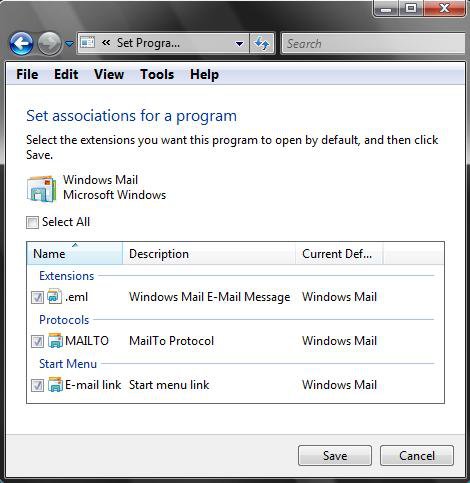
B) Check the file extension associations you want this program to open by default, and uncheck the ones you do not want this program to open. (See screenshot below)

C) Click on Save to apply.

D) Click on OK to close window. (See screenshot below step
6A)
choose.jpg
That's it,
Shawn


Published by
Brink's Avatar
Administrator

Join Date: Apr 2007
Location: Texas, USA
Posts: 29,563
Brink has a reputation beyond reputeBrink has a reputation beyond reputeBrink has a reputation beyond reputeBrink has a reputation beyond reputeBrink has a reputation beyond repute
Brink has a reputation beyond reputeBrink has a reputation beyond reputeBrink has a reputation beyond reputeBrink has a reputation beyond reputeBrink has a reputation beyond reputeBrink has a reputation beyond reputeBrink has a reputation beyond reputeBrink has a reputation beyond reputeBrink has a reputation beyond reputeBrink has a reputation beyond reputeBrink has a reputation beyond reputeBrink has a reputation beyond repute

Tutorial Tools

Applies to
All Vista Versions
64 Bit & 32 Bit

11-30-2007  
lynnscott


Vista Home Premium 32bit


Re: Default Programs - Program Default Associations

Hi there

Windows Mail is not in the list of programs available to use as defaults. I've followed the instructions you give for associating the file, but it still does not show.

Could you give me any other advice please!

Thanks
lynnscott

My System SpecsSystem Spec
11-30-2007  
Brink


Vista x64 Ultimate SP2, Windows 7 Ultimate x64 SP1
Texas, USA


Re: Default Programs - Program Default Associations

Hi Lynnscott,

Welcome to the forum.

See the NOTE in step 4 at this link instead:

How to Add Back and Set Windows Mail Default Associations

Shawn
My System SpecsSystem Spec
11-30-2007  
lynnscott


Vista Home Premium 32bit


Re: Default Programs - Program Default Associations

Hi Shawn

Thank you so much for your help - everything now appears to be fine.

You're a star!

I hope I don't need to bother you again, but it's good to know there are people around who can help with problems!

Kind regards
lynnscott
My System SpecsSystem Spec
.
11-30-2007  
Brink


Vista x64 Ultimate SP2, Windows 7 Ultimate x64 SP1
Texas, USA


Re: Default Programs - Program Default Associations

Your welcome Lynnscott,

Glad to hear everything is OK now. It's no bother at all, just post away with your questions. Someone or myself should help if we know a solution.

Shawn
My System SpecsSystem Spec
01-18-2008  
Elyvne963


Home Premium


Re: Default Programs - Program Default Associations

I did all you said, but I still have the problem. Which is that each time I click on a link in Windows mail I see the message ''application not found''. I looked on other sites, and nobody came up with a solution. Hope you can find one for me . Thx in advance, have a good day.

Fred
My System SpecsSystem Spec
01-18-2008  
Brink


Vista x64 Ultimate SP2, Windows 7 Ultimate x64 SP1
Texas, USA


Re: Default Programs - Program Default Associations

Hi Fred,

Welcome to Vista Forums.

See if doing a complete reset of Windows Mail will solve your problem for you. If you need to backup anything, only backup the messages. Everything else does not need to be restored since your Windows Mail is not working properly.

Windows Mail problems

Shawn
My System SpecsSystem Spec
01-18-2008  
Elyvne963


Home Premium


Re: Default Programs - Program Default Associations

Thx for answering and the welcomes , but even after I did the reset, I still have the same bug... Any other solution ?

Fred, desperatly hoping you have one :P
My System SpecsSystem Spec
01-18-2008  
Brink


Vista x64 Ultimate SP2, Windows 7 Ultimate x64 SP1
Texas, USA


Re: Default Programs - Program Default Associations

Fred,

Did you install or change anything before this happened?

What antivirus program are you using?


You can also try doing a System Restore by using a restore point dated before this problem started.

System Restore - How to

Shawn
My System SpecsSystem Spec
01-19-2008  
Elyvne963


Home Premium


Re: Default Programs - Program Default Associations

I finally solve the problem !! First I tried the system restore and it didin't work. Then, I tried to remember when it started, and I realised it was since I started using Windows mail, from the very beggining (3 weeks ago). Finally I did a reset of internet explorer, opened it, chose it to be my default web browser and then tada! It worked. And so you were right when you said it was maybe a another program that caused it, Firefox... Now I am happy because I can use my links, but I am sad because I can't use Firefox .

I have another question, is it possible, that firefox purpuselly don't work well with vista, you know like they did with Netscape ? Anyways, now if somebody has the same problem you can offer them a new solution. Thx alot for the help, I really appreiated it

Fred
My System SpecsSystem Spec
Comment

 Default Programs - Program Default Associations problems?


Tutorial Tools


Similar topics to: Default Programs - Program Default Associations
Tutorial Category
Default Programs/File Associations Vista General
Default Programs/Associations Vista file management
This is ABSOLUTELY driving me crazy: file type associations/default programs Vista file management
Default programs & File associations Vista file management
Involuntary Program Default - ALL Programs have same default to op Vista installation & setup


Vista Forums is an independent web site and has not been authorized,
sponsored, or otherwise approved by Microsoft Corporation.
"Windows Vista", the Start Orb, and related materials are trademarks of Microsoft Corp.
© Designer Media Ltd

1 2 3 4 5 6 7 8 9 10 11 12 13 14 15 16 17 18 19 20 21 22 23 24 25 26 27 28 29 30 31 32 33 34 35 36 37 38 39 40 41 42 43 44 45 46 47 48 49 50