
How to Open and Change Folder Options in Vista
 Information
Folder Options can change the way files and folders function, as well as how the content in folders are displayed.
 STEP ONE
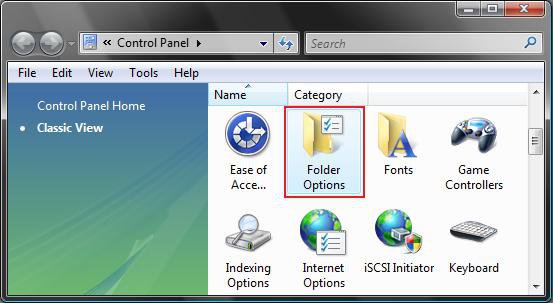
1. Open the Control Panel. (Classic View)
2. Click on the Folder Options Icon. (See screenshot below)
OR
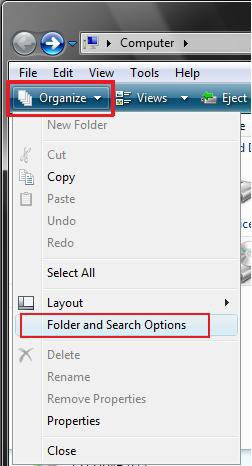
1. In a Windows Explorer window.
2. Click on the Organize button. (See screenshot below)
3. Click on Folder and Search Options.
OR
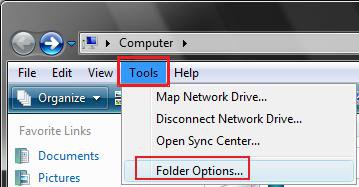
1. In a Windows Explorer window.
2. Click on the Tools menu. (See screenshot below)
3. Click on Folder Options.
STEP TWO NOTE: The Apply to Folders button will be grayed out unless you open it from within the same window that you want to apply the same changes to the other windows with the same folder type templates.
1. To Change the Folder Options Advanced Settings
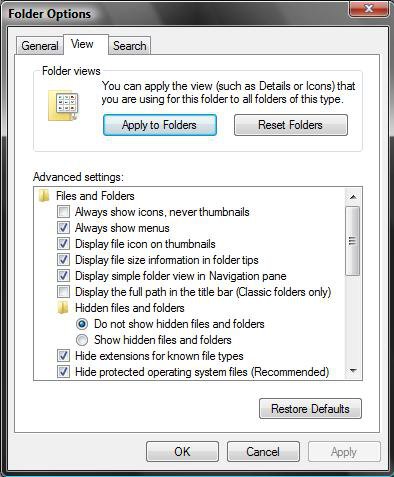
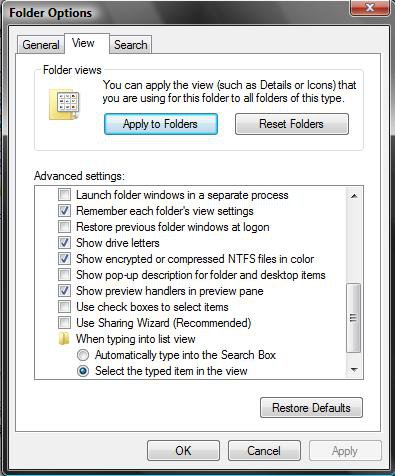
A) Check or Uncheck the options you want or do not want. (See screenshots below step 3)
NOTE: For more information on these options, see: Windows Help and How-to: Change Folder Views and Behavior
B) Go to step 3.
2. To Restore the Default Folder Options Advanced Settings
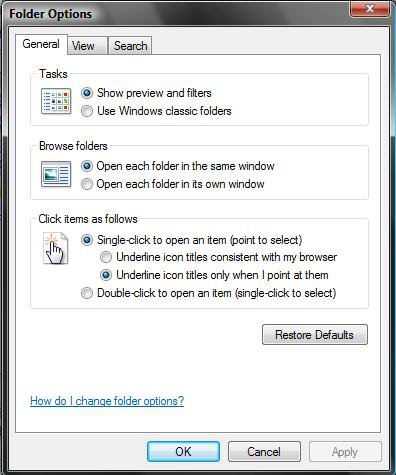
A) Click on the Restore Defaults button. (See screenshots below step 3)
3. Click on OK to apply the changes and close options.
That's it,
Shawn
Related Tutorials
- How to Create a "Folder Options" Shortcut in Vista, Windows 7, and Windows 8
- How to Open and Change Search Options
- How to Change the Visual Effects Options for Appearance and Performance in Vista
- How to Change the Menu to Appear to the Left or Right of a Click in Vista
- How to Change the Advanced Appearance Settings in Vista
- How to Open Each Folder in the Same or it's Own Separate Window in Vista
- How to Reset Windows Explorer Folder View Settings in Vista
- How to Hide or Show Hidden Files and Folders in Vista
- How to Show and Change a File Name Extension in Vista
- How to Fix New Folder in Vista
- How to Set and Unset the Read-only File and Folder Attribute in Vista
- How to Enable or Disable Folder Options in Vista
- How to Save and Print a File and Folder Directory List in Vista
- How to Select Files Using a Check Box in Vista Windows Explorer
- How to Turn the Preview Pane On or Off in Vista
- How to Pin a Folder to the Start Menu in Vista
- How to Add or Remove the Hidden Files and Folders Option in Vista
- How to Copy the Full Path of a File or Folder in Vista
- How to Enable Simple File Sharing in Vista
- Cannot Rename or Move a File or Folder in Vista Fix
- How to Hide or Show the Navigation Pane Folders Tree Lines in Vista
- How to Enable or Disable Full Row Select in Vista Windows Explorer
- How to Add or Remove Default Items from Folder Options "View" Tab in Windows 7 and Vista
Attachments

Last edited by a moderator:
