
How to Change the Screen Resolution in Vista
 Information
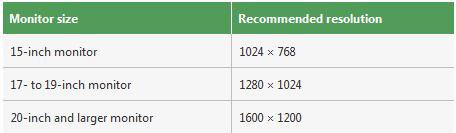
This will show you how to change the screen resolution in Vista with the recommended native settings based on the monitor size. The screen resolution setting determines how much information is displayed on the display screen. It is measured horizontally and vertically in pixels. At lower screen resolutions, such as 640 x 480, fewer items will fit on the screen, but they will be larger. At higher resolutions, such as 1600 x 1200, more items will fit on the screen but they will be smaller.
 Note
NoteThe resolution options will vary with each computer based on the video device, monitor size, and video & monitor drivers. If the screen looks distorted or fuzzy, then you may have an incorrect screen resolution size set for your monitor.
 Warning
- Make sure your Color Depth (Colors) is set to 32 bits for the best picture. If it is set to 16, then the Windows Aero color scheme will look like the Windows Vista Basic one even though you have Windows Aero selected in color schemes.
- Vista does not allow for each user to have their own screen resolution. Changing the Screen Resolution in one user account will change it for the computer and for all user accounts.
NOTE: Always check you monitor documentation though to see what it says it's native resolution is. Some monitors may not always use the usual native resolutions below.
Monitor Size | Usual Native Resolution |
14-15 inch | 1024x768 |
17-19 inch | 1280x1024 |
20-23 inch | 1600x1200 |
24 + inch | 1900x1200 |
17-18 inch Widescreen | 1280x800 |
19 inch Widescreen | 1440x900 |
20-23 inch Widescreen | 1680x1050 |
24-29 inch Widescreen | 1920x1080 to 1920x1200 |
30 + inch Widescreen | 1920x1080 to 2560x1600 |
Here's How:
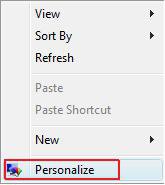
1. Right click on a empty area of your desktop and click Personalize. (See screenshot below)
2. Click on the Click to Play button in the video below.
[flash]http://www.vistax64.com/download/flash/Screen_Resolution.swf[/flash]
That's it,
Shawn
Related Tutorials
- How to Change the Advanced Appearance Settings in Vista
- How to Change the Visual Effects Options for Appearance and Performance in Vista
- How to Change the ClearType Font Settings in Vista
- How to Change the DPI Scale in Vista
- How to Change the Screen Refresh Rate in Vista
- How to Change the Default Vista Fonts
- How to Disable or Enable the Transient Multimon Manager (TMM) in Vista
- How to Enable or Disable Changing Display Settings in Vista
- How to Change the Color Bit Depth Settings in Vista
Attachments
Last edited by a moderator:


