Windows Vista Forums
Vista Forums Home Join Vista Forums Windows 7 Forum Vista Tutorials Tags

Welcome to Windows Vista Forums. Our forum is dedicated to helping you find solutions with any problems, errors or issues you are experiencing with Windows Vista. The Vista forum also covers news and updates and has an extensive Vista tutorial section that covers a wide range of tips and tricks.

Go Back   Vista Forums > Vista Forums > Tutorials

Vista Tutorial - Activate Vista by Phone

Comment
 
LinkBack Tutorial Tools Display Modes
<!-- google_ad_section_start -->Activate Vista by Phone<!-- google_ad_section_end -->
Activate Vista by Phone
How to Activate Vista Normally and by Phone Activation
Published by Brink
08-11-2007

How to Activate Vista Normally and by Phone Activation
Information
  This will show you how to activate Vista normally, and by using Phone activation. Phone activation is used to get a local phone number to call and get Vista activated by phone. For more information, see: Windows Help and How-to: Activating Windows FAQs and Microsoft Help and Support: KB940315


NOTE
  A Express or Retail Vista can be installed on any one computer at a time for as many times as you like. A OEM Vista may only be able to be installed on the exact same computer as many times as you like. The product key number for the Vista 32 bit version is the same one for it's 64 bit version. You can only have the Product Key activated on one computer and version of 32 bit or 64 bit Vista at a time. See: Microsoft: License Terms for Software Licensed from Microsoft
WARNING
 
  • Microsoft no longer provides support for preinstalled OEM (recovery) copies of Vista. If you have one of these, then you must contact the OEM, instead of Microsoft in this tutorial, to activate your OEM Vista. OEM contact information should be included in the documentation that came with your computer or OEM Vista installation CD/DVD package.
  • A OEM (retail) version Vista installation DVD that is bought separately and did not come preinstalled on a OEM computer is still supported by Microsoft using the method in this tutorial below.
  • You only have 30 days of trial period to activate Vista, 3 days if you checked the Automatically activate Windows when I'm online while installing Vista. If you let the trial period expire, you will be placed into a Reduced Functionality Mode until you activate Vista. When you activate Vista, the product key number used will be tied to that computer. If you make significant changes to the computer, like a new motherboard, you will be required to do a Phone Activation. If you want to use it on another computer, then you must uninstall it from the other computer first and do a Phone Activation on the new computer. This is to verify that you are using the product key on only one computer.
Tip
  ERROR MESSAGES:

For more information, see: Microsoft Help and Support: KB931276 and Microsoft Help and Support: KB951287
  • The Windows Vista product key you typed is invalid for activation.
  • Your Product Key is already in use.
  • Windows Activation Error: A problem occurred when Windows tried to activate. Error Code 0x8007232B
  • Activate Windows Now
  • Your activation period has expired and Windows is no longer working.
  • To use Windows you must activate this copy of Windows.
  • Etc....
There has been a update for this through Vista's Windows Update to help with frequent prompting to activate Vista. If this applies to you, be sure to download the correct 32/64 bit version for your Vista. See: Microsoft Help and Support: KB931573 Update


RELATED LINKS:
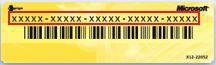
EXAMPLE: Product Key ID Number Sticker
NOTE: The product key ID has 25 characters in it. For more about this, see: How to See The Product Key in Vista
Name:  Retail.jpg
Views: 26532
Size:  4.6 KB
EXAMPLE: Vista not Activated
WARNING: The Product ID number displayed here is not your Product Key number.
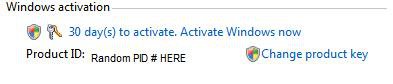
Name:  PID.jpg
Views: 26764
Size:  7.1 KB
EXAMPLE: Vista Activated
WARNING: The Product ID number displayed here is not your Product Key number.

activated.jpg


STEP ONE:
Try to Activate Vista Normally
NOTE
  If you have a valid license for Vista, then double check that you entered the product key number correctly. See: How to See The Product Key in Vista
1. Open the Start Menu.
2. Right click on Computer and click Properties.
A) Go to Step 3.
OR

1. Open the Control Panel (Classic view).
2. Click on the System icon.

3. Scroll down to the bottom and you will see this screenshot. (See screenshot below step 5B)
4. Click on the Activate Windows now link.
A) Go to step 6.
5. If it will not activate, then click Change product key.
A) Type in the product key again to make sure it is correct.
NOTE: You can also use this if you just want to change it to a different product key for the same version of the installed Vista. See: How to See The Product Key in Vista

B) Click on the Activate Windows now link.
Name:  PID.jpg
Views: 26764
Size:  7.1 KB

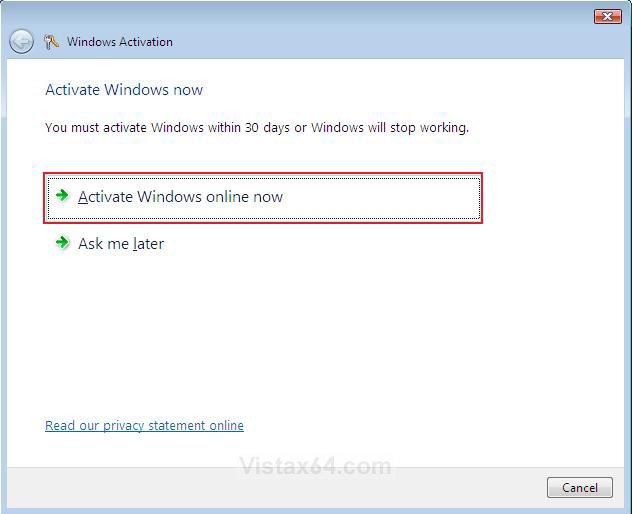
6. Click Activate Windows online now. (See screenshot below)

activate.jpg

7. If Vista fails to activate, then proceed to step 2 below.


STEP TWO:
How to Do a Phone Activation
NOTE
  On a preinstalled OEM Vista, you may need to call the manufacturer (Ex: HP) to get Vista activated again.
OPTION ONE:
1. Do the STEP ONE section above.
2. Click Use the automated phone system to activate. (See screenshot below)
A) Go to step 3 in OPTION TWO below.
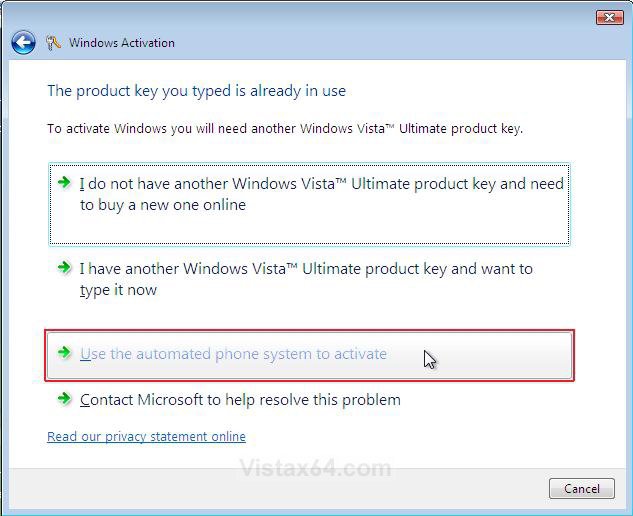
activation.jpg
OPTION TWO:
1. Open the Start Menu.
2. In the white line (Start Search) area, type slui.exe 4 and press Enter.
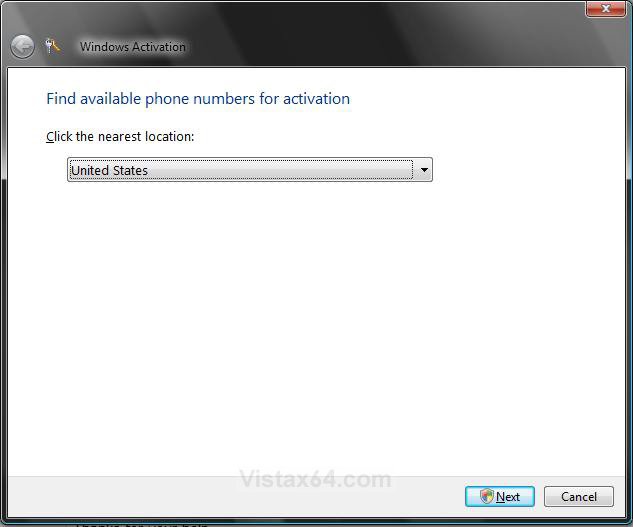
3. Select your nearest location and click the Next button. (See screenshot below)
location.jpg

4. Click Continue for UAC prompt.
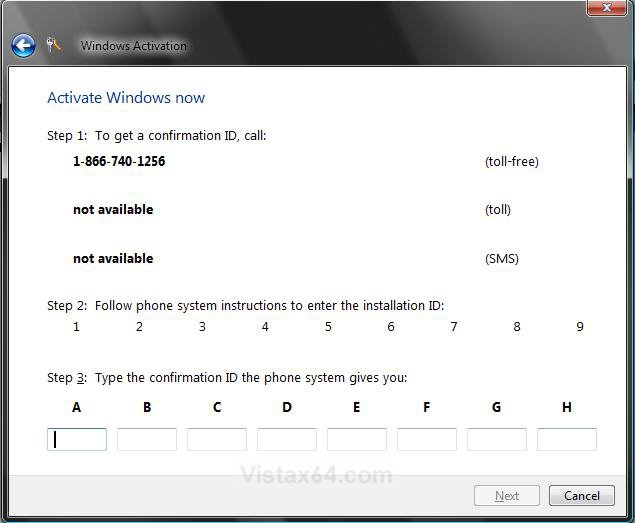
5. A local phone number should apear with a set of numbers generated by Windows and displayed on your screen under Step 2: . (See screenshot below)
NOTE: There will be sets of numbers under the 1 to 9. I just removed them here for obvious reasons.

6. Call the activation phone number selected.
7. At first, the activation line will be automated, so you will be asked to enter or speak the numbers (Step 2 in screenshot below step 10) displayed on your screen into the phone.

8. If Automated Service is Successful -
NOTE: Usually this is not always successful.
A) The automated service will issue you a set of Confirmation ID numbers.
NOTE: Have a pen and paper handy to write these numbers down.
B) Go to step 10.
9. If Automated Service is Unsuccessful -
A) If the activation service informs you that it was unsuccessful and cannot help you with activation, then STAY ON THE LINE and your call will be transferred to an activation operator who will assist you in activating your copy of Vista. The operator will give you the set of Confirmation ID numbers if they agree your copy of Vista is legitimate.
NOTE: Just explain to the operator your situation and what you did to require activation. (EX: hardware upgrade, installed Vista on a new computer after uninstalling it from the old one, etc...)
10. Type in the set of Confirmarion ID numbers given to you into the Step 3: area to be able to activate Vista. (See screenshot below)
NOTE: You will get these numbers from the phone automated system or operator after they have confirmed the numbers you gave them in step 7 above.
confirmation_id.jpg
NOTE: The numbers in Step 2 of this screenshot will be there for you to use in step 5 above. I have just cleared them from this screenshot for obvious reasons.

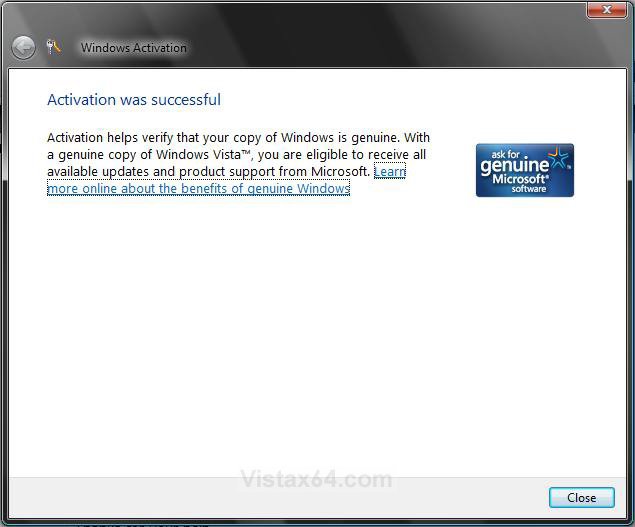
11. When you get the Activation was successful window, click Close to finish. (See screenshot below)
successful.jpg
That's it,
Shawn
Published by
Brink's Avatar
Administrator

Join Date: Apr 2007
Location: Texas, USA
Posts: 23,732
Rep Power: 150
Brink has a reputation beyond reputeBrink has a reputation beyond reputeBrink has a reputation beyond reputeBrink has a reputation beyond reputeBrink has a reputation beyond reputeBrink has a reputation beyond reputeBrink has a reputation beyond reputeBrink has a reputation beyond reputeBrink has a reputation beyond reputeBrink has a reputation beyond reputeBrink has a reputation beyond repute

Tutorial Tools
Show Printable Version Show Printable Version
Email this Page Email this Page

Applies to
All Vista Versions
64 Bit & 32 Bit

Page copy protected against web site content infringement by Copyscape

Old 05-20-2008  
widgetwilk
Newbie


Join Date: May 2008
Vista Home
 
Rep Power: 9
widgetwilk is on a distinguished road
  widgetwilk is offline

Re: Activate Vista by Phone

How can all this be done when all that is on the computer is the 'Blue Screen'???

saying it needs a Activation Code
My System SpecsSystem Spec
Old 05-20-2008  
Brink's Avatar
Brink
Administrator


Join Date: Apr 2007
Vista x64 Ultimate SP2
Texas, USA
 
Rep Power: 150
Brink has a reputation beyond reputeBrink has a reputation beyond reputeBrink has a reputation beyond reputeBrink has a reputation beyond reputeBrink has a reputation beyond reputeBrink has a reputation beyond reputeBrink has a reputation beyond reputeBrink has a reputation beyond reputeBrink has a reputation beyond reputeBrink has a reputation beyond reputeBrink has a reputation beyond repute
  Brink is online now

Re: Activate Vista by Phone

Hi Widgetwilk,

It sounds like you may be in Reduced Functionality Mode. See this tutorial instead for how to get out of it if this is the case.

Reduced Functionality Mode

Hope this helps,
Shawn
My System SpecsSystem Spec
Old 05-25-2008  
mch_mntr
mchl_mntr


Join Date: May 2008
vista ultimate x32
 
Rep Power: 9
mch_mntr is on a distinguished road
  mch_mntr is offline

Wink Re: Activate Vista by Phone

where do i get the confirmation I.D. online in the internet
My System SpecsSystem Spec
Old 05-26-2008  
Brink's Avatar
Brink
Administrator


Join Date: Apr 2007
Vista x64 Ultimate SP2
Texas, USA
 
Rep Power: 150
Brink has a reputation beyond reputeBrink has a reputation beyond reputeBrink has a reputation beyond reputeBrink has a reputation beyond reputeBrink has a reputation beyond reputeBrink has a reputation beyond reputeBrink has a reputation beyond reputeBrink has a reputation beyond reputeBrink has a reputation beyond reputeBrink has a reputation beyond reputeBrink has a reputation beyond repute
  Brink is online now

Re: Activate Vista by Phone

Hi Mch_Mntr,

Welcome to Vista Forums.

Yes, you will get the Confirmation ID number from the phone activation automated system or operator when you call them.

Shawn
My System SpecsSystem Spec
Old 06-29-2008  
jordan vista
Newbie


Join Date: May 2008
vista ultimate 32bit
 
Rep Power: 9
jordan vista is on a distinguished road
  jordan vista is offline

Re: Activate Vista by Phone

does it cost money to activate windows over the phone
My System SpecsSystem Spec
Old 06-29-2008  
Brink's Avatar
Brink
Administrator


Join Date: Apr 2007
Vista x64 Ultimate SP2
Texas, USA
 
Rep Power: 150
Brink has a reputation beyond reputeBrink has a reputation beyond reputeBrink has a reputation beyond reputeBrink has a reputation beyond reputeBrink has a reputation beyond reputeBrink has a reputation beyond reputeBrink has a reputation beyond reputeBrink has a reputation beyond reputeBrink has a reputation beyond reputeBrink has a reputation beyond reputeBrink has a reputation beyond repute
  Brink is online now

Re: Activate Vista by Phone

Hi Jordan,

Welcome to Vista Forums.

Only if you select a non toll-free number to use.

Shawn
My System SpecsSystem Spec
Old 07-22-2008  
Mod Zezima
Member


Join Date: Jul 2008
32bit
 
Rep Power: 7
Mod Zezima is on a distinguished road
  Mod Zezima is offline

Re: Activate Vista by Phone

when ever i try to pick the "call for assistance" it just brings up the help menu
My System SpecsSystem Spec
Old 07-22-2008  
Brink's Avatar
Brink
Administrator


Join Date: Apr 2007
Vista x64 Ultimate SP2
Texas, USA
 
Rep Power: 150
Brink has a reputation beyond reputeBrink has a reputation beyond reputeBrink has a reputation beyond reputeBrink has a reputation beyond reputeBrink has a reputation beyond reputeBrink has a reputation beyond reputeBrink has a reputation beyond reputeBrink has a reputation beyond reputeBrink has a reputation beyond reputeBrink has a reputation beyond reputeBrink has a reputation beyond repute
  Brink is online now

Re: Activate Vista by Phone

Hi Mod Zezima,

I'm not sure where you are getting call for assistance from. After you click on Activate Windows online now, you would click on Use the automated phone system to activate to get the phone number. Be sure you are doing STEP TWO for a phone activation.

Hope this helps,
Shawn
My System SpecsSystem Spec
Old 09-20-2008  
HTMLCODER.exe
Newbie


Join Date: Sep 2008
Vista... DUuuuh!
 
Rep Power: 6
HTMLCODER.exe is on a distinguished road
  HTMLCODER.exe is offline

Angry Re: Activate Vista by Phone

Hmmm... I have only three options:
---------------
Buy a new key online
Type a new key
Contact HP for help
---------------
What should I do?
My System SpecsSystem Spec
Comment

Tags
phone, activate

Tutorial Tools
Display Modes


Similar Threads
Tutorial Tutorial Starter Category Comments Last Post
Vista Phone Dialer can't dial phone rules correct Danz26 Vista General 4 05-27-2009 12:58 PM
I cannot activate my Vista Ultimate and the phone help is useless. Brad Syputa Vista installation & setup 3 03-08-2007 09:12 AM
Can't Activate - Clicking Activate Windows Does Nothing :( war59312 Vista General 1 03-06-2007 01:31 AM
Motorola Razr V3c and Build 6000 Don't Mix (Recently Got a Cell Phone Virus while trying to set up Motorola Phone Tools 4.0) Kevin John Panzke Vista General 9 12-10-2006 02:21 PM
Could you activate beta 2 Vista installation via phone? Alex Tan Vista installation & setup 4 08-11-2006 12:47 PM


Vista Forums is an independent web site and has not been authorized,
sponsored, or otherwise approved by Microsoft Corporation.
"Windows Vista", the Start Orb, and related materials are trademarks of Microsoft Corp.
© Designer Media Ltd
Tutorial powered by GARS 2.1.8m ©2005-2006