Windows Vista Forums
Vista Forums Home Join Vista Forums Windows 7 Forum Vista Tutorials Tags
Welcome to Windows Vista Forums. Our forum is dedicated to helping you find solutions with any problems, errors or issues you are experiencing with Windows Vista. The Vista forum also covers news and updates and has an extensive Windows Vista tutorial section that covers a wide range of tips and tricks.

Go Back   Vista Forums > Vista Forums > Tutorials

Vista - Help and Support in Vista

Comment
 
Old 08-24-2007  
Brink


Vista x64 Ultimate SP2, Windows 7 Ultimate x64


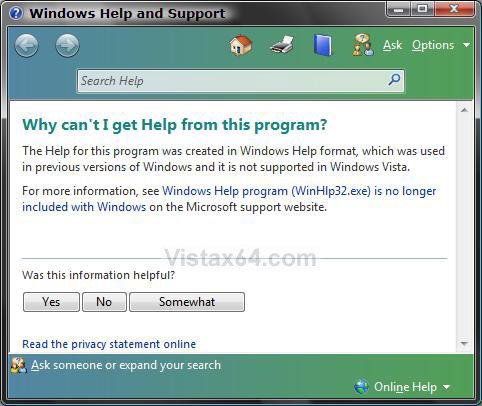
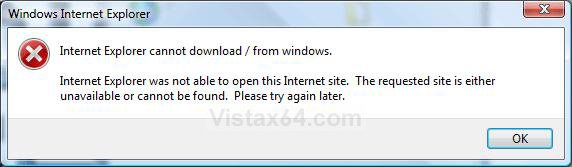
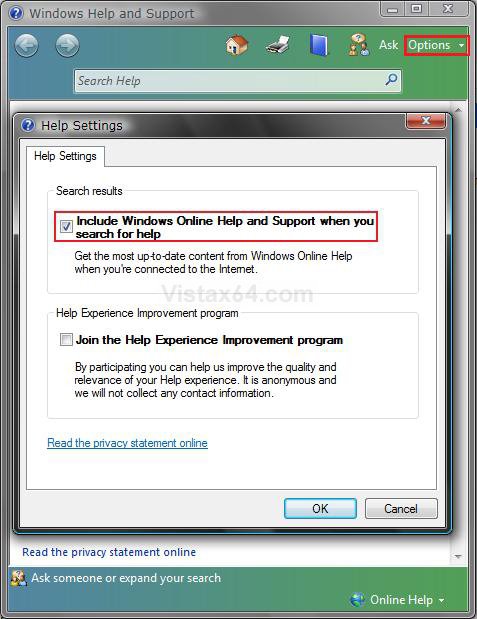
Help and Support in Vista

How to Fix Windows Vista Help and Support


...

My System SpecsSystem Spec
Old 02-22-2008  
timmytommya5


Vista Home Premium 32bit


Re: Help and Support in Vista

HEJ SHAWN,
I JUST FIX MY LOST HISTORY BAR THAT I TRIED TO FIX IN MANY WAYS EVEN THE COMPANY WHERE I BOUGHT IT DONT HAVE ANY IDEA OF IT,UNLESS THEY WILL FORMAT AND REINSTALL ALL THE PROGRAMS BACK,but guess!
I it was fixed automatically when i was deleteing the temporary files,and other files that hides in the computer...
now when i just checked my comp the HISTORY BAR appeared.this is solved also...3 problems and 2 is solved..... help and support is fixed, i got 35gb space back from the hidden files and now i got my history bar back.smily for you SHAWN, you are the best on the internet to solve VISTA PROBLEMS.

TIMMY

My System SpecsSystem Spec
Old 02-22-2008  
Brink


Vista x64 Ultimate SP2, Windows 7 Ultimate x64


Re: Help and Support in Vista

Thank you Timmy.

Just wish I knew how to solve your 3rd problem for you.
My System SpecsSystem Spec
Old 02-22-2008  
timmytommya5


Vista Home Premium 32bit


Re: Help and Support in Vista

hi shawn,
i just had a problem on my comp now,i downloaded nvidia on my vista and then it says reboot and i did since then it went black on the screen,what can i do?am writing you from another computer now.
My System SpecsSystem Spec
Old 02-22-2008  
Brink


Vista x64 Ultimate SP2, Windows 7 Ultimate x64


Re: Help and Support in Vista

Timmy,

See if you can boot your computer into Safe Mode.

Safe Mode

When in Safe Mode, open the Control Panel (Classic view) and click on Device Manage. Open you Display adapters (Video device) properties and click on the Driver tab. Click on Roll Back Driver. This will have the driver go back to the version before the one your tried to install.

Hope this helps,
Shawn
My System SpecsSystem Spec
Old 02-23-2008  
timmytommya5


Vista Home Premium 32bit


Re: Help and Support in Vista

Thanks i done that already before u sent this,my wife fixed it.but i cant go back to the older version because i updated it before this happened and its frozen and whitish on the screen that why i uninstalled it before taking this version but still it shows like the one i deleted..

thanks
My System SpecsSystem Spec
Old 02-23-2008  
Brink


Vista x64 Ultimate SP2, Windows 7 Ultimate x64


Re: Help and Support in Vista

Timmy, just to confirm, is it running ok now?
My System SpecsSystem Spec
Old 02-24-2008  
timmytommya5


Vista Home Premium 32bit


Re: Help and Support in Vista

its running ok now,but the problem is that i cant see my computer through the tv incase i want to see movies on my comp through the tv , my computer screen flashes white stuffs and then when ever i start the NVIDIA it kicks back to d computer instead of staying hooked to the tv when i transfer the pc to the tv.what can i do?i have already unistalled it a day before and my windows update automatically every 24hours,how can i get back the old one that i had before i had it updated?this problem started 4days ago when i got a update and i accepted,since then this problem started.
My System SpecsSystem Spec
Old 02-24-2008  
Brink


Vista x64 Ultimate SP2, Windows 7 Ultimate x64


Re: Help and Support in Vista

Timmy,

I'm afraid that I do not know what to do for that problem. You might post the problem in one of the forums to see if someone else may know a solution for you. Give as many details on the problem and hardware setup you can to help. Hope you get a solution soon.

Sorry,
Shawn
My System SpecsSystem Spec
Old 04-15-2008  
pbw


biznes 32bit


Re: Help and Support in Vista

Simply and ...easy thanks a lot ...
My System SpecsSystem Spec
Old 04-15-2008  
Brink


Vista x64 Ultimate SP2, Windows 7 Ultimate x64


Re: Help and Support in Vista

Your welcome PBW, and welcome to Vista Forums.

Shawn
My System SpecsSystem Spec
Comment

Tutorial Tools


Similar Threads
Tutorial Category
Vista support Software
vista help and support Vista General
Does vista support 4gb or not Vista General
Re: Vista x86 support 4GB RAM Vista General
Creative Vista Support: Native and Drivers and planned support Vista hardware & devices


Vista Forums is an independent web site and has not been authorized,
sponsored, or otherwise approved by Microsoft Corporation.
"Windows Vista", the Start Orb, and related materials are trademarks of Microsoft Corp.
© Designer Media Ltd
Tutorial powered by GARS 2.1.8m ©2005-2006

1 2 3 4 5 6 7 8 9 10 11 12 13 14 15 16 17 18 19 20 21 22 23 24 25 26 27 28 29 30 31 32 33 34 35 36 37 38 39 40 41 42 43 44 45 46