Windows Vista Forums
Vista Forums Home Join Vista Forums Windows 7 Forum Vista Tutorials Tags
Welcome to Windows Vista Forums. Our forum is dedicated to helping you find solutions with any problems, errors or issues you are experiencing with Windows Vista. The Vista forum also covers news and updates and has an extensive Windows Vista tutorial section that covers a wide range of tips and tricks.

Go Back   Vista Forums > Vista Forums > Tutorials

Vista Tutorial - Menu Open Appearance

Comment
 

Menu Open Appearance

How to Change the Menu to Appear to the Left or Right of a Click in Vista
Published by Brink
08-25-2007

How to Change the Menu to Appear to the Left or Right of a Click in Vista
Information
  This will change all menus in Vista to appear to the left or right of where you click in Vista.

EX: Windows Explorer Menu bar, right click Context Menu, etc.
WARNING
  If the menu does not have enough room to fully open at the border of the window or display screen, it will compensate and open from the opposite direction of the border instead. This will override whatever side you have the menu set to open on below.
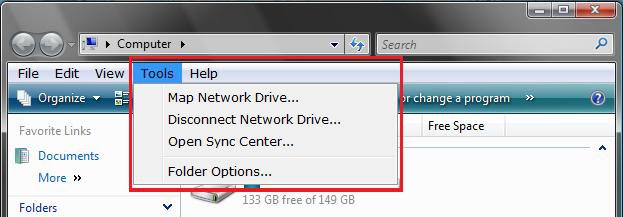
RELATED LINKS: EXAMPLE: Set to LEFT HANDED
left_handed.jpg
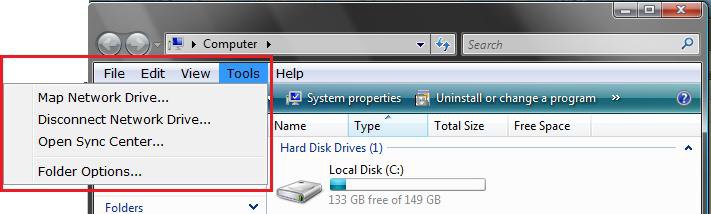
EXAMPLE: Set to RIGHT HANDED
right_handed.jpg


Here's How:
1. Open the Control Panel. (Classic View)

2. Click on the Tablet PC Settings icon.

3. To Have Menus Open to the Left -
A) Select (dot) Right-handed. (See screenshot below step 5)

B) Go to step 5.
4. To Have Menus Open to the Right -
A) Select (dot) Left-handed. (See screenshot below step 5)
5. Click on OK.
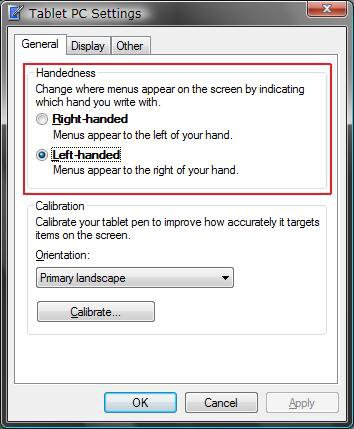
settings.jpg
That's it,
Shawn

Published by
Brink's Avatar
Administrator

Join Date: Apr 2007
Location: Texas, USA
Posts: 25,806
Rep Power: 150
Brink has a reputation beyond reputeBrink has a reputation beyond reputeBrink has a reputation beyond reputeBrink has a reputation beyond reputeBrink has a reputation beyond reputeBrink has a reputation beyond reputeBrink has a reputation beyond reputeBrink has a reputation beyond reputeBrink has a reputation beyond reputeBrink has a reputation beyond reputeBrink has a reputation beyond repute

Tutorial Tools

Applies to
All Vista Versions
64 Bit & 32 Bit

Comment

Tutorial Tools


Similar Threads
Tutorial Category
Menu won't stay open Live Mail
Windows DVD Maker Main Menu Appearance Question Vista music pictures video
cannot open start menu Vista General
"Show window preview" greyed-out in Taskbar appearance menu Vista installation & setup
Open Classic Appearance Properties For More Color Options Vista General


Vista Forums is an independent web site and has not been authorized,
sponsored, or otherwise approved by Microsoft Corporation.
"Windows Vista", the Start Orb, and related materials are trademarks of Microsoft Corp.
© Designer Media Ltd
Tutorial powered by GARS 2.1.8m ©2005-2006

1 2 3 4 5 6 7 8 9 10 11 12 13 14 15 16 17 18 19 20 21 22 23 24 25 26 27 28 29 30 31 32 33 34 35 36 37 38 39 40 41 42 43 44 45 46